
Participant
January 21, 2020
Answered

How can I delete videos locally from my IPhone in Premiere Rush

  • January 21, 2020
  • 2 replies
  • 4016 views

In my Premiere Rush App several old videos (which I don't need anymore) are saved locally on my IPhone. How can I delete these videos from my local IPhone memory?


Title edited by mod
This topic has been closed for replies.
Correct answer Kartika Rawat

Hi there!

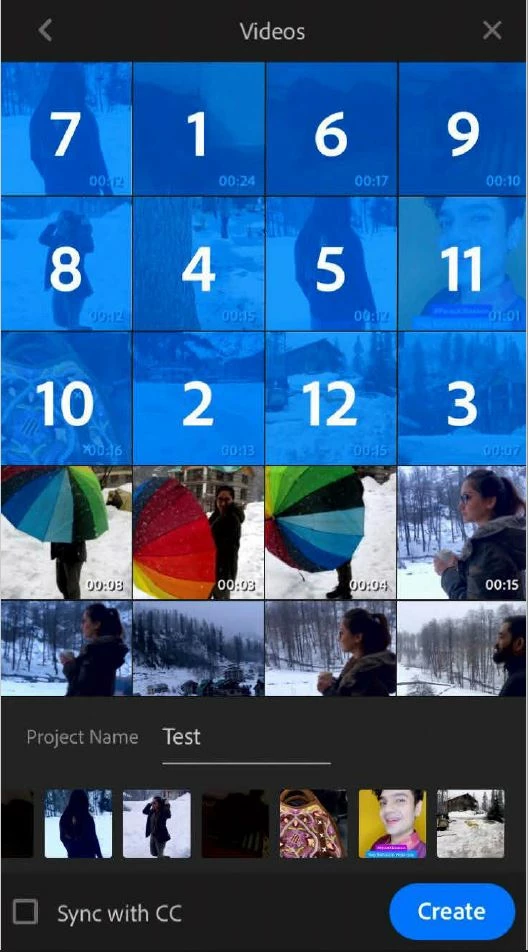
We appreciate you writing in. I understand that you want to delete the files from the path :

LOCAL > Videos. Am I correct?

Premiere Rush won't allow you to delete the video files that are saved in your library within the application. I am sharing a screenshot of my phone which I am assuming that you're getting too.

Let us know if you've any other questions.

Thanks,

Kartika

2 replies

Kartika Rawat
Community Manager
Kartika RawatCommunity ManagerCorrect answer
Community Manager
January 22, 2020

Hi there!

We appreciate you writing in. I understand that you want to delete the files from the path :

LOCAL > Videos. Am I correct?

Premiere Rush won't allow you to delete the video files that are saved in your library within the application. I am sharing a screenshot of my phone which I am assuming that you're getting too.

Let us know if you've any other questions.

Thanks,

Kartika

Participant
December 1, 2021

Hi there,


I see that you say there is no way to delete these raw files. I, as well as every other premiere rush user is also hoping to delete these files. You see, the only reason that we use premiere rush is because it can make a video while I'm on the go, there for it's done on a smart phone. I currently have 8 or 9 raw files in my rush app, I've made 3 video projects with that raw footage, and already the Premiere Rush app is consuming 15GB of space and my phone HD is full. This means I can no longer use this app, will delete it, find another way to edit video footage, and will NEVER recommend this app to anyone. I snowboard. Tons of my friends make snowboard videos of the stuff they do. Until this issue is resolved, you have my word that I will never use the app again and will also never recommend it to anyone. It's simply not sustainable.


It's almost 2022. Get with the times, hire a coder, and make your crap work.

Participant
April 21, 2023

Hello, I found how to fix!


The files are stored within rush itself, those are what they call PROJECT ASSETS. 


Basically, each and every time you are 100% DONE with your rendering and you do not need those files anymore: 


Open any project > click on Project Assets > manually select all you want to delete (there might be thousands of files so it takes some time) > click on the trash bin on the bottom of the page 


In this way I cleared more than 20GB of data storage. I attach a pics of Rush on Ipad, it s almost identical if you have it on the iphone.


Cheers! 


Participating Frequently
January 21, 2020

If you want to delete older Rush projects (not exported videos), click the three dot menu on the right hand side of your project and then choose Delete From Device.

 This will delete your Rush project. 


If you want to delete older video files that were exported to your gallery through Rush, you have to find them and delete them manually. 

ToBeiAuthor
Participant
January 21, 2020
Thank you for your quick response.
I know both of the described ways.

But what I don‘t know, is how to delete the original videos on my IPhone. I can see all of them, when I try to generate a new project. The old videos are saved under „local -> videos“ on my IPhone memory.
I can select them again to create a new project, but I cannot delete them.
I am happy with any new support.