


- Home
- Premiere Rush
- Discussions
- Re: How do you make still images longer?
- Re: How do you make still images longer?

Copy link to clipboard
Copied
I have found many videos that work for premiere pro but I have found none that work for premiere rush.


 1 Correct answer

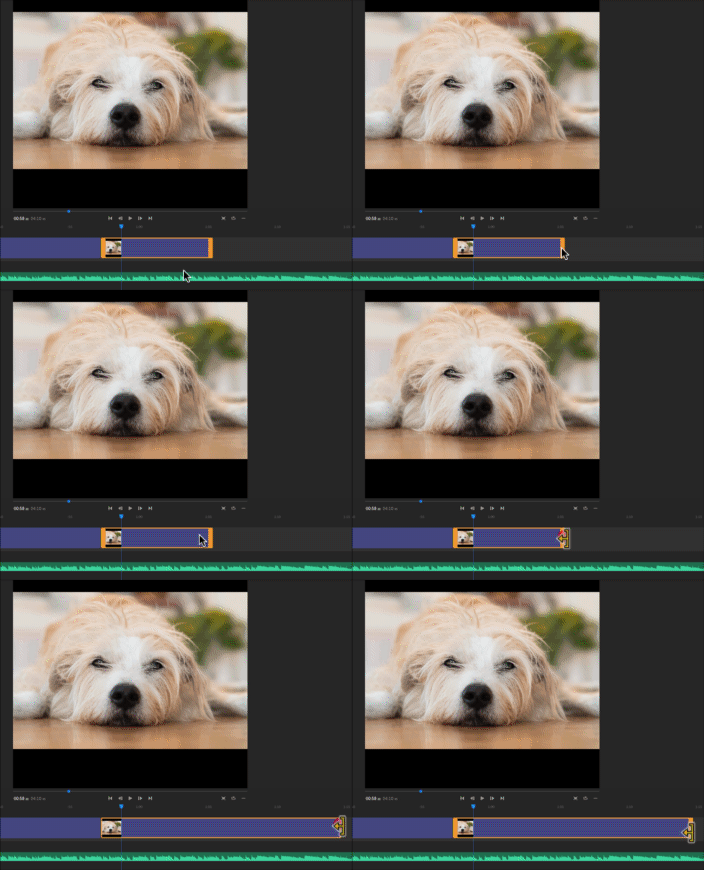
Are you asking how to increase the duration of the Still in the sequence? Click on the right edge of the clip on the timeline and drag it to the right:
MtD

 15
Replies
15
15
Replies
15

Copy link to clipboard
Copied
Are you asking how to increase the duration of the Still in the sequence? Click on the right edge of the clip on the timeline and drag it to the right:

MtD

Copy link to clipboard
Copied
Not working...
Copy link to clipboard
Copied
Found out: Doublecklick under the timeline then it`s working:-)

Copy link to clipboard
Copied
I am having difficulties extending the duration for a still image. I could get it to work in one project, but not another. The still image has an orange outline but I can't seem to "grab" the right edge.... Can anyone suggest a solution? Thanks.

Copy link to clipboard
Copied
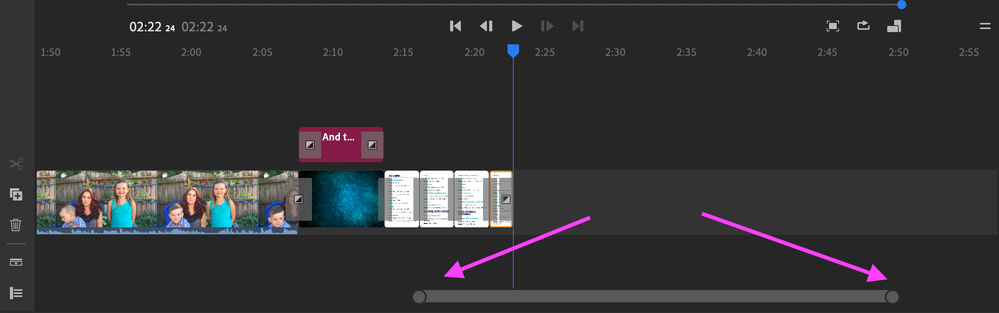
Yes! I had the same problem. What you have to do is zoom in on the timeline. There is a bar under the main timeline (each end has a circle on it). Expand that and it allows you to zoom in on the timeline. Once it is larger, you will be able to grab the yellow border and expand the length of the still.

Copy link to clipboard
Copied
I still can't seem to 'grab' the orange handle. It works on some images but not on others. This is very frustrating!

Copy link to clipboard
Copied
I'm also having this issue - I've expanded the timeline so the content is enlarged but there doesn't seem to be any way to drag the right edge of the image file outwards.

Copy link to clipboard
Copied
I had the same problem. I just did a chat with an Adobe advisor. It seems you can't do that with still images, and the only way to have a still appear for longer is to copy and paste. Very annoying, when you can do exactly what you want to do in iMovie... I tried to make it a feature request, but Rush wasn't listed among the products.

Copy link to clipboard
Copied
omg thank you! I was getting so frustrated!
Copy link to clipboard
Copied
You have completely saved my sanity (at least for today)! Thank you for taking the time to help others resolve this annoying little feature in Rush. I was using very foul language; trying to get my mouse to grab the small frame.

Copy link to clipboard
Copied
Thank You. Thank You. What an easy solve I would have NEVER figured out.
gary
Copy link to clipboard
Copied
I used to be able to add a Still > Add Effect Pan & Zoom and be able to stretch the length of the movement.
I upgraded to the latest Adobe RUSH and the ability to do so IS GONE.
Any ideas why? or did it move to SPEED

Copy link to clipboard
Copied
It moved to SPEED...ugh

Copy link to clipboard
Copied
Copy link to clipboard
Copied
gary
Gary Alipio
Director of Marketing + Web Design
Academy of the Sacred Heart <>
4521 St. Charles Ave.
New Orleans, LA 70115
Direct 504.269.1252 | Cell 504.458.2525
Facebook <> | Instagram
<>
#1 Best Catholic & All-Girls High Schools in Louisiana, Niche.com
<>
For a virtual tour of our two campuses, click here
<>


Find more inspiration, events, and resources on the new Adobe Community
Explore Now
 AdChoices
