
Participant
October 21, 2018
Answered

I am completely lost

  • October 21, 2018
  • 2 replies
  • 795 views

Hello,

Here is my story...

I wanted to purchase Adobe Premiere Elements but instead I somehow purchased Adobe Premiere Rush. In turn I didn't realise and so subscribed to the Adobe Creative Cloud thinking this would benefit the use of what I needed. Now I am at a stage where nothing has gone right and want to cancel my Creative Cloud subscription and perhaps get a full refund for the Premier Rush.

The problem is, I can not find anyone from the Adobe team to contact. No support number, no live chat, and simply no options when I select through the support pages. It suggests to select a contact option... but how is it possible when there is no options shown?

I feel like I am about to explode. So please, someone help me.
    This topic has been closed for replies.
    Correct answer Barb Binder

    Ok, let's try this:

    1. Open Adobe.com
    2. Sign in with your Adobe ID
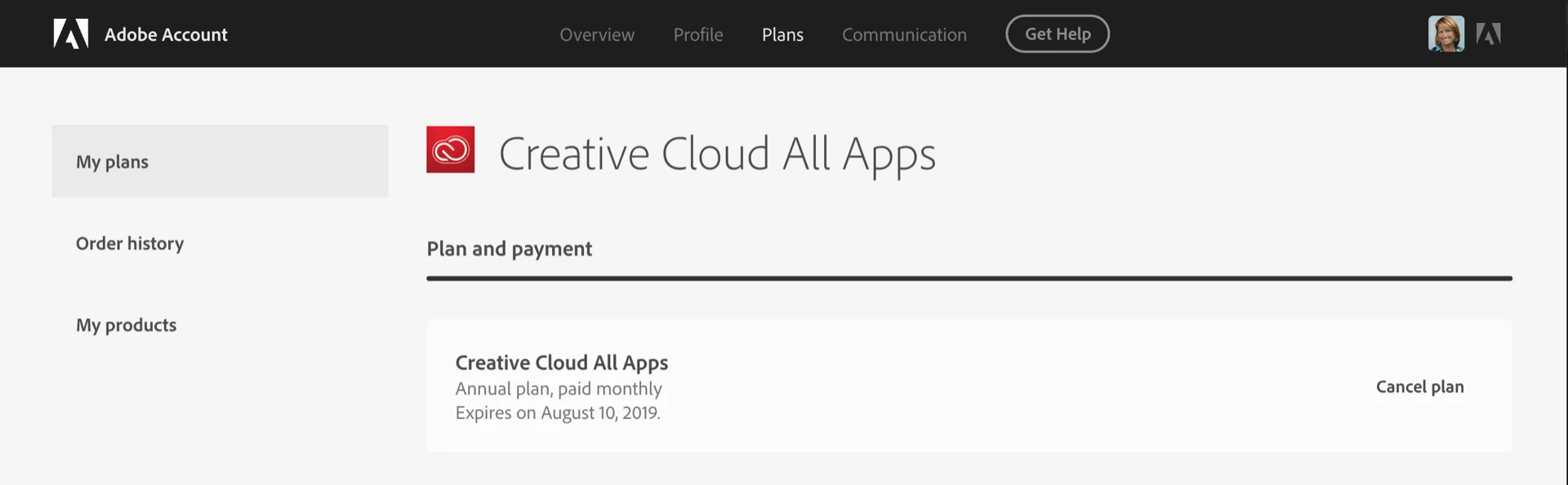
    3. Click on your avatar (top right) > Adobe Account
    4. Click Manage Plan
    5. Choose Cancel plan and follow the prompts

    ~Barb

    2 replies

    Participant
    March 24, 2020

    I need help on what buttons to push

    I have no idea what to do to try to edit a document from an email 

    Barb Binder
    Community Expert
    Community Expert
    October 21, 2018

    Hi Adam:

    This is the community forum—users helping users. To cancel your subscription, please visit Adobe's customer care page:
    Contact Customer Care

    ~Barb

    ~Barb at Rocky Mountain Training
    Participant
    October 21, 2018

    Hi Barb,

    Yes I am aware of that. However, when I follow the Customer Care link you have provided, I can not get though anywhere because it does not give me any contact options. Otherwise all the answers do not help either.

    Participant
    October 21, 2018

    Ok, let's try this:

    1. Open Adobe.com
    2. Sign in with your Adobe ID
    3. Click on your avatar (top right) > Adobe Account
    4. Click Manage Plan
    5. Choose Cancel plan and follow the prompts

    ~Barb