
Participant
February 12, 2020
Question

Missing media in projects in Premiere Rush

  • February 12, 2020
  • 11 replies
  • 16220 views

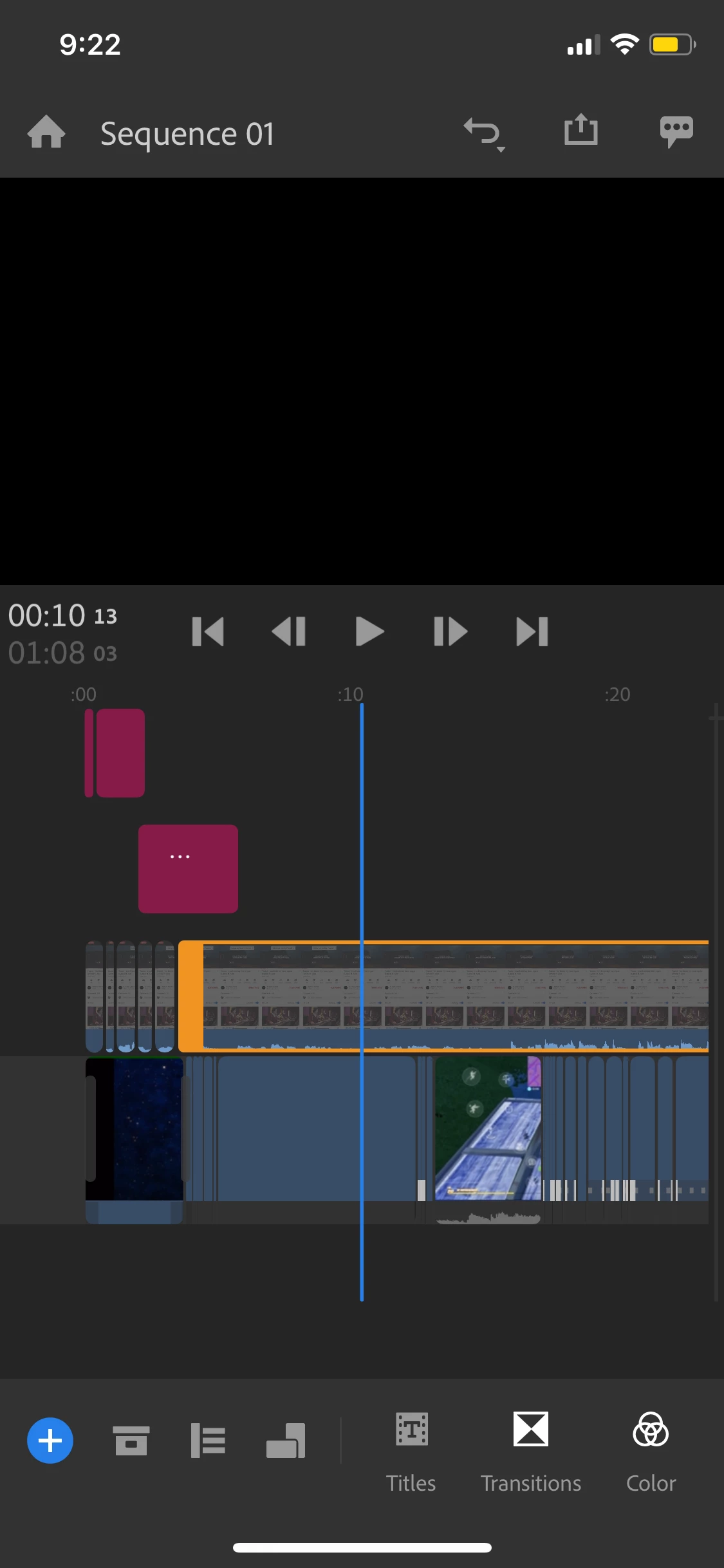
I'm working on a project on premiere rush (mobile)  but when I open the app and select my project, some of my media isn't there. It is just a blank box. It has the same editing and effects as when the media's is there, it just isn't showing the video.

Is there a way to get my videos to show again? (I don't have the "don't view button" selected)

I also can't upload anymore media - I get an "error importing media" message when I try to do so.

title edited by mod


11 replies

Participating Frequently
April 23, 2022

I had the same problem - many times. After many calls to support the tech finally said I should be using the desktop version of Rush - that they don't support the iOS version and that it was unstable. I had so many projects lost or destroyed. The desktop is no better - Rush is just a real poor solution. Premier is great but if you want a simpler iOS based solution it's not Rush.


I swithced to LumaVision and wow, what a difference. It has so many features Rush doesn't (key frames, tracking, stabilization...) but mostly it's simple, easy to use and STABLE! I will eventually delete Rush when I can figure out how to save my old, corrupted projects. But at least now I am spending my time creating instead to troubleshooting. 


Gregor

Inspiring
April 4, 2023

Hello all,


I also switched to LumaFusion when my subscription ran out. $30 one time payment for a stable product designed for mobile vs $100 annually for a crash factory. LOL. Thanks Adobe for reaching us the way the world works. Seriously though thank you to the workers to do their best to support the customers of a sinking ship.

Participating Frequently
April 23, 2022

This also occurs if you move the original footage to another location after the project is completed. The worst part is that unlike InDesign where you can source the file by the exact name and relink the file and automatically any other files in the same location there doesn't seem to be a way to even show what the missing file name is or relink. That's a big fail I think. Fine if you don't want to re-edit ever again, but that's a pretty rare occurence. Unless someone has a way to relink automatically?  

Participant
September 25, 2021

Same issue. Spent all morning editing a video and now it's gone.  Adobe used to produce good software but in the last few years there are increasing problems like this. What bugs me most is their policy to eliminate support: no email support, no chat support, and phone support wait times measured in 1/2 days and not minutes.  I feel like a sucker for trying to hang in there with Adobe software.  It's low quality software from a company who no longer cares about its customers.      

Participating Frequently
February 23, 2022

This is still an issue - two years later. Adobe has become a very unresponsive, bloated and ineffective company. Rush is a giant waste of time. Still no solution. 

Participant
August 20, 2021

Yes I am having the same issue! I basically redid the entire video portion bc it was grayed out.  Now it says a file is missing and can't share even though I haven't deleted any of the files. only worked on my ipad but checked across all devices

Inspiring
May 27, 2021

I am also experiencing grayed out edited media.


when I add the same clips a second time, they gray out too.


I do not work between desktop and iPhone, I work iPhone only.


none of the troubleshooting tips I've searched for online have helped with this at all.


Any solutions?

petergaraway
Adobe Employee
Adobe Employee
May 27, 2021

Hi @beckym32065284 


Can you send a screenshot of the issue? What happens when you long press on the clip? Do you get a menu that says Connect Media? 


Participant
August 1, 2021

I have the same problem. When I go to reconnect media, I get a spinning blue wheel, then it disappears, but the media is not linked. Additionally, relinking media every time I open the program is unacceptable. This is affecting my ability to work, my income, and my sanity. I'm on a brand new iPad Pro with up to date OS, I've logged out, reinstalled, literally everything suggested here and not only can I not access my projects in rush, they also won't load in pro on my desktop, same disconnected media issue. Two years this issue has been called out, and it's still here. At this point I just want a reduced price\refund on part of my cc subscription since it's not cheap and doesn't actually include a functional editing program for mobile devices, just a place to lose hours of work the moment you close your device. I've attached screenshots. 

Participant
October 19, 2020

Same issue here! How adobe can justify charging people for this app is just insulting. I have all brand new equipment so it isn't tech error. the desktop version is a huge waste of time, red errors and missing media on ipad/iPhone/windows desktop each time I use it.

Participant
August 24, 2020

I'm having the same issue. So much precious time down the drain. Help! 

Participant
July 13, 2020

I have the same exact issue. I have been working the whole day and when I was ready to export my 3 mins video all sorts of problem occurred. First Adobe Rush do not render on the app no matter what I did to fix it. Second, when I tried to use my deskstop the app give me the issues being mentioned her. I am very FRUSTATED with this app. Will be cancelling my subscrition and spreading the word that this is app is a HUGE waste of time. 

Participant
July 1, 2020

I'm with the same problem! All the work i started on Iphone, and checked to sync automatically, but now , the videos and voices that i recorded is missing, I hope that I don't lost everything.

Did you got a solution?

Participant
July 1, 2020

the rush start to download files, I don't know why if all the videos was in my iphone.... After that the videos appeared back in the project but the voice recorded in adobe rush didn't, also i can't find it in any place.... So I stoped sync the project.

I'm really upset with this app... I lost a lot of work and time....

petergaraway
Adobe Employee
Adobe Employee
February 14, 2020

Hello  Yoonfnm,


Very sorry for the inconvenience here. We are investigating this issue right now and hope to have it fixed ASAP. In the meantime, if possible, you could sync your project and complete the project on the desktop or Android.


It would be very helpful if you can tell me what type of file is offline (was it recorded on your iPhone or another camera/app?). If you could also share the file with me that would be great!


Lastly, if you want to track the progress on this issue, you can add your vote here: https://adobe-video.uservoice.com/forums/916423/suggestions/39692695


Thanks,


Peter

marty42km
Participant
February 15, 2020

Having the same issues and its seriously affecting my productivity 

caroline_edits
Community Manager
Community Manager
February 26, 2020

Hey Marty, happy to look into this for you! Would you mind answering a couple of questions so we can further our investigation?

Could you tell me what kind of media you're editing? What did you use to film it? 


Caroline