
February 10, 2021
Answered

Moving track contents up a track so I can add a background video

  • February 10, 2021
  • 2 replies
  • 364 views

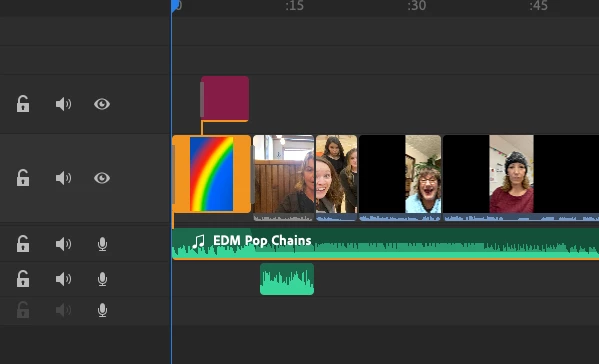
I'm baffled!  I need to add a background looping animation BELOW my track with all my video clips.  I thought I could easily move the entire track up one (I guess that's a controversial idea!) or, at the very least, move them one by one up a track so I can put something underneath.  NO GO!  What is going on that some clips are locked to the track and won't move?  Take it easy on me, I just started using this a few days ago. 🙂
This topic has been closed for replies.
Correct answer Ko.Maruyama

What are you editing on? (iPad?)

I'm not sure if it's available on the basic version (I'm using the paid version), but worth a try:

1. Long Hold on the video of the people - it should get a little bigger

2. Drag it to the layer above.

3. Repeat

4. Extend your looping animation (rainbow?) to the length you need, or duplicate it.


note: You'll always need something on the bottom layer, so you can't move everything up first, leaving the bottom layer empty.

2 replies

Ko.Maruyama
Community Expert
Ko.MaruyamaCommunity ExpertCorrect answer
Community Expert
February 23, 2021

What are you editing on? (iPad?)

I'm not sure if it's available on the basic version (I'm using the paid version), but worth a try:

1. Long Hold on the video of the people - it should get a little bigger

2. Drag it to the layer above.

3. Repeat

4. Extend your looping animation (rainbow?) to the length you need, or duplicate it.


note: You'll always need something on the bottom layer, so you can't move everything up first, leaving the bottom layer empty.

February 12, 2021

I guess these help forums are no help at all.  Thanks Adobe!