
Participating Frequently
December 18, 2018
Answered

Multiple Video Layers

  • December 18, 2018
  • 5 replies
  • 26264 views

Is there a way to have more than one video timeline, similar to how Premier works?

Kinda weird that you can't have layer of images or other video on top of each other for an app made by Adobe when LumaFusion does it really well. Having only one timeline and no ability to have layers of still images under videos or multiple frames of video in one project seems a little basic compared to whats out there already...

Thanks!
This topic has been closed for replies.
Correct answer Ko.Maruyama

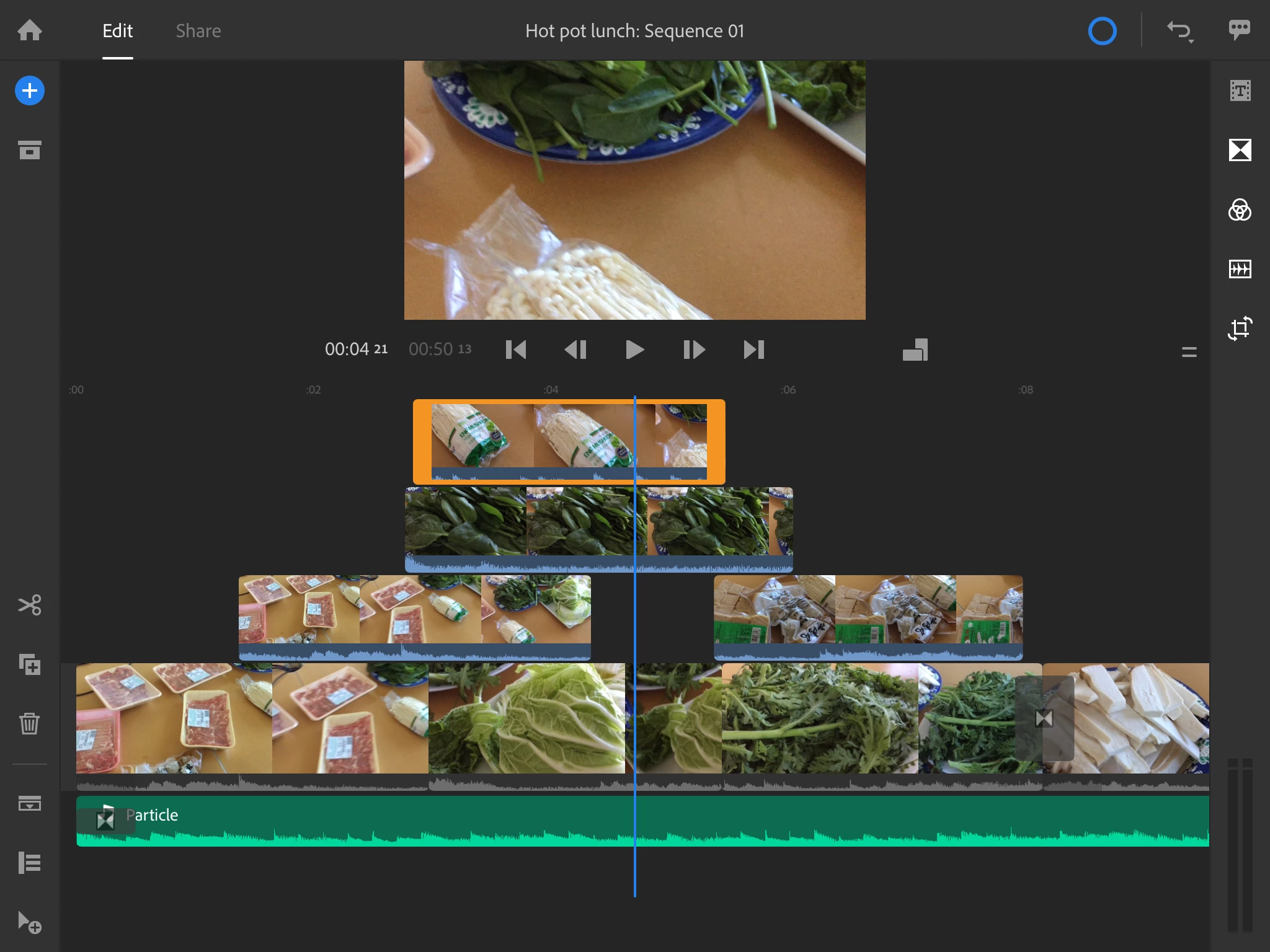
You can have multiple layers of video (base + 3 layers)

5 replies

Participating Frequently
December 20, 2018

Anyone know how to change the color of the background in the project to solid colors other than black???

Community Manager
December 19, 2018

Hi MarkusTheArtist, Warren Heaton,

You can have multiple Sequences(Timeline) by duplicating a sequence in project panel. Just open the project panel, click on ellipsis(...) on any sequence thumbnail and hit Duplicate to copy that sequence in the project panel.

You can also rename the (duplicated )sequences as you like and keep them intact while you continue editing on the original sequence.

Moreover, you can create a new sequence by clicking on the Sequence button at the bottom of Project Panel after selecting media files.

I Hope this will help.

You can also submit feature requests for anything you would like to see in Rush here: https://adobe-video.uservoice.com/forums/916423-premiere-rush

Keep highlighting your doubts. !

Glad to help,

Mayjain

Warren Heaton
Community Expert
Community Expert
December 19, 2018

Thanks, Mayjain!!!

Warren Heaton
Community Expert
Community Expert
December 19, 2018

I don't think this part of the question was answered:  No, Rush does not have more than one video timeline per project.  (It might be worth noting that LumaFusion also only has one timeline per project.)  If more than one timeline is needed, the Rush project file can be opened directly in Premiere Pro (no need for an intermediate XML file) providing the full feature set of Premiere Pro.  (Or course, there's no round trip, but a  "Send Timeline to Rush" would be a good feature request for Premiere Pro.)

UPDATE:  Yes, Rush does have more than one timeline per project!  See Mayjain's response later in this thread.

With its current functionality, Rush is probably best suited for those who need to quickly shoot, edit, and post for social channels like YouTube, FaceBook and Instagram.  Rush's camera "Pro" mode puts everything that you'd want to be able to adjust on the fly right at your finger tips - defiantly worth checking out if you also shoot with your iPhone/iPad.

Adobe offers the Premiere Rush Free Starter plan (https://creative.adobe.com/products/download/rush?promoid=F4KHZWNG&mv=other), allowing users to do a limited number of exports, access 2GB of cloud storage and Adobe Fonts and Abobe Portfolio.  You just need to create an Adobe ID if you don't already have one.  So, you can definitely give it a try before subscribing to a Creative Cloud plan.

LumaFusion is looking to be a very impressive video editing application for mobile.  Like Rush, it also only has 3 video/audio tracks for photos, titles and graphics and also only has one timeline per project.  It's main standout feature is the ability to import footage from a Western Digital Wireless Pro drive or Western Digital Wireless SSD.  I read that the developers are trying to implement a proxy workflow for Apple ProRes source footage.  If they manage to roll that out, that could be very helpful to some workflows.  It's $20 with an in-app subscription option for $10/month or $70/yearly for access to their stock footage.  As far as I'm aware, there's no free version.

petergaraway
Adobe Employee
Adobe Employee
December 19, 2018

Hi Markus,

Ko is correct. Rush supports 4 AV tracks and 3 audio only tracks on both desktop and iOS. Check out this link for Rush tutorials that show off all the things that Rush can do.

Learn how to use Premiere Rush CC

Best,

PG

Ko.Maruyama
Community Expert
Ko.MaruyamaCommunity ExpertCorrect answer
Community Expert
December 18, 2018

You can have multiple layers of video (base + 3 layers)

Participating Frequently
December 20, 2018

Awesome yeah just figured it out!