
Exit
  • Global community
    • Language:
      • Deutsch
      • English
      • Español
      • Français
      • Português
  • 日本語コミュニティ
  • 한국 커뮤니티
1

No video when uploading a video from iphone 13 pro max. Audio only. No network connection

New Here ,
Jan 12, 2025 Jan 12, 2025

Trying to edit a video on Premiere Rush. When I upload the video to the app, it uploads to the app with no problem, but won't play the video, only the audio. It shows the blue audio indicator. This has happened with several videos I've tried to edit with the app, 9 out of ten times the video doesnt work, but the audio does. There is an alert on the top of my project list "no network connection. Only projects you have previously opened on this device will be available." But I can't figure out what this means exactly. I've tried shutting my phone off, deleting and reinstalling the app, clearing previous projects, even converting the videos to different file types. Nothing seems to work. I also can't figure out why some videos are fine, while most don't work. On the main project page I just see multiple blank untitled projects. Any ideas how to fix this? I love this app, but someting has changed reccently and I can't figure out what. Thank you
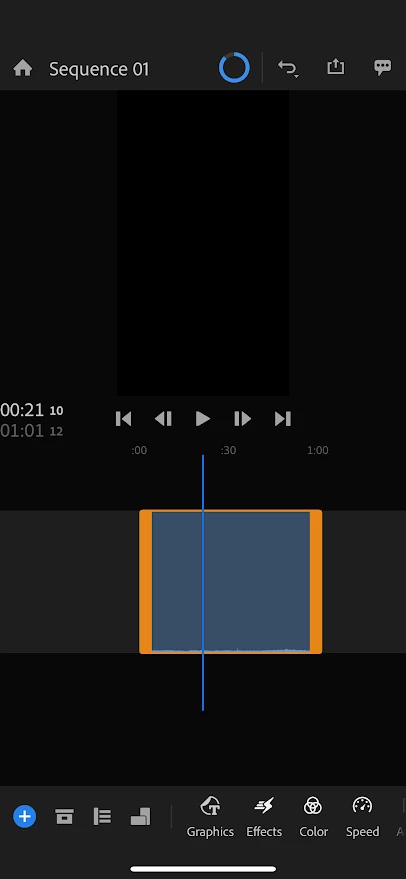
 

IMG_9175.PNG

TOPICS
Error or problem , Import , Mobile version
180
Translate
Report
Community guidelines
Be kind and respectful, give credit to the original source of content, and search for duplicates before posting. Learn more
community guidelines

correct answers 1 Pinned Reply

Adobe Employee , Jan 13, 2025 Jan 13, 2025

Hey there, @k_l._2233,

Thanks for the post. I'm glad you're here, you're welcome here on this Adobe forum for Rush.


Has this worked before but now now? If so, you're experiencing the same problem many people are having with any format but plain vanilla H.264 at 24 or 30 fps.


If you have a premium sub, then you can use HEVC. Otherwise, you shoiuld be able use the app. It has not been developed to handle high frame rates, cinematic video, or HDR, though. Ensure, you are not shooting with any o

...
Translate
Adobe Employee ,
Jan 13, 2025 Jan 13, 2025
LATEST

Hey there, @k_l._2233,

Thanks for the post. I'm glad you're here, you're welcome here on this Adobe forum for Rush.


Has this worked before but now now? If so, you're experiencing the same problem many people are having with any format but plain vanilla H.264 at 24 or 30 fps.


If you have a premium sub, then you can use HEVC. Otherwise, you shoiuld be able use the app. It has not been developed to handle high frame rates, cinematic video, or HDR, though. Ensure, you are not shooting with any of these enabled.


If you have any oddball audio settings enabled, like "spatial audio," disable that, as well. In fact, "spatial audio" seems to be the greatest offender in this area. These are all available in your iOS device's "camera settings."


Scrutinize those, change them back to to ordinary video and audio and shoot a few test files. See if they behave better and. report back with the results. I hope the advice helps. Let the community know.


The "no network" issue should be of no concern. It is a bug from a feature with CC Sync that is no longer functional. Essentially, you can ignore the warning. Let me know if it gets in the way other than this annoyance.


Cheers,
Kevin


Kevin Monahan - Sr. Community & Engagement Strategist – Pro Video and Audio
Translate
Report
Community guidelines
Be kind and respectful, give credit to the original source of content, and search for duplicates before posting. Learn more
community guidelines