
Playback Issues - Blank Grey Screen
Hi everyone,
I know that nabs141 posted this about 4 and a half years ago, but I was unable to find a solution that worked for my app when I had the same problem. I am also new here so I don't really know how this works, but I kind of am desperate for a solution, so I apologise if this doesn't make any sense.
I recently got Rush on my laptop and am using it for a project. However, when I tried to add text, I realised that I couldn't edit it or even see it, especially when I played the actual video. I could see it displayed as TITLE when I went to the home page dislpaying the projects, and the video frame, but I couldn't see it in playback mode. The screen stays blank like this when I try to play it:
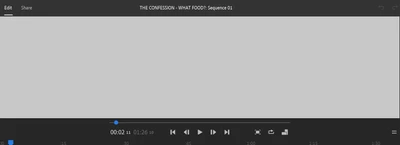
I can still hear the audio, though. I have tried the solutions suggested on nabs141's post, but I didn't really understand any of them, and I tried Go to the File menu > View > Enable "Use Optimized Clips" but I couldn't find the File menu. All my other friends who are doing a project like this are not seeing this. They have been able to finish editting the video successfully. I am quite concerned, as if this problem continues, I will have trouble with my assignment next term. I can do the following:
- import media
- insert graphics
- hear the audio while in playback
I am unable to:
- see the video while in playback
- edit the graphics
- move clips so that it is only text shown (as in, have a title screen with just words) and so that it is only the transition
I would greatly appreciate any suggestions. I don't know if this will help, but I have an Acer Intel Core i3. I am not experienced with using Adobe products, but have used a video editing software before called Davinci Resolve. Thank you everyone!
 AdChoices