jamiltv
Participant
April 21, 2019
Resuelto

Rush 1:1 aspect Ratio from 16:9 video

  • April 21, 2019
  • 1 respuesta
  • 2715 visualizaciones

Hi.

How can I crop to a 1:1 ratio and then only export the 1:1 portion of the video?

    Este tema ha sido cerrado para respuestas.
    Mejor respuesta de Meg The Dog

    In Project Assets, duplicate your sequence. Then, working on the copy of your sequence, switch the Orientation from Landscape to Square:
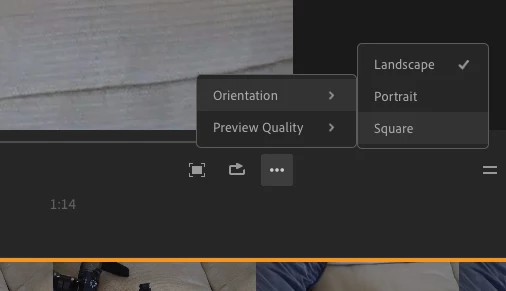
    and export.

    MtD

    1 respuesta

    Meg The DogRespuesta
    Inspiring
    April 21, 2019

    In Project Assets, duplicate your sequence. Then, working on the copy of your sequence, switch the Orientation from Landscape to Square:

    and export.

    MtD

    mindfrog
    Participant
    March 13, 2020

    Hey can you please help me. How can you change aspect ratio to something else than landscape, portrait or square? For example 4:5 or 1.91:1 or 4:3 etc.? Didn't find this option from Rush, either desktop or iPhone app.