
Participant
December 29, 2019
Answered

'T!' and can't access Adobe Stock

  • December 29, 2019
  • 2 replies
  • 1200 views

For some reason, many of the titles have a triangle in the top-right corner with 'T!' inside. Why is that?
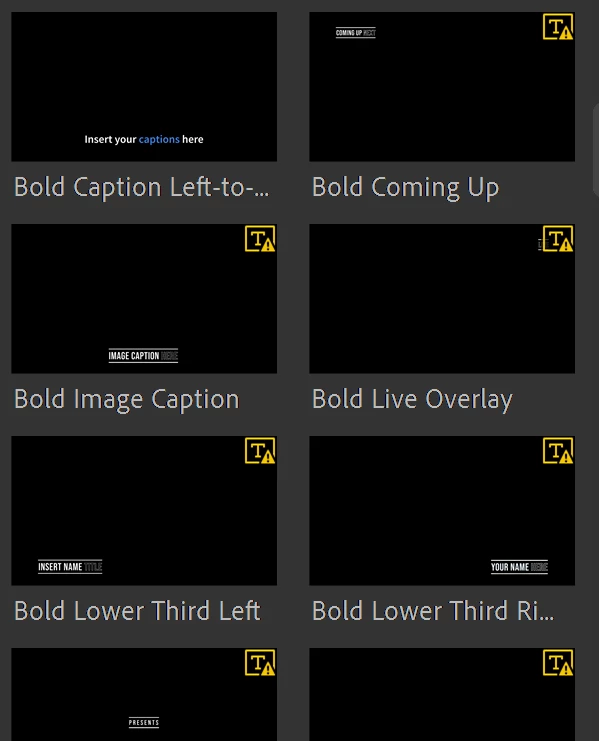
 

Also, within the 'Title' menu, I can't click on 'St [Adobe Stock] More Titles.' Do I have to download Stock to access those titles?

This topic has been closed for replies.
Correct answer Kartika Rawat

Hi there!

Welcome to the community. I understand that More Titles is not enabled in Rush. Am I right?

I found a similar thread. Check out and let us know if it helps: https://community.adobe.com/t5/premiere-rush/rush-not-integrating-with-stock-on-pc-version/td-p/10802114


Thank you,

Kartika


2 replies

Kartika Rawat
Community Manager
Kartika RawatCommunity ManagerCorrect answer
Community Manager
December 30, 2019

Hi there!

Welcome to the community. I understand that More Titles is not enabled in Rush. Am I right?

I found a similar thread. Check out and let us know if it helps: https://community.adobe.com/t5/premiere-rush/rush-not-integrating-with-stock-on-pc-version/td-p/10802114


Thank you,

Kartika


Participant
January 9, 2020

Great, thank you for finding that thread. For some reason, I could not find that before I put my question up... The thread had the correct solution.


Pax Christi

gerikp
Community Expert
Community Expert
December 29, 2019

I think that the warning in the top-right corner means that the MOGRT uses a font that you don't have on your computer. It's ok, you can change the font to one you want or once you add the title to your project Rush will download the font from Adobe Fonts and add it.


Not sure why you can't click on the More Titles. Make sure you have the newest updates.

Participant
January 9, 2020

Great suggestion, thank you for your answer. Totally makes sense.