
Exit
  • Global community
    • Language:
      • Deutsch
      • English
      • Español
      • Français
      • Português
  • 日本語コミュニティ
  • 한국 커뮤니티
2

Video is changing color. Premiere Rush

New Here ,
Oct 12, 2020 Oct 12, 2020

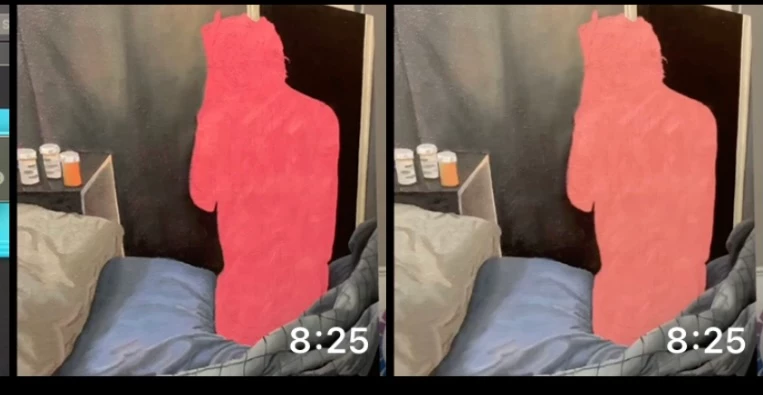
Hello.  I am using the free version of premiere rush on ios and the exposure or color is changing on my videos.  They are getting lighter. In the photo below, the original is on the left and the right has just ben brought in to PR and exported with no change.  Could it just be because the free version is dropping my resolution from 4K to 720?  Sorry I dont know anything about video editing.  Any help would be appreciated.  IMG_5739.jpg
TOPICS
Export , Mobile version
329
Translate
Report
Community guidelines
Be kind and respectful, give credit to the original source of content, and search for duplicates before posting. Learn more
community guidelines

correct answers 1 Pinned Reply

Adobe Employee , Mar 25, 2024 Mar 25, 2024

Hi @nhdr,

Thanks for the message. Do you suppose you are shooting HDR? In your camera settings, you can switch it to "most compatible" mode. Please try that and report back.


Thanks,
Kevin

Translate
New Here ,
Mar 25, 2024 Mar 25, 2024

Have same problem. After rendering Rush changes tone of my video😡 I use last version of the app on my iPhone 14 Max Pro. I definitely didn't apply any color schemes. Everything by default. 

Translate
Report
Community guidelines
Be kind and respectful, give credit to the original source of content, and search for duplicates before posting. Learn more
community guidelines
Adobe Employee ,
Mar 25, 2024 Mar 25, 2024
LATEST

Hi @nhdr,

Thanks for the message. Do you suppose you are shooting HDR? In your camera settings, you can switch it to "most compatible" mode. Please try that and report back.


Thanks,
Kevin

Kevin Monahan - Sr. Community & Engagement Strategist – Pro Video and Audio
Translate
Report
Community guidelines
Be kind and respectful, give credit to the original source of content, and search for duplicates before posting. Learn more
community guidelines