

Participant
February 17, 2020
Answered

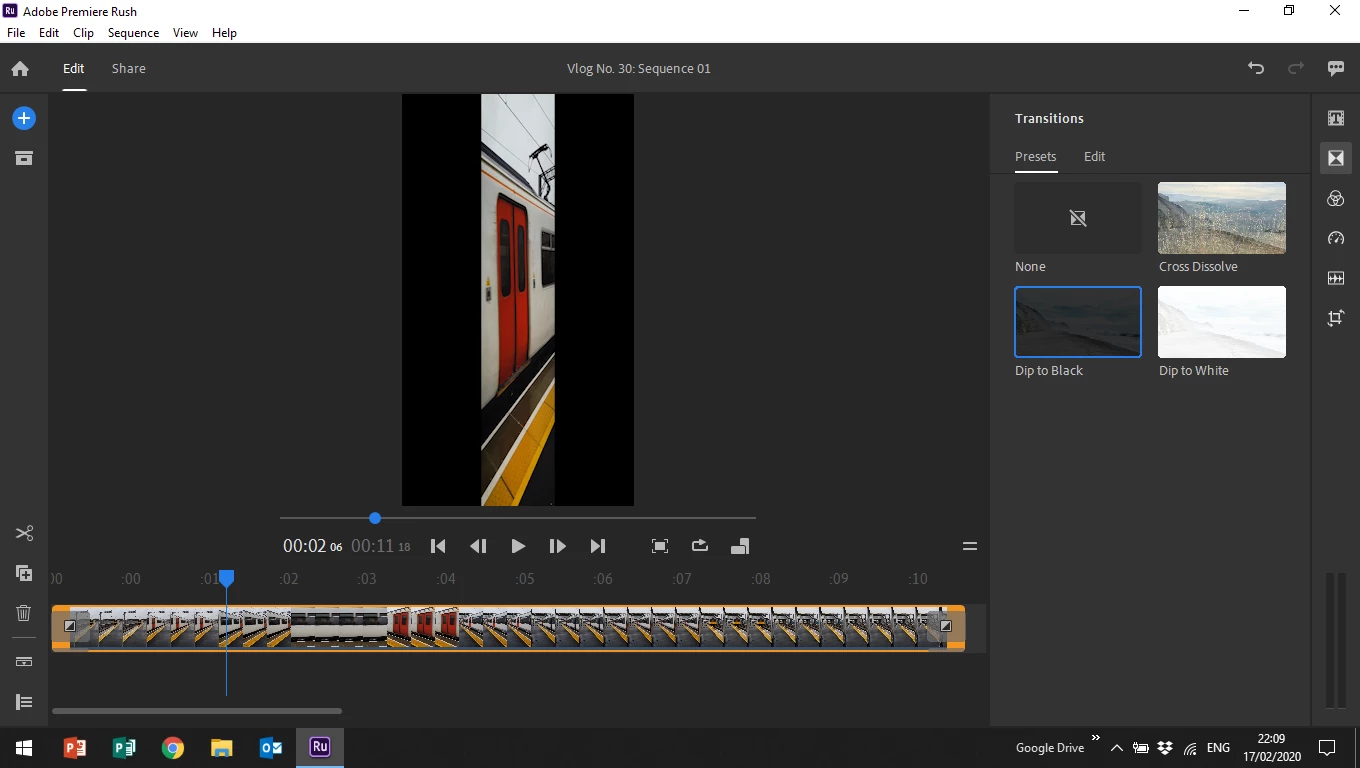
Videos appearing squeezed on the preview and the timeline after update in Premiere Rush.

  • February 17, 2020
  • 4 replies
  • 3810 views

Hi all,


I've just updated Premiere Rush to it's newest version, and all the videos in my current projects are appearing squeezed (see image below). If anyone knows how to resolve this issue, I would very much appreciate your help. Thank you.


Troy

Title edited by mod
 

This topic has been closed for replies.
Correct answer Also Squeezed

I had the same issue and found a fix, not sure if it will work for you as well.


View > Uncheck "Use Optimized Clips"

View > Preview Quality > Set to Low

4 replies

Participant
June 8, 2023

The fix for me was to do: Transform > Rotation > Set to .001 degrees. It instantly fixed it and placed it on 0 degrees.

Swink Design Ltd
Participant
July 10, 2020

Hi, I'm having the same issue. I'm new to Adobe Rush. I created a 5 minute movie for a presentation on my old imac. I've recently invested in a new more powerful imac - today i've gone into Rush to view the project and the entire timeline is horizonally condensed to the point that future changes seem almost impossible. Spent days on teh presentation so I hope that there is a fix! Cheers, Chris.

Also SqueezedCorrect answer
Participant
October 19, 2021

I had the same issue and found a fix, not sure if it will work for you as well.


View > Uncheck "Use Optimized Clips"

View > Preview Quality > Set to Low

Participant
May 2, 2022

This worked for me too! Thanks:)

Kartika Rawat
Community Manager
Community Manager
February 20, 2020

Hi Troy,

Thank you for reaching out. 

  • Are you getting this issue with a specific project or it's random?
  • What happens when you close the Premiere Rush and re-launch it?

Looking forward to your response.

Regards,

Kartika

Participant
February 25, 2020

Hi Kartika,


I keep getting them on all my projects. Even the older ones that were fine are appearing the same way now. It does make editing a bit difficult as I'm looking at an image that is squashed rather than in the true aspect ratio. The good thing is once I export the file it all seems to appear perfectly normal.


Regards,


Troy

Kartika Rawat
Community Manager
Community Manager
February 26, 2020

Thanks for getting back to us. Could you try to sign out and sign in back to Creative Cloud and re-launch the Premiere Rush.

Let us know if it brings any change.

Kartika

Legend
February 18, 2020

It looks like you're on a Windows 10 computer.

What device created this video?

Open the original video clip in the free download MediaInfo. In MediaInfo, set View to Text and then copy the text and paste it to this forum. Once we kow the specs of your video we can better advise you.

Participant
February 18, 2020

Hi Steve,


The video was filmed on a Samsung Galaxy S8 phone then imported and edited on a Windows 10 PC. Though the preview looks squeezed, once I export the footage, it appears normal.

anissa_thompson
Community Expert
Community Expert
February 19, 2020

Rush may need to resync to get the latest info for your media and update it's cache... Try logging out of Rush & Adobe CC completely (on all devices you use Rush is safest), and log back in again.

Hope this helps! Make sure to press "✔ Correct Answer" on this post if this answers your question. Happy Creating!Anissa • @anissat