
Carola_BHG
Inspiring
December 27, 2021
Answered

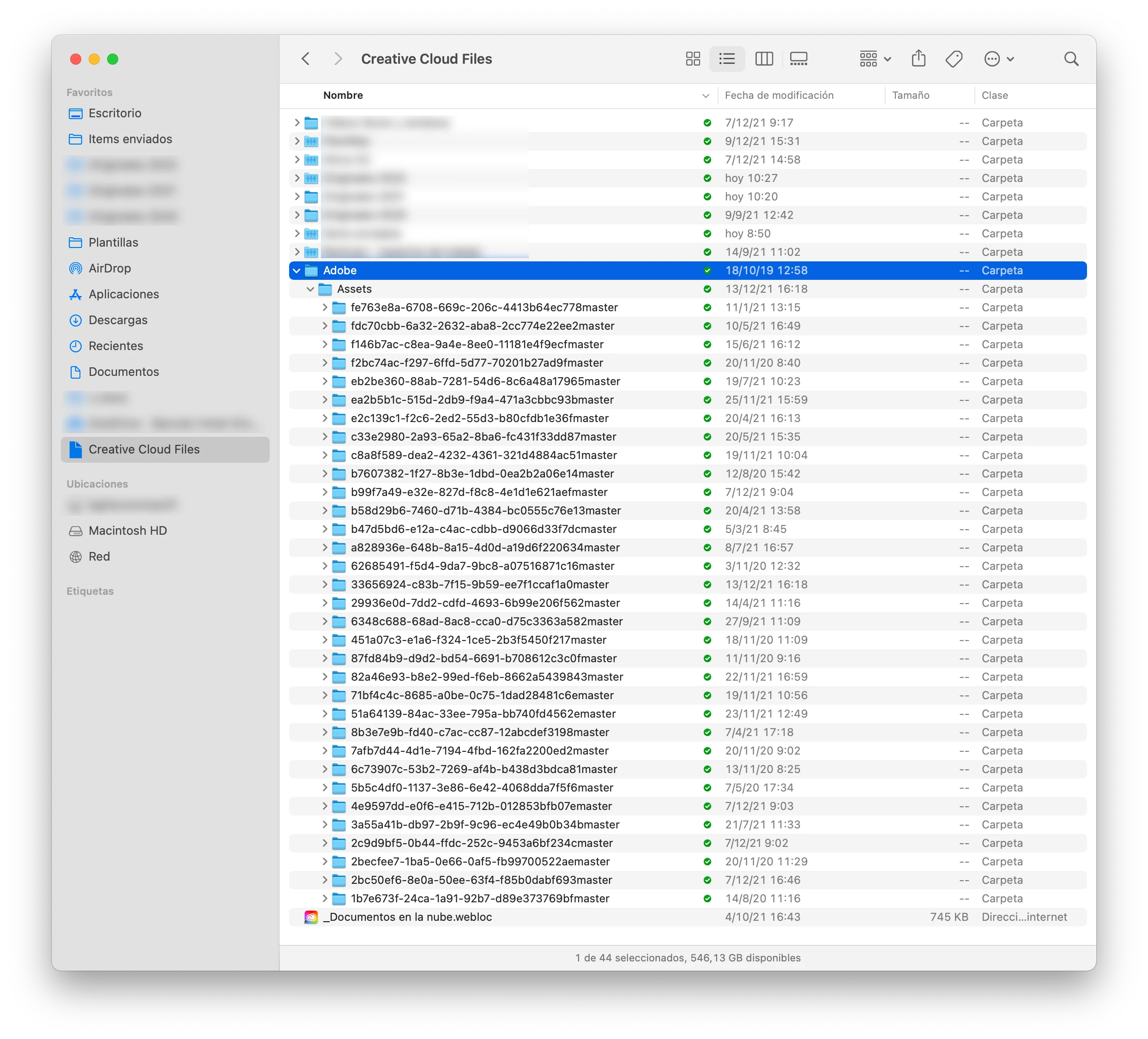
What is this "Assets" folder inside "Adobe" Folder in my Creative Cloud?

  • December 27, 2021
  • 2 replies
  • 1736 views

Hello!

Is time to clean things in the end of the year and I stumbled to this folder that I have not created and I'm not sure what it is for.

It all contains video pieces and looks like they are pieces from my Adobe Rush projects. But those projects as far as I knew, depend on the actual resources you have to have stored in a place so Rush can grab them and actually put the video together. So I'm really not sure about these.

Can they be deleted? Doesn't Adobe Rush work as I thought or something changed? WHy is all this stuff created? It makes for 6 GB worth of files so I'm really looking forward to delete them.

Correct answer Kevin J. Monahan Jr.

Hello @Carola_BHG
Thanks for the message. Here's what the developers said about this situation.

quote

If the editor keeps the project on the devices where the original files are stored, it is safe to delete the files. However, if you try to open the project on a device that it didn't originate from or if the original files are deleted, the project will not be available.


I hope that the statement above answers your question.


Thanks,
Kevin

2 replies

Kevin J. Monahan Jr.
Community Manager
Kevin J. Monahan Jr.Community ManagerCorrect answer
Community Manager
July 10, 2023

Hello @Carola_BHG
Thanks for the message. Here's what the developers said about this situation.

quote

If the editor keeps the project on the devices where the original files are stored, it is safe to delete the files. However, if you try to open the project on a device that it didn't originate from or if the original files are deleted, the project will not be available.


I hope that the statement above answers your question.


Thanks,
Kevin

Kevin Monahan - Sr. Community and Engagement Strategist – Adobe Pro Video and Audio
Carola_BHG
Inspiring
July 11, 2023

Hello Kevin, thank you for replying! That helps to know more. So I understand those files are the Rush projects themselves but in an 'understandable' format, so you don't really know what are they for. I'm glad I didn't go ahead and delete them all.


Now, I wish I could share Rush projects with another user in my work team, given that the files can be shared (synced) within devices, but I already know that is not the case.

Kevin J. Monahan Jr.
Community Manager
Community Manager
July 11, 2023

Good. I'm glad you are more clear on the files. @Carola_BHG. Yes, project sharing is a long-standing feature request. Sorry about that. There are ways to share projects in Premiere Pro if you were unaware. Team Projects works really well, I think.


Kevin

Kevin Monahan - Sr. Community and Engagement Strategist – Adobe Pro Video and Audio
Kaijukilluh2099
Known Participant
July 9, 2023

How is there no answer?!


Carola_BHG
Inspiring
July 10, 2023

Hi! Yes, no answer and the folder is now 9,53 GB 🙂 And my hard disk drive is tiiiny, so I'm carrying around an external disk thanks to this and the inability to partially sync my Adobe files.

If you could vote this question, maybe they would see it.