Boondoge
Participant
December 10, 2020
Answered

Error compiling movie - 1609629690 - Unable to produce frame - H264 - Using Pan and Zoom Effect

  • December 10, 2020
  • 9 replies
  • 4702 views

Hi! First post, wanted to share my experience with a rendering error I've been receiving since the last Adobe Rush update (v1.5.40) for Pan / Zoom .


My Surface Pro's sad specs:

Intel(R) Core(TM) i7-1056G7 CPU @ 1.30GHz 1.50 Ghz

16.0 GB RAM

64-bit OS

Windows 10


This is my 5th video in the same format, nothing has changed EXCEPT Rush was updated to a newer version, one that allows the Pan / Zoom feature's start and endpoints to be adjusted (FINALLY!) -- So naturally I decided to Pan / Zoom every image in my sequence.


This increased my render time by a factor of 1000% -- but that's not my issue. At the same point every time in the render Rush would stall. Eventually I would get the following error message and Rush would need to be force stopped before work could again commence:


Error compiling movie.

Accelerated Renderer Error

Unable to produce frame.

Writing with exporter: H.264

Writing file type: H264

Around timecode: 2:51:18 - 2:52:04

Rendering at offset: 171.600 seconds

Component: H.264 of type Exporter
Selector: 9
Error code: -1609629690


There are a number of solutions on here but none of them have panned out for me. I tried reducing the quality of the export (❌); deleting the asset and re-inserting all effect elements (❌); going back to previous version of Rush (❌); esnuring enough disc space on drive (❌); and finally, I went back to the newer version of Rush -- v1.5.40 -- and looked at the Pan / Zoom effect on the image following where my stall occurs and I noticed something: a glitching out / black screen when I examine the image while the Pan / Zoom side bar is open.


Adobe Rush did not like how small I made the starting point of the zoom. Who knows if this is my machine or a bug, but if you're running into this issue and you've been using Pan / Zoom, this is what fixed it for me:


Make the starting or end point of Pan / Zoom larger and try to render again.
This topic has been closed for replies.
Correct answer Alex5DB6

Hi everyone. Same problem and same solution.

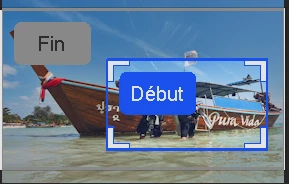
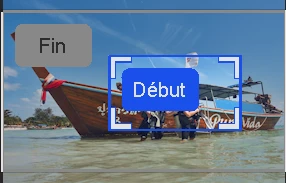
Increase the size of the START and END points. When too small, export will fail.
Try different sizes until it works:

Too small
Big enough

9 replies

Kevin-Monahan
Community Manager
Community Manager
May 18, 2023

Hi,

I read these posts and have an idea that may work for the community. Try resizing images before importing them into Rush. The raw images are often too large for processing on a phone or an underpowered computer. Try resizing them to no more than twice the frame size. This is an old rule of thumb for all editing applications, even Premiere Pro. Try it and let me know if that helps you.


Thanks,
Kevin

Kevin Monahan - Sr. Community & Engagement Strategist – Pro Video and Audio
Participant
February 18, 2023

It is now FEB 2023 and I still have the same issue. Is this something on our end? I can get it to render often times but come on! The one thing I want to use in RUSH and it doesnt work.

Participant
October 23, 2022

Its now October 2022 and i have same problem!!!!! I did all the suggestions on this thread.   but the only thing that worked was turning off all pan and zooms on the video. I even upgraded to subscription and then canceled my subscription. then end!!! looking for a new video editor any suggestions? 

Participating Frequently
October 24, 2022

If you are on a Mac, I always thought iMovie was a good equivalent to Premiere Rush. 

Mulyá
Participant
June 1, 2022

Thankyou!!


corymjk
Participant
May 21, 2022

I can confirm that in May 2022 I am experiencing the same issue and am happy to report the workaround does still work.


Digital Marque
Participant
February 10, 2022

@Boondoge has the only solution that works. It is now 2022 and the same problem is still there. If the Start or End Points are too small, it will crash the render.

Participating Frequently
April 26, 2021

I was having this problem and followed the instructions Boondoge gave above and Vwala! It worked for me. Thank you! This was seriously bugging me!

Alex5DB6Correct answer
Participant
February 28, 2021

Hi everyone. Same problem and same solution.

Increase the size of the START and END points. When too small, export will fail.
Try different sizes until it works:

Too small
Big enough

Participant
April 5, 2021

Same issue overhere. After updating to the latest version I am experiencing all kind of export problems. It started using the Pan/Zoom option but also exporting still images with music fails sometimes.


The option Pan/Zoom is really great to make it all look a bit more vivid but not being able to export anymore is really anoying.

Did some search work and found some stuff about the GPU, tried to uninstall the current drivers, update the drivers assign a simple windows driver to the graphics card but all without a result.


Please fix, I am using Premiere Rush every weekend to prepare video's/images with music.


Specs:
Windows 10, 64bit

Intell i7-4750HQ

8GB Ram

Nvidia GeForce GTX 950M


Kartika Rawat
Community Manager
Community Manager
December 15, 2020

Hi there!

Thank you for trying the troubleshooting steps on your own.

  • Have you tried exporting the video through other presets?
  • Also, to isolate the issue. Can you try removing Pan/Zoom effect and see if that improves performance?

Let us know.

Kartika

Participant
December 19, 2020

I have much the same problem.  After using PZ on a single frame I was forced to use Task Manager to cancel Rush using Task Manager.  This happened several times with various rendering settings.  I followed the advice from Boondoge, increasing the start size, and I was able render a final product.  (Thanks Boondoge).  The rendering was very slow for about 2-3 minutes, then all of a sudden the pace picked up and the rest of the video rendered smoothly.  I can confirm that by removing PZ on that single frame, rendering returned to normal.