
joannab79880566
Participant
December 1, 2018
Answered

How projects are saved for later edition?

  • December 1, 2018
  • 2 replies
  • 3267 views

Hi,

I'm working on many projects and I can't switch between them without problems. I can see some of them after opening program, but not all of them are there. I don't know on what it depends, but they are showing like randomly, never all at once. I also can't find projects anywhere on my local disk and cloud storage, but for sure they are somewhere, because I can go back to them (if they appear on "Your projects" main Adobe Premiere Rush CC panel) and see my previous changes on them. Could you help me sort it out?
This topic has been closed for replies.
Correct answer anissa_thompson

Hi @joannab79880566 ,

Video content created in Rush is actually stored on Adobe's cloud-based servers, not in your local storage or personal Creative Cloud:

"Rush projects are saved in the cloud so your changes are reflected across all your devices through automatic project syncing

The Rush mobile app includes all the same features as the desktop version of Rush"

You might want to check for a few things:

  1. Make sure you are only using ONE Adobe ID to access your content (I've accidentally created files in one of my alternate work accounts without realizing).
  2. Trying logging completely out of your CC desktop manager, rebooting your computer, then checking to make sure Rush is using the latest version, logging back in and restarting the Rush app. If you are using Rush on iOS, I would also recommend logging out of your device(s), restarting them, and coming back in.
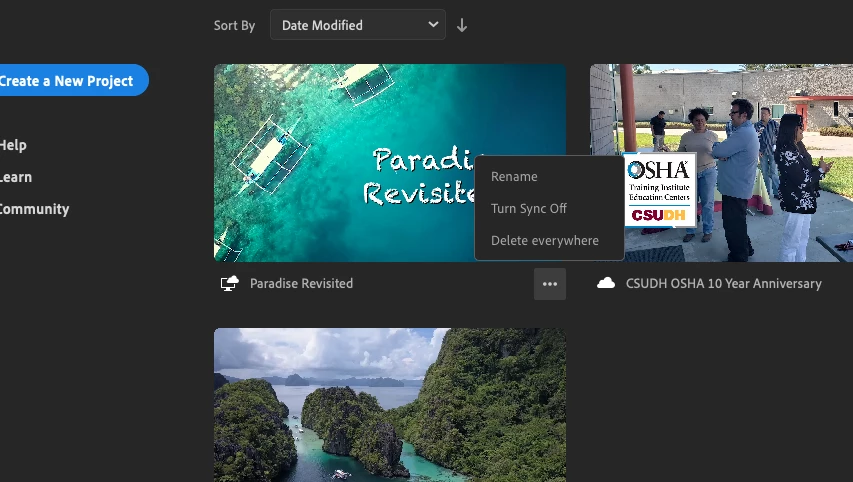
  3. Double-check each projects' "Turn Sync Off" option and make sure they can sync:


Hope this helps... let us know if you got all of your videos reconnected.

2 replies

caroline_edits
Community Manager
Community Manager
December 5, 2018

Hey JoannaB!

Are your projects saving changes now? Happy to keep troubleshooting with you if they're not.

-Caroline

Known Participant
March 13, 2021

hard to believe that there is no option to save projects locally or on my own server. This is a payed software and I expect the possibility to keep control on my working data, instead of having them somewhere in a cloud 😞

anissa_thompson
Community Expert
anissa_thompsonCommunity ExpertCorrect answer
Community Expert
December 3, 2018

Hi @joannab79880566 ,

Video content created in Rush is actually stored on Adobe's cloud-based servers, not in your local storage or personal Creative Cloud:

"Rush projects are saved in the cloud so your changes are reflected across all your devices through automatic project syncing

The Rush mobile app includes all the same features as the desktop version of Rush"

You might want to check for a few things:

  1. Make sure you are only using ONE Adobe ID to access your content (I've accidentally created files in one of my alternate work accounts without realizing).
  2. Trying logging completely out of your CC desktop manager, rebooting your computer, then checking to make sure Rush is using the latest version, logging back in and restarting the Rush app. If you are using Rush on iOS, I would also recommend logging out of your device(s), restarting them, and coming back in.
  3. Double-check each projects' "Turn Sync Off" option and make sure they can sync:


Hope this helps... let us know if you got all of your videos reconnected.

Hope this helps! Make sure to press "✔ Correct Answer" on this post if this answers your question. Happy Creating!Anissa • @anissat
johara52
Participant
April 26, 2021

I'm a new user of Premiere Rush, long time user of Photoshop and Lightroom.

I am working on my fiest Rush project, and need to SAVE the project in an EDITABLE state to finish later.

How do I "Save" the Project as it is so far, and then later re-open it and ammend parts and add more?