
Participant
December 28, 2019
Answered

Premiere rush can't open mac photos library

  • December 28, 2019
  • 5 replies
  • 10559 views

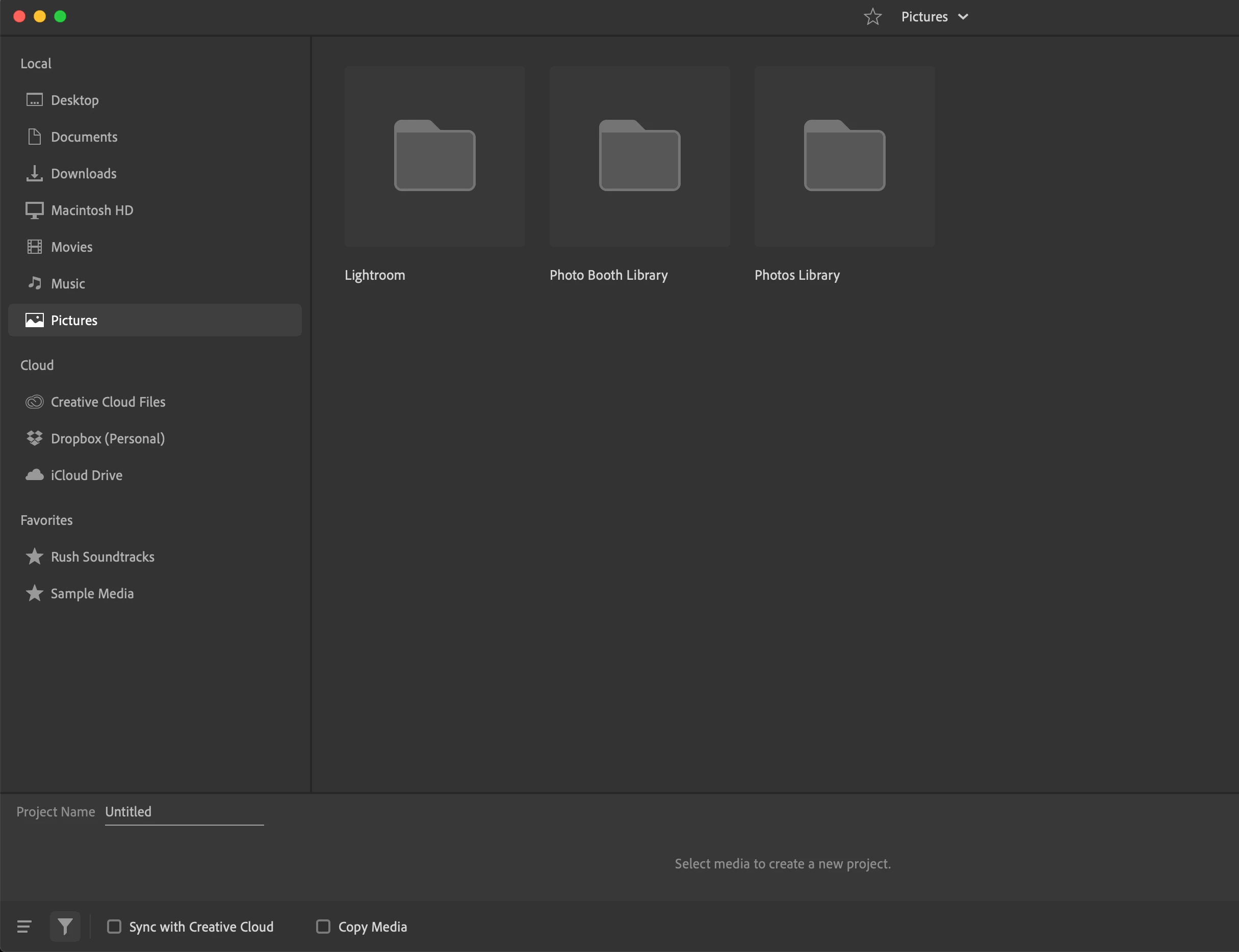
I'm trying to edit a video in my Mac Photos library using Premiere Rush. I can see the library from the "select media" screen, but the folder won't open and show my videos. I have verified that Rush has access to Photos in System Prefs - Privacy.


Anyone know how to fix this?
This topic has been closed for replies.
Correct answer gerikp

You'll have to drag your photos and videos out of the photos.app and into another folder and then import into Rush from that folder.

5 replies

Participating Frequently
June 28, 2023

I'm just starting to get into Rush (MBP) and create projects, and the first thing I noticed is that Rush will not show Photos folder in order to upload images. I have checked the filter on the bottom of the screen and "All Media Types" is selected. And the Pictures tab I have circled below, does nothing/doesn't open. I am missing how to import images?

Participant
November 1, 2021

Wow !!! Is unbelievable, and I was thinking about it as a configuration app problem. Thanks, people !!

Inspiring
January 22, 2023

I'm having the same problem that was first mentioned in 2019. But now it's 2023.

2 Questions:

1 - Is there still no way to directly access my Photo Library on my Mac from the Adobe Rush app?

2 - Is the best workaround to use an iPad to start the project and access the videos I want from my Photo library and sync the project to Adobe Creative Cloud and then open the project on my Mac in Adobe Rush?

Thanks.

Participant
January 30, 2023

The desktop workaround seems to be to open the Photo App and right click the video you want and choose "Edit With..." about midway down. Select Adobe Premiere Rush. The process will then take up to 20 seconds - but, a donut-shaped two-tone grey circle will appear next to the thumbnail magnifier slider tool in top left of the main Photo App screen to let the user know something is happening. When this circle is completely filled with white, the Adobe Premiere Rush app will automatically be moved to the top on the desktop and an alert window will appear with the status of the loading clip. Not sure if Premiere Rush needs to be opened first, but this definitely works when it's open

Participant
October 24, 2020

I delete Premiere rush for this reason. Too much media to transfer, and not motivate to use disk space for that, it's crazy!

Known Participant
May 7, 2021

Exactly. I went ahead and EXPORTED my video from Photos to my MOVIES folder just this one time, then I will DELETE the Rush app. In this day and age of technology, it's unbelievable that this should be so hard. 

Participant
August 26, 2020

I have been working on trying to export from 'Photos.app' for around 4 days and I finally thought to myself, "Ty, You're not stupid, you're missing something". I'm legitimately baffled at the fact a function this simple is not incorporated, whether it be Apple's or Adobe's fault, get a grip and fix this. I have many 10's of GB's worth of videos I need edited and I am now going to have to transfer them to the desktop and then export to CC to be able to do anyhting with them.WHAT A HEADACHE. 

Not only this, all of my videos are on iCloud and I have to download, then Transfer, Then EXPORT. I am so very upset. One video is going to take about an hour to move because of the size of the files. UGHHH.....


Mod note: Edited. Please do not use profanity.

WakeSurfer
Adobe Employee
Adobe Employee
September 9, 2021

I love Apple - but the way Apple makes it so difficult to access the Photo Library is not a good customer experience.  

Participant
May 23, 2022

Agreed. I love Apple also, as with Adobe, it has so much to offer creators but when there is a snag like this, it can really hinder creative energy. 


gerikp
Community Expert
gerikpCommunity ExpertCorrect answer
Community Expert
December 29, 2019

You'll have to drag your photos and videos out of the photos.app and into another folder and then import into Rush from that folder.

shooby-doAuthor
Participant
January 3, 2020

Holy cow - Rush on Mac can't import videos directly from the photos library? Plus, there's no option under the File menu to import media using the standard MacOS interface for grabbing files from the file structure? That seems crazy for a Mac video editor.


Guess I'll have to use iMovie.

Kathleen Prati
Participant
April 21, 2020

The easist and fastest way to work around this astonishing issue is to open the project on your iphone or ipad. Import the files, then name and save it to CC. All will be present when project is opened on Mac. One hopes Adobe will update the problem.