
Answered
Rush 1:1 aspect Ratio from 16:9 video
Hi.
How can I crop to a 1:1 ratio and then only export the 1:1 portion of the video?

Hi.
How can I crop to a 1:1 ratio and then only export the 1:1 portion of the video?
In Project Assets, duplicate your sequence. Then, working on the copy of your sequence, switch the Orientation from Landscape to Square:
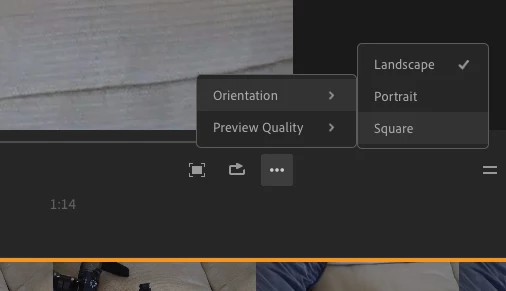
and export.
MtD
Already have an account? Login
Enter your E-mail address. We'll send you an e-mail with instructions to reset your password.
 AdChoices