
Known Participant
June 13, 2025
Question

Danger of connecting to Adobe website. Its SSL certificate is not trusted anymore

  • June 13, 2025
  • 7 replies
  • 2637 views

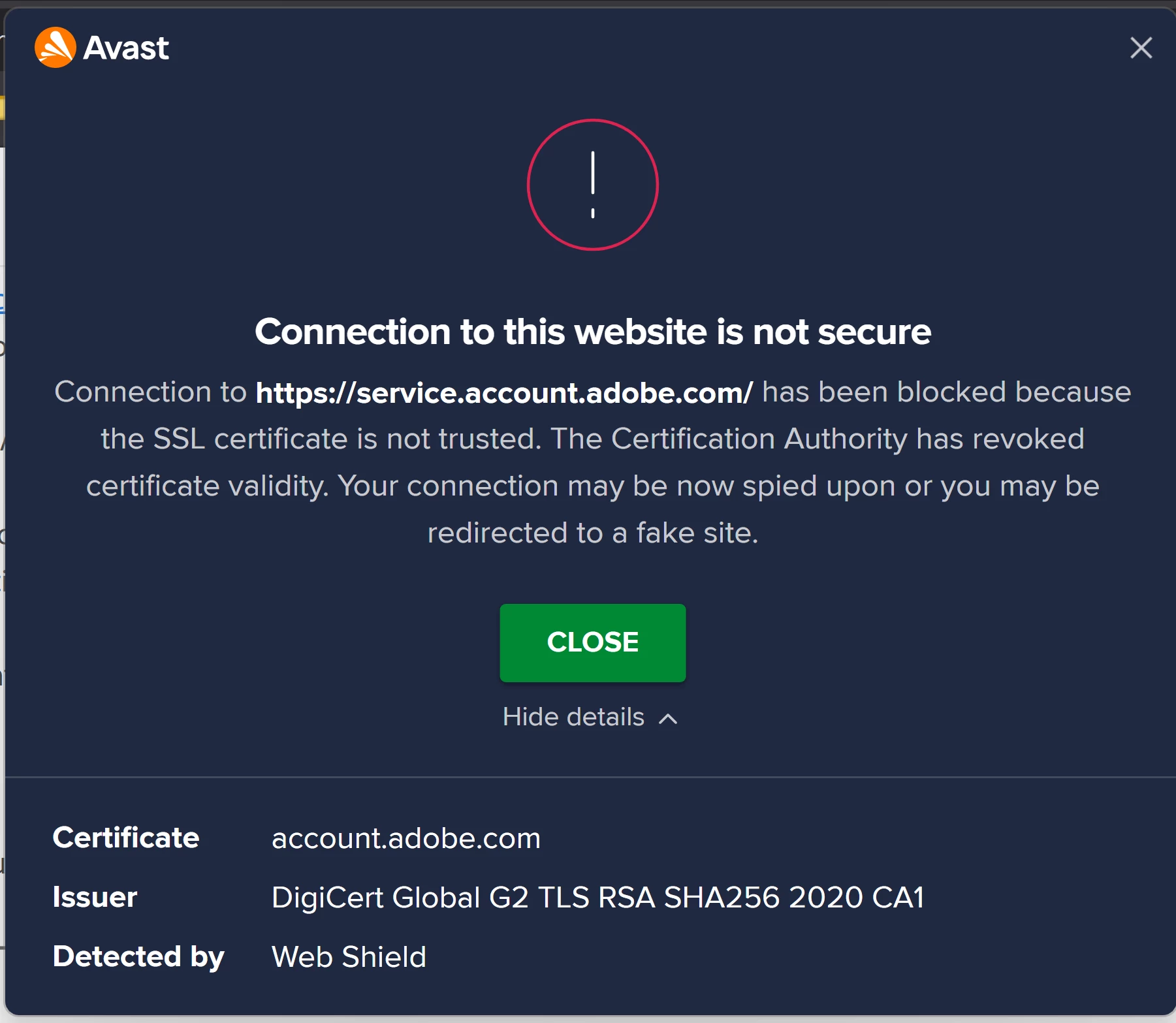
Starting today, when I try to access the contributor's website, a message about the danger from my antivirus started appearing:

'Connection to http://service.account.adobe.com has been blocked because the SSL certificate is not trusted. The Certification Authority has revoked certificate validity. Your connection may be now spied upon or you may be redirected to a fake site.'


Has anyone encountered a similar problem? I would be grateful if someone could clarify the situation in more detail.
7 replies

Participant
June 21, 2025

Have been getting the same error when going to Manage Account from the Creative Cloud Desktop app as well as when trying to get fonts. Was unable to use Generative Expand in InDesign today so not certain if this may have been caused by this issue. 

Participating Frequently
June 16, 2025

Same issue, with AVAST - on both Firefly and Adobe express

daniellei4510
Community Expert
Community Expert
June 14, 2025

In my experience, antivirus software can be a little too paranoid at times. Have you tried from a device that doesn't have antivirus software? I'm on a Mac, so it's not something I install myself. Well, I do, but I disable it until I think something is amiss and what viruses I have found were more annoying than harmful.

Adobe Community Expert | If you can't fix it, hide it; if you can't hide it, delete it.
Nancy OShea
Community Expert
Community Expert
June 14, 2025
quote

antivirus software can be a little too paranoid at times. 

By @daniellei4510

==========

And rightfully so.  Log-ins over a non-secure connection are risky.  Nobody knows who's receiving/sending data on the other side. TLS/SSL Certs issued from a reputable Certificate Authority are about the only assurance that consumers have of a safe web experience.  When that breaks down, it inspires distrust that the site is doing all it should to protect its users.


Speaking as a website developer & owner, security is a constant battle with bad actors. And AI is making things worse.


IMO, everyone should use up to date anti-malware and spyware protection, no matter which devices you use. 

https://www.antivirusguide.com/best-anti-malware-mac/


Nancy O'Shea— Product User & Community Expert
daniellei4510
Community Expert
Community Expert
June 14, 2025

I won't go so far as to say I haven't at times attempted to use antivirus software, and I've also installed it temporarily when my computer has started doing weird things like throwing pop-up adds at me, but I have yet to find one that doesn't slow my computer down, or give me spurious reports, or begin to heckle me constantly due to yearly notices when my subscription is about to run out. I have found a few minor viruses (nothing particularly dangerous...just annoying) as a result of using virus scanning software. In those cases, the software wants me to pay to have the virus removed, but they also give me the locations where the culprit is located, and I've been able to delete the file myself. Even my ISP offered free virus scanning software for a year, but it acted like virus itself and I turned it off, only to turn it on when I think I might have something suspicious on my machine. I also have a second computer that I used to download any software, or visit any sites, that I THINK look a bit on the suspicious side and install it there first, before installing on my main computer.


All that said, I suppose I wouldn't go so far as to insist NO ONE should install antivirus software on a Mac (at least not without a second Mac), but if one does have problems, disabling it temporarily has solved a handful of issues I've experienced in the past.

Adobe Community Expert | If you can't fix it, hide it; if you can't hide it, delete it.
Nancy OShea
Community Expert
Community Expert
June 14, 2025

Looks like a bad URL.  Try this link instead. 

https://contributor.stock.adobe.com/


Or this one

https://account.adobe.com/


Nancy O'Shea— Product User & Community Expert
Known Participant
June 14, 2025

Yes, I am always go to this link: https://contributor.stock.adobe.com/be_en/portfolio

but now for some reason the antivirus started issuing the warning described above

Nancy OShea
Community Expert
Community Expert
June 14, 2025

@2024creative and @Rajitha23461929g772,

This isn't the first time that somebody forgot to renew Adobe's TLS/SLL certs. 

I'll report the issue.  But this is the weekend.  It might not receive attention until Monday at the earliest. 


Thanks for your patience. 


Nancy O'Shea— Product User & Community Expert
daniellei4510
Community Expert
Community Expert
June 13, 2025

No problem here, except that I need to remove the word 'service.'

Adobe Community Expert | If you can't fix it, hide it; if you can't hide it, delete it.
Inspiring
June 13, 2025

---------------------

RALPH_L
Community Expert
Community Expert
June 13, 2025

No warning.