Participating Frequently
November 26, 2023
Answered

quality issue on an ai image

  • November 26, 2023
  • 4 replies
  • 922 views

Hello,


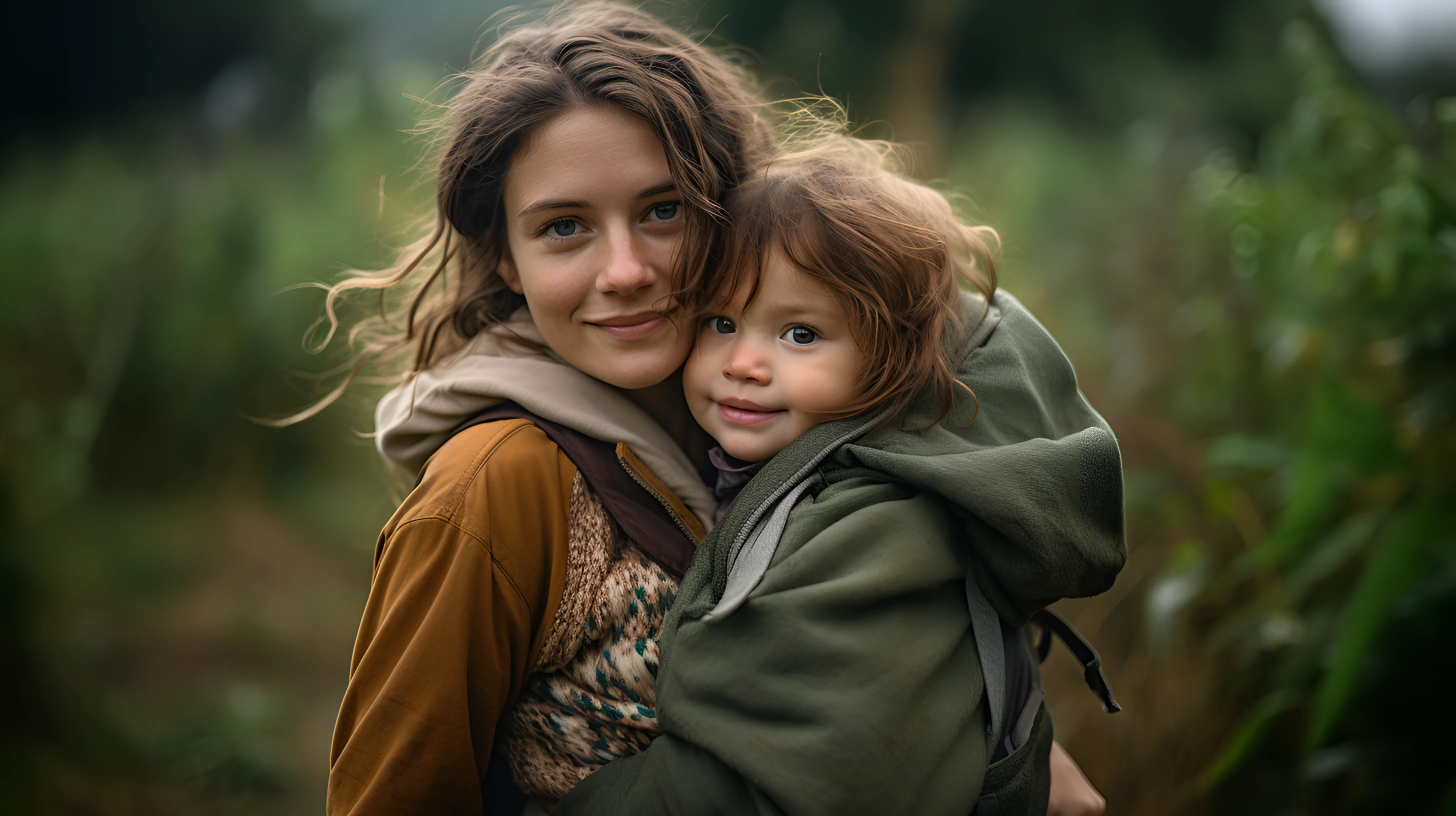
this is my first post her. Can someone please help me with why adobe rejected this image claiming quality issues? Thanks a lot in advance for your advice!

Bye, Stefan 
This topic has been closed for replies.
Correct answer Jill_C

It's rather underexposed, the mom's hand looks malformed, and the little girl's left eye isn't drawn correctly - the white rim at the bottom of the pupil isn't accurate. The hood on the little girl's jacket is also unrealistic - it's huge!

4 replies

RALPH_L
Community Expert
Community Expert
November 27, 2023

The vertical pointing hair on the left, the blurred zipper on the womans coat, the light upper lip on the woman where the hair crosses. Why is this a png file. PNG must have transparency. If not, it should be jpg.  

Ch1can0Author
Participating Frequently
November 27, 2023

Hello Ralph, 


thank for you hints. So far I have submitted all of my images as PNG, regardless of whether they contain transparencies or not. Because unlike jpg, png offers lossless compression. I want to deliver the maximum possible image quality, I thought the file size would be less important. Am I doing this wrong all the time? Thanks in advance for the clarification!

Bye, Stefan 

Jill_C
Community Expert
Community Expert
November 27, 2023

Adobe has repeatedly stated that png file type should only be used for files with transparency. 

Jill C., Forum Volunteer
Nancy OShea
Community Expert
Community Expert
November 26, 2023

The blurry white blob in upper right corner is distracting.  I would remove it with Spot Healing brush in Photoshop.


Nancy O'Shea— Product User & Community Expert
daniellei4510
Community Expert
Community Expert
November 26, 2023

I fixed the eyes, noses, and mouths with facial restoration software (works best with Google Chrome. I did this by taking the result and placing it beneath the original on a new layer. Masked the original image and erase the eyes, nose, and mouth individually. Facial restoration software over-compensates the skin and it's best to keep the original skin. I then rounded out the eyes as well as duplicating the woman's left eye and pasting it over her right eye.


Facial restoration: https://colab.research.google.com/drive/1sVsoBd9AjckIXThgtZhGrHRfFI6UUYOo#scrollTo=zuBCgeH08tdn


In addition, I fixed the right hand side of the woman's mouth with generative fill to remove the hairs. A little more work with Liquify is probably necessary. I duplicated the catch light from the woman's left eye and copied it to all the other eyes. Catch lights are generally identical in a portrait, regardless of the number of people involved. The hand, as @Jill_C mentioned elsewhere, could be removed entirely with gen fill. Lastly, I put a square around just a few of the stray hairs that should have been removed. 


Adobe Community Expert | If you can't fix it, hide it; if you can't hide it, delete it.
Ch1can0Author
Participating Frequently
November 26, 2023

Hello, 


thank you both for the feedback, i still have a lot to learn. : ) Another picture with a father carrying a child was accepted and quality wise i find it similar to the one above. Well, perhaps sometimes it also depends a bit on the reviewer. But i see all your points, thanks a lot, also for the link to facial restoration, didn´t knew that one.  

Bye, Stefan


daniellei4510
Community Expert
Community Expert
November 27, 2023

The one that was accepted doesn't have the more glaring errors compared to the other, although it does still lack the realistic quality of an actual photograph. Even running it through facial restoration software didn't help much, outside of improving their teeth. The facial wrinkles in the father's face are too deep for an otherwise young man and could have been softened with gaussian blur and a variety of other tools. That said, I can see where it was accepted in this case, but some improvements could have still been made. I would have marked a submission like this as an Illustration rather than a Photograph, given that it lacks the qualities of an actual photo. Good luck with your future submissions!

Adobe Community Expert | If you can't fix it, hide it; if you can't hide it, delete it.
Jill_C
Community Expert
Jill_CCommunity ExpertCorrect answer
Community Expert
November 26, 2023

It's rather underexposed, the mom's hand looks malformed, and the little girl's left eye isn't drawn correctly - the white rim at the bottom of the pupil isn't accurate. The hood on the little girl's jacket is also unrealistic - it's huge!

Jill C., Forum Volunteer
