
Legendari
Participant
March 24, 2023

Looking straight at side of Shape Extrude result creates an artifact

  • March 24, 2023
  • 3 replies
  • 345 views

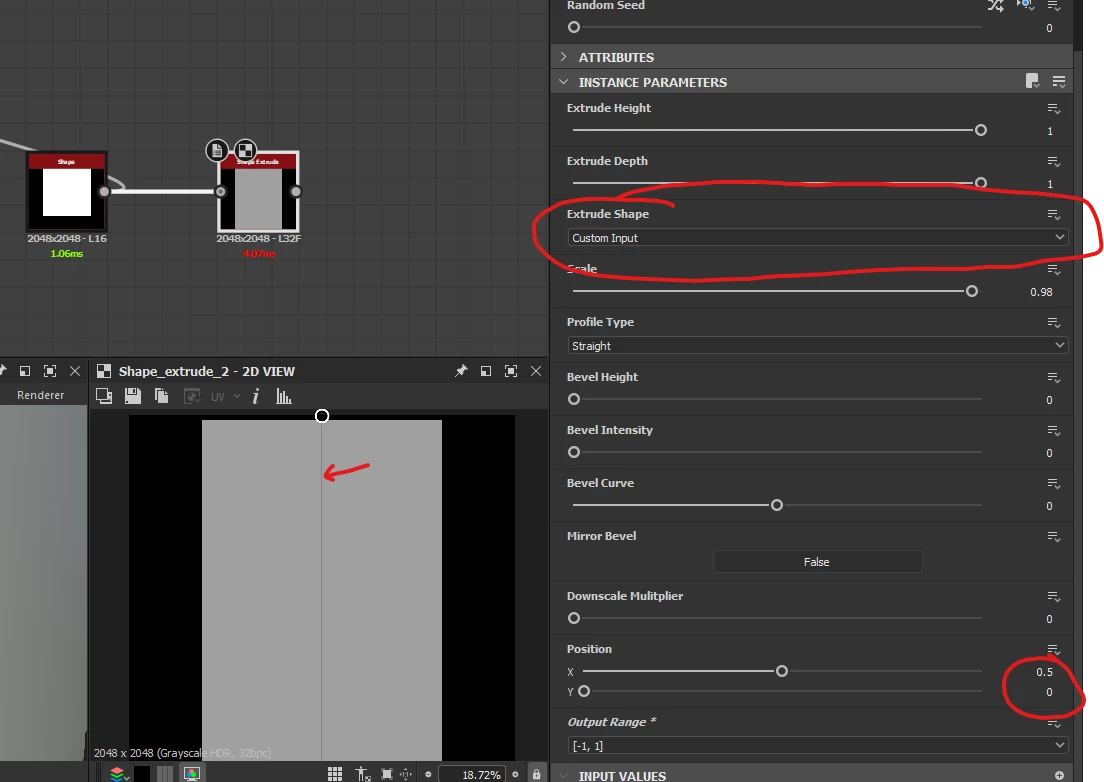
Hello! I am trying to do some height map modelling with the shape extrude, however, when I look at the result there is a gray vertical line going throught the center of the shape that technically should not be there. I have tried everything I can think of to get rid of it but without success.


To repro, just set a shape node of a square as an input, set the shape etrude to use custom input, and set the position to : X = 0.5, Y = 0.0
3 replies

Nicolas3D
Community Manager
Community Manager
March 27, 2023

Indeed, there is a bug in the Shape Extrude node, thanks a lot for the report! We will fix it in a coming release. 
You should not have to modifiy default nodes to fix bugs, don't hesitate to continue to report such errors so we can fix them for everybody 🙂 

Legendari
LegendariAuthor
Participant
March 27, 2023

Thanks @davescm , you a hero! I did not know you could ispect almost every node, very interesting! 

davescm
Community Expert
Community Expert
March 24, 2023

If you open up the Shape Extrude node node (Ctrl+E) you can see how it works, you can do this with many nodes.

The artifact problem stems from a distance node which is set to 0 pixels wide and extends the mask. If you change that pixel width parameter to just 0.001 the artifact is removed. You can then save the sbs as shape_extrude_modified.sbs


Dave