Exit
  • Global community
    • Language:
      • Deutsch
      • English
      • Español
      • Français
      • Português
  • 日本語コミュニティ
  • 한국 커뮤니티
3

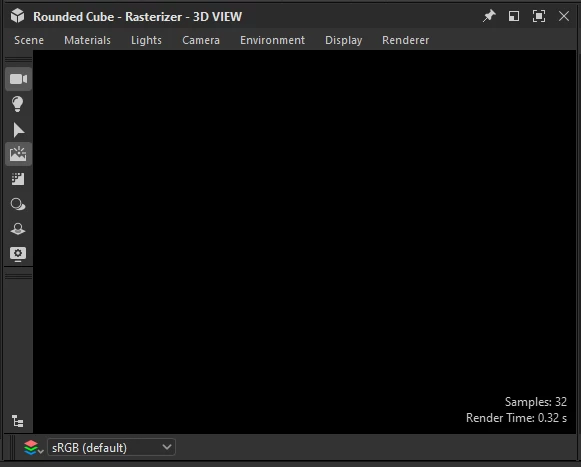
Substance Designer V15 Black 3D View

Community Beginner ,
Jul 15, 2025 Jul 15, 2025

I want to test the new update but dont know to fix this.
 

231446628hbb_0-1752634415740.png


Bug Unresolved
764
Translate
Report
Community guidelines
Be kind and respectful, give credit to the original source of content, and search for duplicates before posting. Learn more
community guidelines

correct answers 1 Correct answer

Adobe Employee , Jul 31, 2025 Jul 31, 2025

Hello again, I appreciate your patience!


After investigating this further, we confirmed the black render is caused by the GPU lacking features required to perform the render. This is the case for GPUs several generations back, such as the NVIDIA GTX 10xx series (Pascal).


To learn more about supported hardware, please refer to Designer's system requirements. As a workaround, you can use the OpenGL renderer.


Please note a new option in the Project settings lets you set up the default rendere

...
Translate
5 Comments
Adobe Employee ,
Jul 16, 2025 Jul 16, 2025

Hello! Thank you for reporting this, I am happy to help!


First, please share Designer's log file: Reproduce the issue, then go to 'Help > Export log...' and send me the exported file. The file includes system paths and project file paths. Make sure to send it out to me as a direct message if you do not want to disclose that information publicly.


Then, please check if the 3D View is using a default scene state file (*.sbsscn):


  1. Go to Edit > Preferences > Projects
  2. Select the last project file in the list
  3. In the 3D View tab below the list, check the 'Default state file' setting: does it have a red cross or a checkmark on the far right?
  4. If it has a checkmark, go to the path specified for that setting and rename the specified *.sbsscn file
  5. Close the 3D View
  6. In Designer, go to Windows > New 3D View


Does the 3D View render the default rounded cube scene?


Best regards.

Luca Giarrizzo | Quality Engineer, 3D & Immersive | Adobe
Translate
Report
Adobe Employee ,
Jul 16, 2025 Jul 16, 2025

In addition to what @Luca Giarrizzo just mentioned, I also want to highlight that our new Renderer can take a bit of time to load at first launch (as mentioned in this video).


Therefore, I advise you to wait a minute to check whether the 3D view is loading or not.


Best regards,


Cyril Dellenbach (Micro) | QA Support Artist | Adobe
Translate
Report
Community Beginner ,
Jul 16, 2025 Jul 16, 2025

231446628hbb_2-1752715719842.png


it has a red cross. I uninstall and reisntall DS and reset reset scene but the red cross still appear

Translate
Report
New Here ,
Jul 28, 2025 Jul 28, 2025

Has anyone been able to find a fix for his yet? 

Translate
Report
Adobe Employee ,
Jul 31, 2025 Jul 31, 2025
LATEST

Hello again, I appreciate your patience!


After investigating this further, we confirmed the black render is caused by the GPU lacking features required to perform the render. This is the case for GPUs several generations back, such as the NVIDIA GTX 10xx series (Pascal).


To learn more about supported hardware, please refer to Designer's system requirements. As a workaround, you can use the OpenGL renderer.


Please note a new option in the Project settings lets you set up the default renderer to use for all new 3D views. Go to 'Edit > Preferences > Projects', select the last project file in the list. Under the '3D View' tab below the list, set the 'Default Renderer' setting to 'OpenGL'.


LucaGiarrizzo_0-1753975203119.png


Thank you for your understanding.


Best regards.

Luca Giarrizzo | Quality Engineer, 3D & Immersive | Adobe
Translate
Report
