Answered
FX-map Max blending in color mode?
Fx map in color mode does 3 kinds of blending : add/sub , Max and alpha blend . But Max one doesn't seem working.
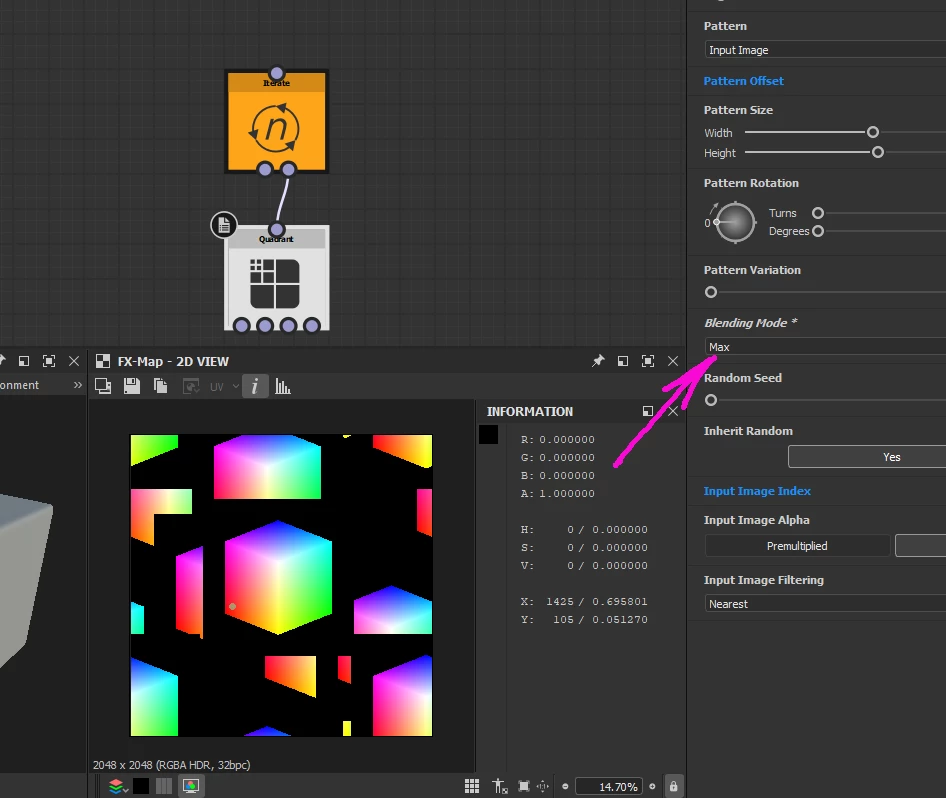
Is it a bug or I am missing something?

Fx map in color mode does 3 kinds of blending : add/sub , Max and alpha blend . But Max one doesn't seem working.
Is it a bug or I am missing something?
Hello,
Thank you @davescm for flagging this to me!
The Max blending mode is not supported for FX-Maps in Color mode. There is indeed a bug in the sense that this blending mode should not be listed in this case.
Similarly, the Alpha blending mode is not supported in Grayscale mode.
I have reported this to the rest of the team. Thank you @kirkr5689 for reporting this!
Best regards.
Already have an account? Login
Enter your E-mail address. We'll send you an e-mail with instructions to reset your password.
 AdChoices