AdamZ101
Participant
August 13, 2021
Answered

How to expose Rotation within the Transformation 2D node

  • August 13, 2021
  • 1 reply
  • 2253 views

Hi, I'm trying to expose only the rotation of the Transformation 2D node. When I click "Expose as a new graph" next to Transform Matrix, I  get "X Y Z W" when the Sbsar is brought into Unity. How Can I expose that as a either a percentage or something that's more user friendly? Thanks!
This topic has been closed for replies.
Correct answer davescm

Hi

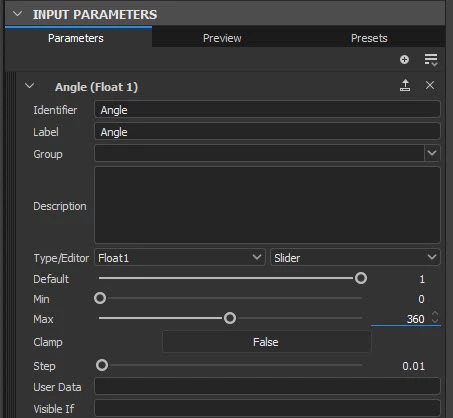
Create a new input parameter called, for example, Angle, with minimum 0 and maximum 360


In transform 2D create an empty function for the transform matrix.

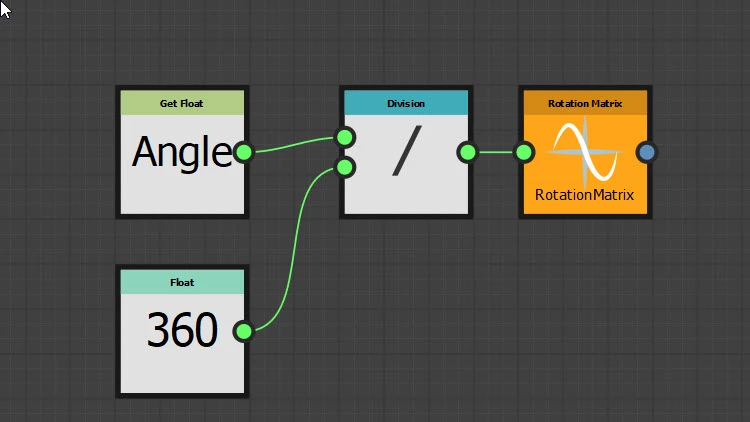
In that function set a Get Float node to the Angle parameter, divide it by 360 and send it to a Rotation Matrix node which you should also right click and set as the output node


You should now be able to control your rotation with the graph "Angle" input parameter (0-360 degrees)


Dave


1 reply

davescm
Community Expert
davescmCommunity ExpertCorrect answer
Community Expert
August 13, 2021

Hi

Create a new input parameter called, for example, Angle, with minimum 0 and maximum 360


In transform 2D create an empty function for the transform matrix.

In that function set a Get Float node to the Angle parameter, divide it by 360 and send it to a Rotation Matrix node which you should also right click and set as the output node


You should now be able to control your rotation with the graph "Angle" input parameter (0-360 degrees)


Dave


AdamZ101
AdamZ101Author
Participant
August 16, 2021

Thanks so much Dave!

davescm
Community Expert
Community Expert
August 16, 2021

You're welcome 🙂

Dave