Answered
How to expose Scale within the Transformation 2D node
Trying to expose the Scale with in the Transformation 2D Node, any help? 🙂
Thank you
Pina

Trying to expose the Scale with in the Transformation 2D Node, any help? 🙂
Thank you
Pina
Hi
You need to create a function to drive the scale matrix. To do that :
Add an input to your graph. I've called mine Scale Percentage and given it the identifier scale_percentage.
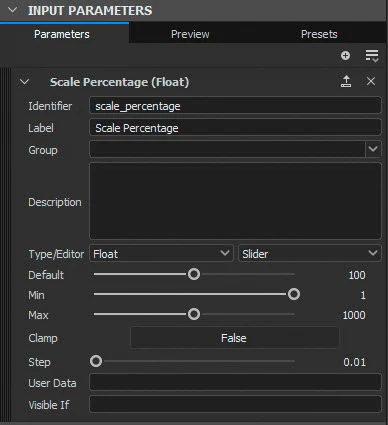
In your transform 2D node at the top right of the transform matrix controls click and choose 'Empty Function'
Add the following function nodes to the function :
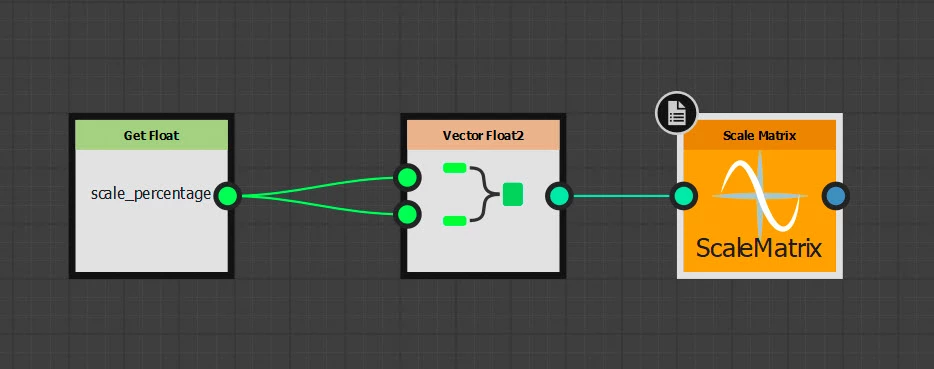
In the Get Float node properties choose the scale_percentage input that you just created.
Right click the Scale Matrix node and click on 'Set as Output Node', it will turn yellow as in the screenshot above.
That is it. The exposed input you made will now control the scale.
Note : I have used just one control - if you want X and Y to be separate just add a second input and use two 'Get Float' nodes in the function graph.
Dave
Already have an account? Login
Enter your E-mail address. We'll send you an e-mail with instructions to reset your password.
 AdChoices