Participating Frequently
February 2, 2022
Answered

Huge File Sizes

  • February 2, 2022
  • 1 reply
  • 449 views

Hi, I'm getting some massive file sizes when exporting to PNG (4096x4096) from Substance Designer.


I understand PNG 4k is going to be large, but my normal maps are coming out at 110mb. I was expecting more along the lines of 15mb. 


What can I do to optimize my exports while still maintaining an acceptable level of quality for offline render engines?

This topic has been closed for replies.
Correct answer Mark_Edwards

It's probably outputting at 32bit depth that file size sounds about right for that.

Designer outputs at the bit depth it's working in you can see it under the output nodes, to control that you might think that you set the output format for the overall graph to absolute and the bit depth you want but in my testing that dose not help + you probably want the normal at 16bit for high end renders anyway and keep the other maps at 8bit.


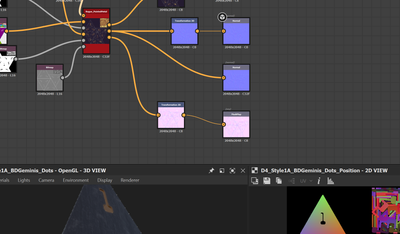
Easiest (a bit hacky but it works) is to drop a 2d transform node in before the final output that does nothing just acts as a pass through and set that to be the absolute pixel depth you want, you can see in the example below where the default is 32bit (which is what I want to work in as I'm doing a lot of height manipulations) but for export it's over the top and 8 or 16 bit would be better.  This way it's easy to export different nodes at different bitdepths.


1 reply

Mark_EdwardsCorrect answer
Inspiring
February 3, 2022

It's probably outputting at 32bit depth that file size sounds about right for that.

Designer outputs at the bit depth it's working in you can see it under the output nodes, to control that you might think that you set the output format for the overall graph to absolute and the bit depth you want but in my testing that dose not help + you probably want the normal at 16bit for high end renders anyway and keep the other maps at 8bit.


Easiest (a bit hacky but it works) is to drop a 2d transform node in before the final output that does nothing just acts as a pass through and set that to be the absolute pixel depth you want, you can see in the example below where the default is 32bit (which is what I want to work in as I'm doing a lot of height manipulations) but for export it's over the top and 8 or 16 bit would be better.  This way it's easy to export different nodes at different bitdepths.
