
samuel_the_hamster
Known Participant
May 29, 2023
Answered

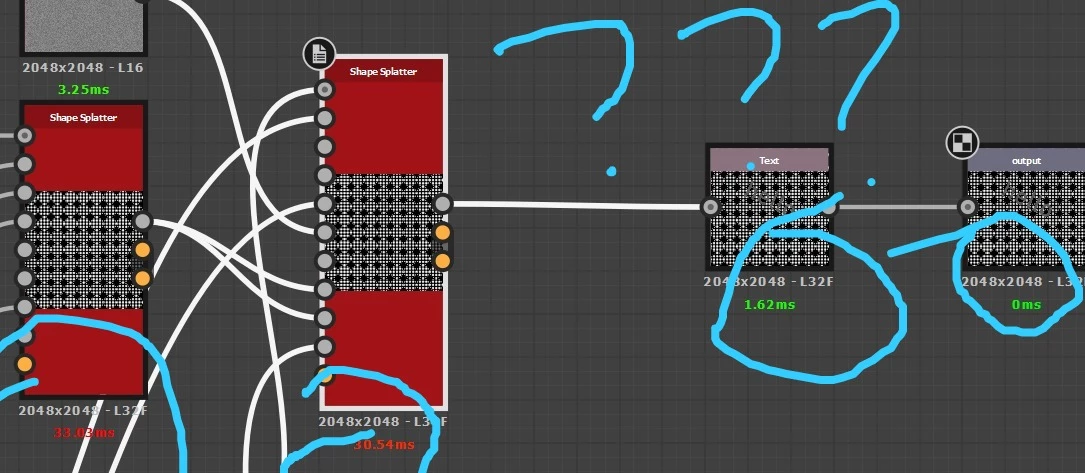
ms (time) below nodes? meaning?
  • May 29, 2023
  • 1 reply
  • 1786 views

wondering what are this times? computation times? what should i do if its red and what it means? thanks!

This topic has been closed for replies.
Correct answer davescm

amazing


if i exported and i need to do some changes i just publish again right?


Yes - just republish

Dave

1 reply

davescm
Community Expert
Community Expert
May 29, 2023

It is the computation time for each node and helps you to see if there are any areas that you may be able to optimise. I don't worry too much about a complex node being red - although it is always good practice to check through the optimisation steps before publishing a material


https://substance3d.adobe.com/documentation/sddoc/performance-optimization-guidelines-102400075.html


Dave

samuel_the_hamster
Known Participant
May 29, 2023

wow dave you are best thank you so much for these explanations

davescm
Community Expert
Community Expert
May 29, 2023

what do you refer to "publishing" btw, saving (smth)?


When you create a material in Substance Designer you save the graph , so that you can edit it later if required.


You can then either :

a. Export the output textures to use in another application. These are standard square bitmap textures that many applications can use.

or:

b. Publish the material as a SBSAR file. These are used by Substance Painter and , via plug ins, by some 3D apps. The advantage of a published material is that you can 'Expose' control parameters from your graph for the user of the material to adjust whilst applying it to their model. That might be colour , or pattern , or many other controls. Most (not quite all) adjustment parameters available within nodes can be exposed in the published material.


https://substance3d.adobe.com/documentation/sddoc/exposing-a-parameter-102400062.html


Dave