
Participant
January 4, 2022
Answered

repeat a pattern along an edge mask

  • January 4, 2022
  • 1 reply
  • 2603 views

Hello all,


Is there a way to repeat a pattern along an edge mask? - e.g repeat a circle along an edge mask so the circle shape follows the edge.  That is the mask does not cut into the circle but the circle follows the mask edge.  This shape will then not just follow the mask edge but fill the mask with the circle shape too.


So you are left with a mask filled with the circle shape BUT also at the edge of the mask the circle follows the edge of the mask cleanly without the mask cutting into the circle?


Can easily fill a mask with a circle shape but it cuts into the circle shape at the edge of the mask but is there a method to be able to fill the mask with the circle but not have the mask cut the circle at the edges.


Thanks in advance.


Mark.
This topic has been closed for replies.
Correct answer Luca Giarrizzo

Hello @MarkyAnonymous,


Placing a pattern evenly along the edge of a shape procedurally regardless of the shape is a complex technical challenge which we are looking into.


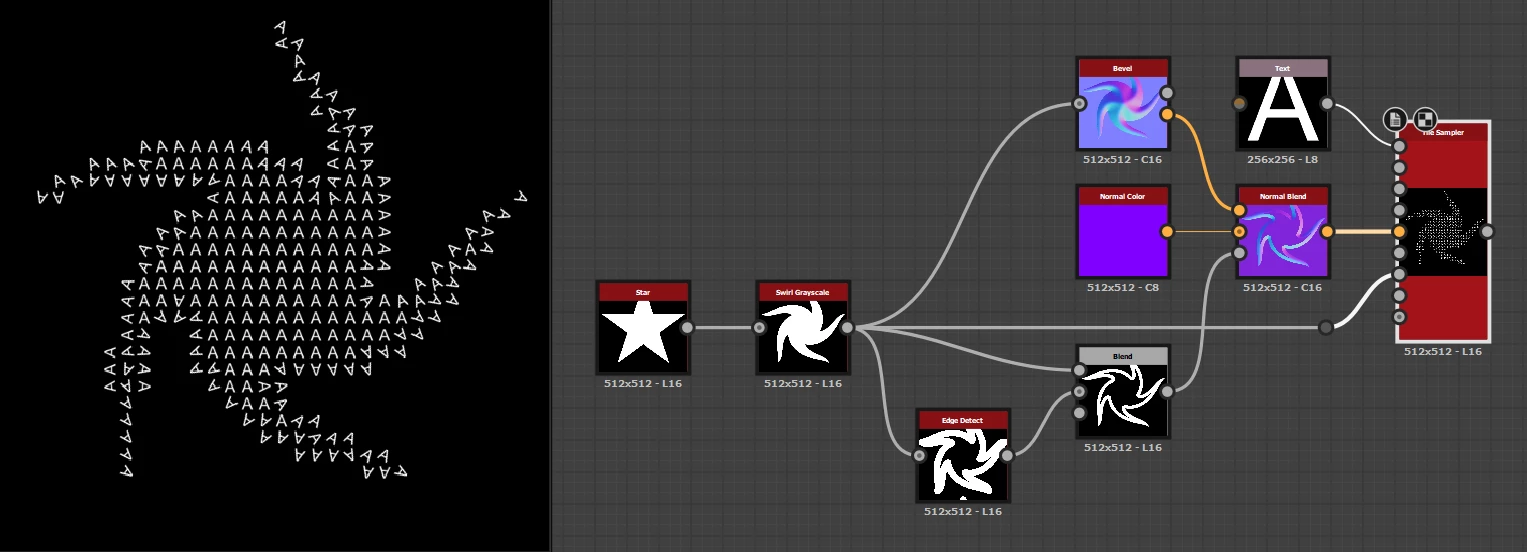
Here is a common method for approximating this effect, albeit without even spacing, corner detection and all the good stuff we are pursuing: use the Bevel node to extract a high intensity normal map of the beveled shape, then pass it as a Vector map to drive the rotation of a pattern in a Tile sampler node.


I hope this is usable, considering the many compromises it entails.


Best regards.


1 reply

davescm
Community Expert
Community Expert
January 4, 2022

Can you draw what you are looking for, as I'm having difficulty following the description?


Dave

Participant
January 5, 2022

Hey Dave,


Thanks for reaching out, please find attached an image where I have created the desired result in 3D by placing the circle where vertices are, however, is it possible to create the same effect in Substance Designer?


The red line shows the outline of the shape, this is taken into Substance as a black and white mask - the white area of the mask would be the inside of the red line.  Is it possible to repeat the circle so it follows the mask edge (red line) in Substance Designer?


- have seen a curve sampler node but can't find it via Substance share - this curve sampler node repeats a shape down a curve creating a similar result shown in diagram but is there way of doing this in Substance Designer? -


Thanks again,


Mark.

Participant
January 5, 2022

Thank you Dave!


The merit goes to Eddy Khaou who generated the many embroidered patches in Ubisoft's Ghost Recon Wildlands – see Eddy's Artstation entry. I have attached a simple implementation of the technique with some exposed parameters to this message.


Indeed, some random positioning will help!


cool, thanks for that - love it 🙂