
Participant
September 27, 2021
Answered

Substance Designer exported textures not seamless?

  • September 27, 2021
  • 1 reply
  • 4273 views

Hello

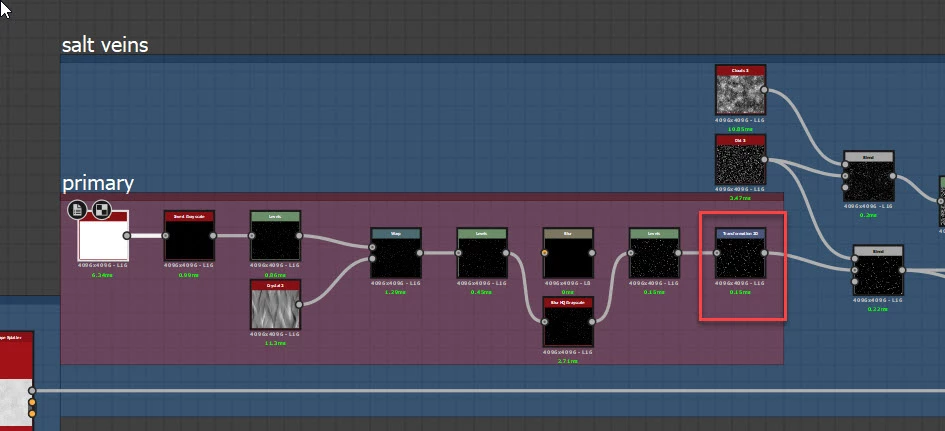
I am a new user of Substance Designer. I recently made my first material and after exporting the textures and applying them in Blender I noticed they aren't seamless. Most of the information I could find is for Painter not for Designer. Are the textures supposed to be with seams? Am I doing something wrong? In case it's normal textures from Designer to be with seams is there a way to make them seamless because I really don't want to spend time in PS for every texture. I am attaching images of the graph and how the texture looks in Blender. Thanks.
This topic has been closed for replies.
Correct answer davescm

Your tiling issues are being introduced by the 2D transform node at the end of the primary salt veins block.


Remove that 2D transform and scale the cells node at the start of the chain instead


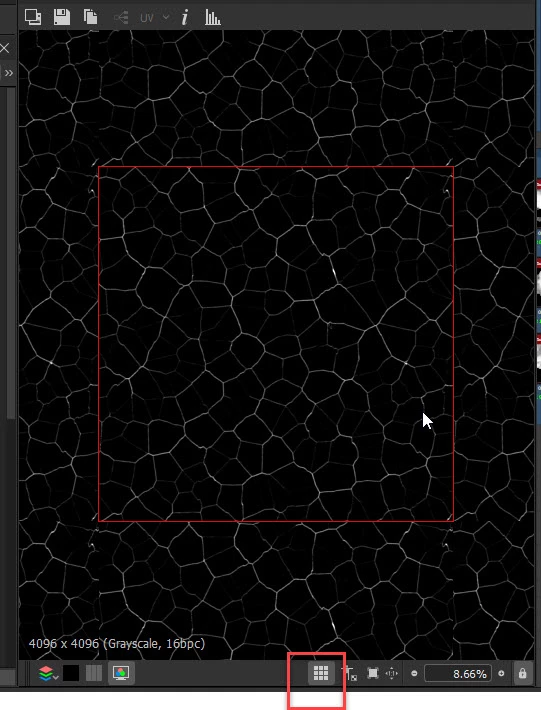
For reference, you can check for tiling issues easily in the 2D view by turning on the tiling button then walking through the nodes


Dave


1 reply

davescm
Community Expert
Community Expert
September 27, 2021

Substance Designer outputs are normally seamless. Can you share the SBS (PM me if you wish) and I'll take a look at it.


Dave

Participant
September 27, 2021

Sure have a look. The material I use is the default metallic roughness set to tessellation.

davescm
Community Expert
davescmCommunity ExpertCorrect answer
Community Expert
September 27, 2021

Your tiling issues are being introduced by the 2D transform node at the end of the primary salt veins block.


Remove that 2D transform and scale the cells node at the start of the chain instead


For reference, you can check for tiling issues easily in the 2D view by turning on the tiling button then walking through the nodes


Dave