
Participant
December 16, 2021
Answered

Trouble opening older designer file

  • December 16, 2021
  • 1 reply
  • 504 views

Hello. I recently received an art test for a material artist cannidate. I am trying to review the test, however I got the follow errors that I can't figure out how to fix. 

"Update file version from "1.1.0.201904" to "1.1.0.202102"

I say yes to all and then it says 

"The following dependency could not be loaded "substancePlugins/nondirectional_warp.sbs"

"The following dependency could not be loaded "substancePlugins/CellularFractal_OLD6.sbs"

"The following dependency could not be loaded "DeteLowPassing.sbsar"

"The following dependency could not be loaded "substancePlugins/Get_Slope"

To my knowledge , these are built in nodes. I can't find anywhere on the web of where to get these plugins to point the designer file to. Any help would be greatly appreciated! 
This topic has been closed for replies.
Correct answer Luca Giarrizzo

Hello,


Thank you for reaching out to us!


The missing dependencies listed in your messages are not built-in nodes, but third-party Substance 3D files. Please ask the person who provided the Substance 3D file you loaded to share the file's dependencies as well.
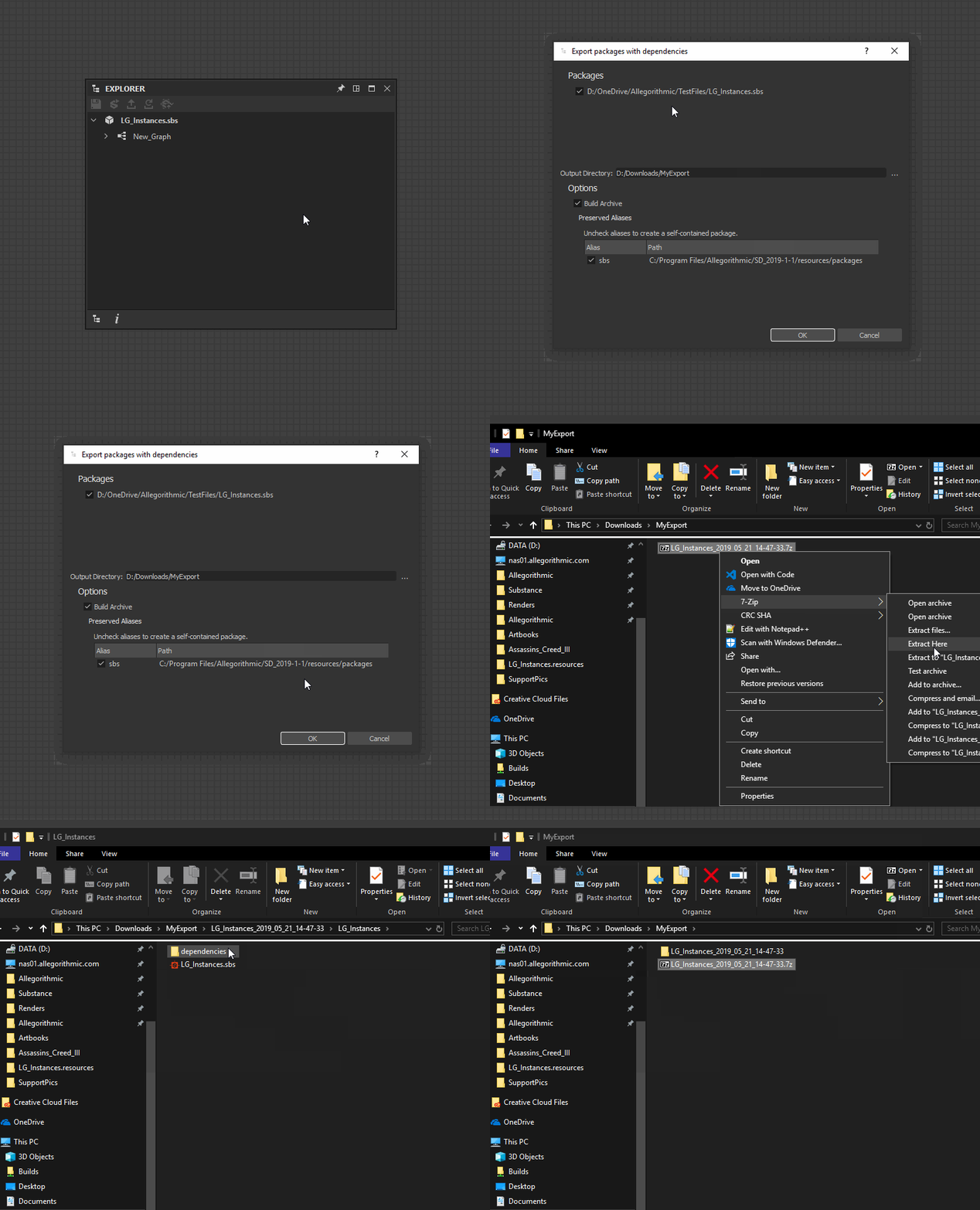
You may let them know that it is possible to do a packaged export of any Substance 3D file from Designer. This will produce a folder or archive file which contains the Substance 3D file along with all its dependencies, with the dependencies paths updated accordingly in the file.

To do a packaged export, right-click on the package in the Explorer panel and select the Export with dependencies... option in the contextual menu. See below for an example of this procedure. They need to go through these steps and send you the packaged export.


That being said, maybe figuring this out is part of the test? 😉


I hope this is helpful, feel free to get back to me if you need further assistance.


Best regards.


1 reply

Luca Giarrizzo
Community Manager
Luca GiarrizzoCommunity ManagerCorrect answer
Community Manager
December 17, 2021

Hello,


Thank you for reaching out to us!


The missing dependencies listed in your messages are not built-in nodes, but third-party Substance 3D files. Please ask the person who provided the Substance 3D file you loaded to share the file's dependencies as well.
You may let them know that it is possible to do a packaged export of any Substance 3D file from Designer. This will produce a folder or archive file which contains the Substance 3D file along with all its dependencies, with the dependencies paths updated accordingly in the file.

To do a packaged export, right-click on the package in the Explorer panel and select the Export with dependencies... option in the contextual menu. See below for an example of this procedure. They need to go through these steps and send you the packaged export.


That being said, maybe figuring this out is part of the test? 😉


I hope this is helpful, feel free to get back to me if you need further assistance.


Best regards.


Luca Giarrizzo | Quality Engineer - Substance 3D Designer | Adobe
Participant
January 5, 2022

Thanks so much!