
Participant
April 11, 2022
Answered

A normal map used as a stencil does not accept transparency.

  • April 11, 2022
  • 3 replies
  • 1459 views

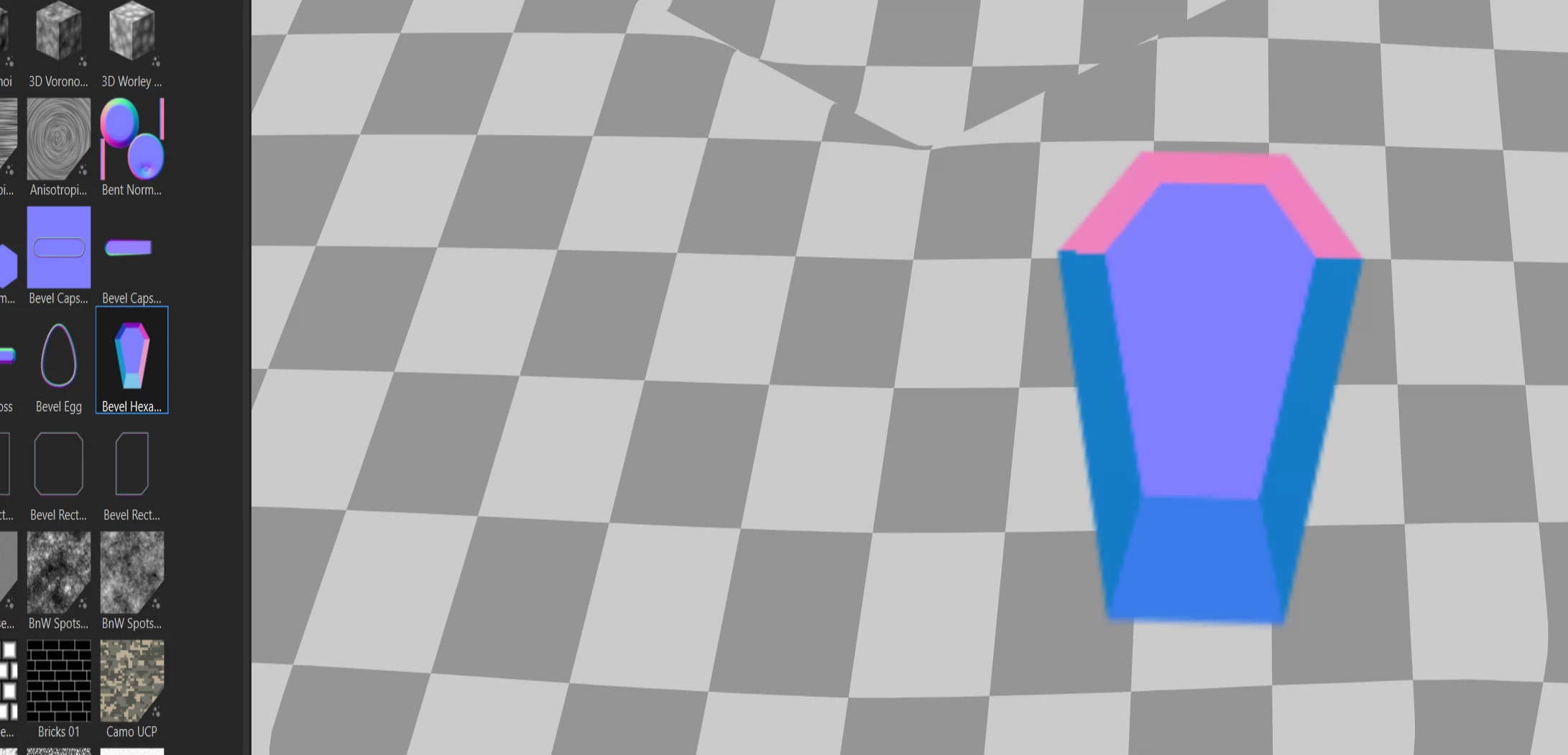
I am using the map normal as a stencil. The map has transparency. The layer blend function is set to normal.

The problem is that Substance Painter ignores the transparency of the normal map. It paints an element, but it also removes normal information from the layer below where the stencil should be transparent.

This problem does not exist with map alebedo, or hight. These maps accept transparency.


Using a stencil that has transparency and normal maps, is impossible. If the object is complex, like an ornament. The normal information from the layer below is removed where it should be, i.e. where the stencil is transparent.


It looks like a bug, especially that other maps (color, hight) accentuate transparency.
 

This topic has been closed for replies.
Correct answer Cyril Dellenbach

Hello @Nando_ ,


With the Paint tool, this is indeed a technical limitation, so Normal stamps will unfortunately always have a background.

Alternatively, you could use the map as a Warp Projection (hold ALT + Drag & Drop resource), and the background should be transparent as expected.


Regards,

3 replies

Participating Frequently
December 13, 2023

Hi Tomas!

I'm running into the same issue (image below). Have you found a solution for it, by any chance?


Thanks!

Cyril Dellenbach
Community Manager
Cyril DellenbachCommunity ManagerCorrect answer
Community Manager
December 13, 2023

Hello @Nando_ ,


With the Paint tool, this is indeed a technical limitation, so Normal stamps will unfortunately always have a background.

Alternatively, you could use the map as a Warp Projection (hold ALT + Drag & Drop resource), and the background should be transparent as expected.


Regards,

Cyril Dellenbach (Micro) | QA Support Artist | Adobe
GeoffroySC
Community Manager
Community Manager
April 13, 2022

Hi,

Could you show what you are trying to do in Painter with a video? I'm having trouble understanding what is your goal.

Kind Regards,

Geoffroy SC

April 11, 2022

I had this same issue with Metallic stencils, until I tried to import as Alpha, then the issue was resolved. Assets that are imported as "texture" and "alpha" behave differently, regardless of the alpha channel the texture has (alpha shows in Assets and Viewport for Texture assets)


Participant
April 11, 2022

Importing normal as alpha does not change this.

It looks like in places where normal should be transparent it paints in neutral value removing information from lower layers.

Strange, maybe someone from Substance can comment on this.