
Inspiring
March 24, 2022
Answered

Ambient Occlusion from Normal or Height

  • March 24, 2022
  • 1 reply
  • 1073 views

Hi.

I want to increase height effects with Ambient Occlusion, but I don´t know how to do this. In my research, I found a filter named "Height to AO", but this filter is not listed in filter session. I found a description of this filter in Adobe Help, but without an explanation in how to use it.

Anybody could help me, please?

Thanks in advance.
This topic has been closed for replies.
Correct answer GeoffroySC

Hi,

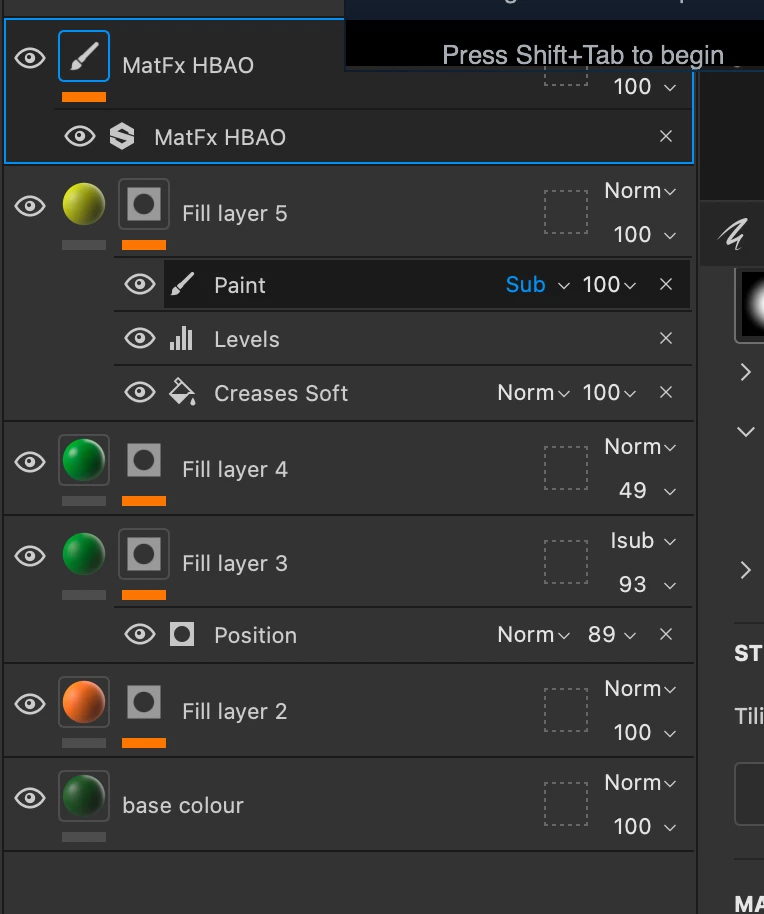
You can drag and drop this at the top of your layer stack.

The paint layer will be in passthrough (https://www.youtube.com/watch?v=H4rgnscD_3U) with the filter on it. 

Regards,

Geoffroy


1 reply

GeoffroySC
Community Manager
Community Manager
March 24, 2022

Hi,

Drag and drop the MatFxHBAO filter on top of your layer stack after having created an AO channel in your texture set settings.

Regards, 

Geoffroy 


Inspiring
March 24, 2022

Hi Geoffroy. Thank you for your reply.

I have a layer just with the height effect. Should I put this filter in that layer?

GeoffroySC
Community Manager
GeoffroySCCommunity ManagerCorrect answer
Community Manager
March 24, 2022

Hi,

You can drag and drop this at the top of your layer stack.

The paint layer will be in passthrough (https://www.youtube.com/watch?v=H4rgnscD_3U) with the filter on it. 

Regards,

Geoffroy