nestor_3612
Participant
Jan 31, 2025 8:33 PM UTC
Answered

Ambient Occlusion shows some rectangles but UVs are ok
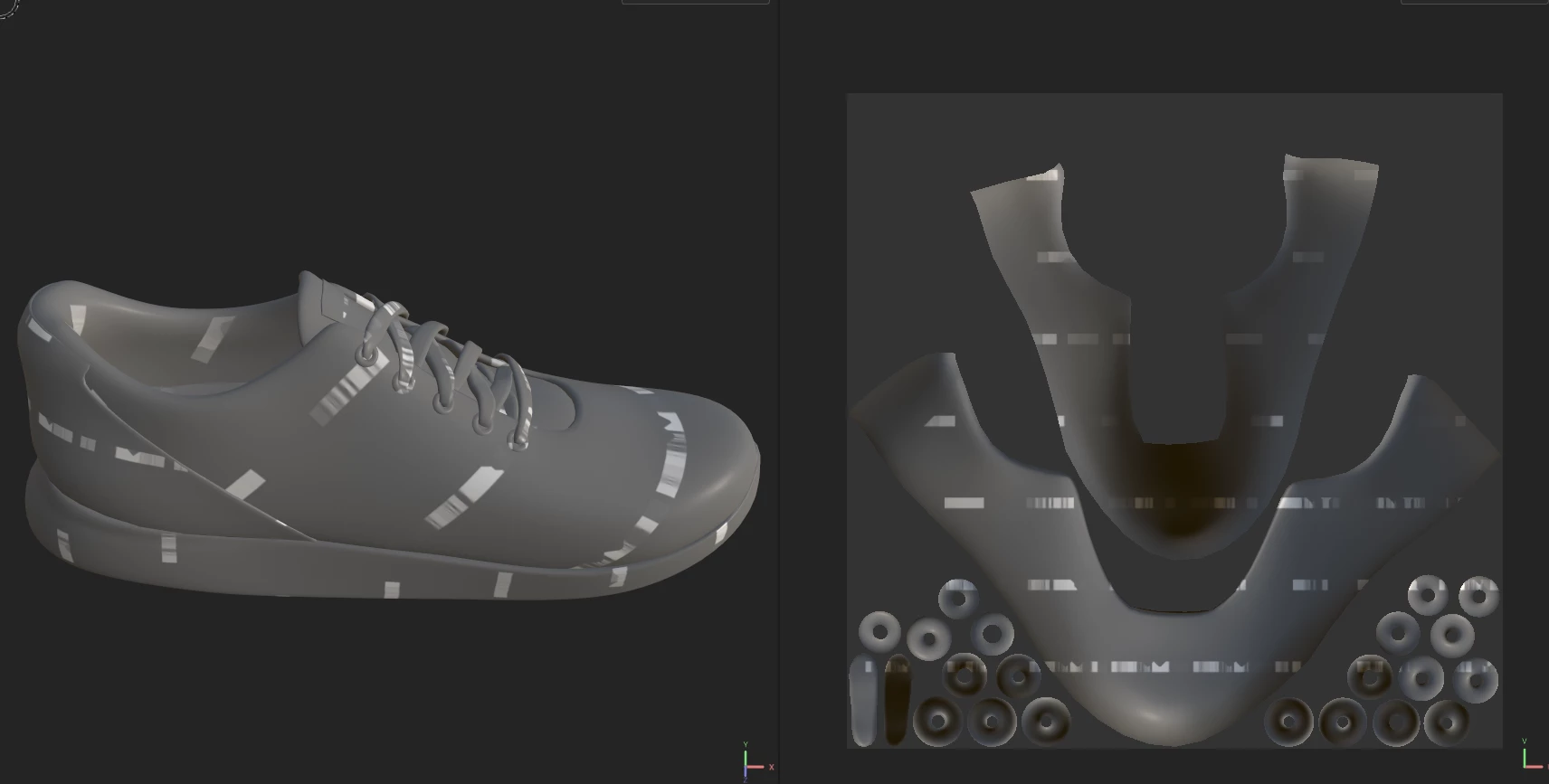
Hi! this happens every time I try to bake, I am doing this from Maya and I already checked for overlapping UVs, and different UV sets but everything is fine 

Nyx Xaos
Nyx XaosCorrect answer
Inspiring
Feb 1, 2025 8:39 AM UTC

Had the same issue with the latest driver for my RTX 3080 ( 572.16 ), I reverted to the December version ( https://www.nvidia.com/en-us/drivers/details/237786/ ) and the oddities are gone! I hope Adobe will work with Nvidia to fix it in upcoming versions in either driver or SP!

6 replies

Santiago23654633vcop
Participant
Feb 12, 2025 12:34 AM UTC

the same, I updated to the last nvidia driver and now my substance dont work to bake maps (specially ambient oclussion).


I have a RTX 4070 ti super

Translate
Santiago23654633vcop
Participant
Feb 12, 2025 12:35 AM UTC

my temporally solution is uncheck the gpu 

is this or reverted the nvidia driver


Translate
Participant
Feb 20, 2025 5:48 PM UTC

Thank you very much, this works!

I did not want to go back to the old driver.

Translate
nestor_3612
Participant
Jan 31, 2025 11:06 PM UTC

I fixed it on my own, turns out I updated the GPU, and everything stopped working properly, I reinstalled the previous version and it worked perfectly, I hope this helps somebody with the same issue. 

Translate
Nyx Xaos
Nyx XaosCorrect answer
Inspiring
Feb 1, 2025 8:39 AM UTC

Had the same issue with the latest driver for my RTX 3080 ( 572.16 ), I reverted to the December version ( https://www.nvidia.com/en-us/drivers/details/237786/ ) and the oddities are gone! I hope Adobe will work with Nvidia to fix it in upcoming versions in either driver or SP!

Translate