
Participant
August 17, 2023
Question

Bad edges when baking. See the files.

  • August 17, 2023
  • 1 reply
  • 3685 views

Hi!

I am facing some issues trying to bake in Substance.

I attached to files That I created to test Substance.
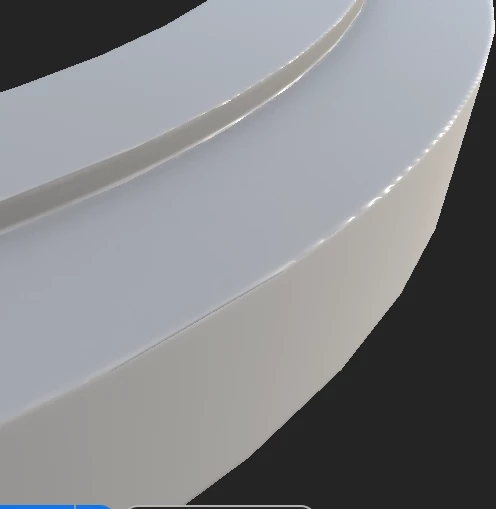
Here you can see what happens. A very bad edges. I am using here 2048 in resolution that need to be enough for a so simple geometry.

What I am losing here?


thank you


This topic has been closed for replies.

1 reply

Cyril Dellenbach
Community Manager
Community Manager
August 17, 2023

Hi @a.bisewski,


Thanks for the question and for the meshes, this greatly helps troubleshooting.


This is not really a deal of resolution in your case, but more about Normals and baking preparation.


First of all, hard edges can be a pain to deal with. Usually, we advise to add a simple bevel on crucial parts, in order to avoid artifacts. Also, cylinders will always have wavy artifacts, due to differences in topology between the high and low.


With that being said, in your specific case, I would remove the sharp edges on the low poly (which prevents to fully smoth the edges), and make sure its surface is "inside" the high poly.


In most situations, this wouldn't be important, but with hard edges, it should help to reduce the artifcats.


Let me know if this helps.


Cyril Dellenbach (Micro) | QA Support Artist | Adobe
Participant
August 19, 2023

Hi Cyril. Thank you so much for your attention.

Your answer really help me a lot.


But I am also facing another problem. While my object is a single part but very complex, my uvs mappig is too small.


When I isolate one region of this model and rescale the uvs map all the edges is baking perfectly.


Why? My object is a mechanical part and have external and internal areas and like a said, is a unique body.


To use this model in Unity3D I can´t use huge sizer like 8k

Cyril Dellenbach
Community Manager
Community Manager
August 21, 2023

This is the expected behavior. The smaller the UV islands, the less pixels they have to define themselves. Therefore, when Islands are in between two pixels or smaller than one pixel, artifacts are likely to appear. 


I advise you to use a UDIM workflow in order to have several UV maps to define the 3D model, so more space for the UVs.


Best regards,


Cyril Dellenbach (Micro) | QA Support Artist | Adobe