
Inspiring
September 12, 2025
Question

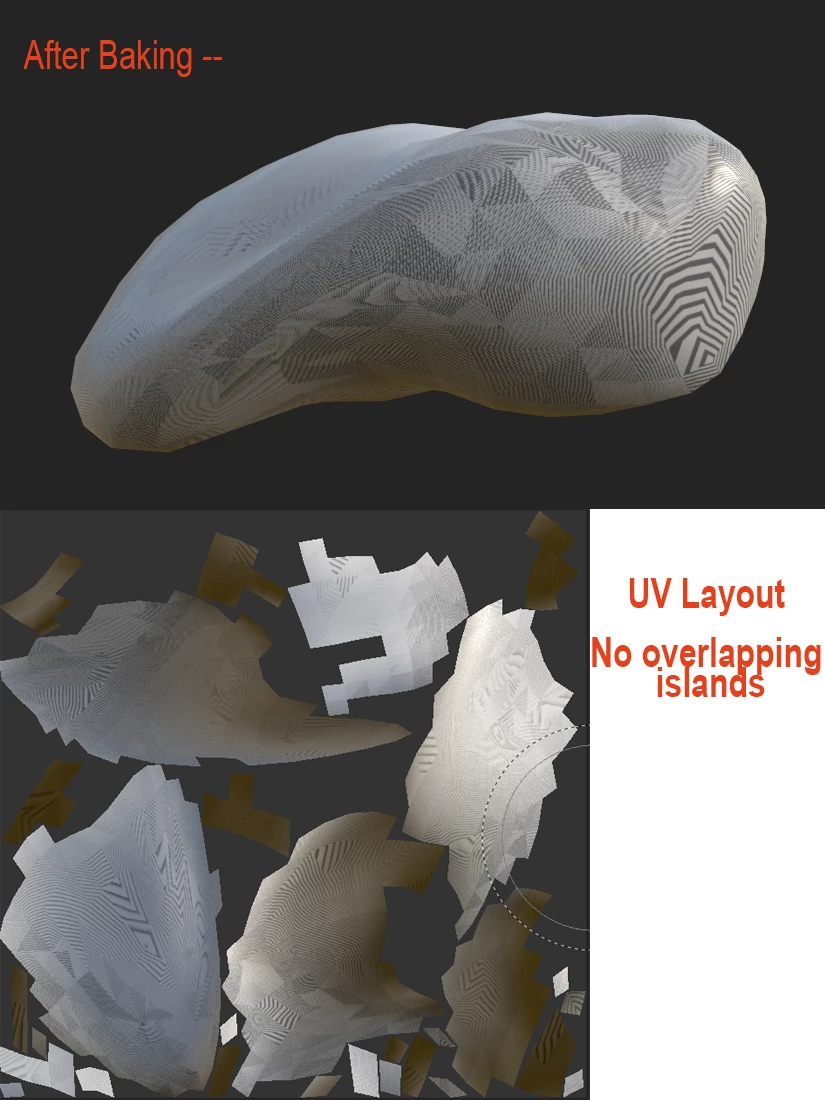
Baking Mesh maps always creates strange lines on the Ambient Occulsion Map

  • September 12, 2025
  • 2 replies
  • 390 views

I have tried disabled GPU Raytracing under Baking Options but still I get these strange lines in the Substance Painter viewports after baking. They seem to be in the Ambient Occlusion map.  Also I set "Self Occlusion" to "Only Same Mesh name".    How can I fix this?
2 replies

Cyril Dellenbach
Community Manager
Community Manager
September 17, 2025

Hi @David De Sousa,


Thank you for your message.


From the screenshot you shared, I think this is a GPU issue. Can you try to update your Nvidia driver? If this doesn't help, I also advise you to deactivate to GPU Raytracing

Edit > Settings > General > Baking options > Enable GPU Raytracing

and let me know if it helps.


Alternatively, I would also check there isn't some sort of duplicated mesh overlapping the original one.


Best regards,


Cyril Dellenbach (Micro) | QA Support Artist | Adobe
Inspiring
September 18, 2025

Thanks, Cyril for your reply.  I do have the latest nVidia driver installed and have GPU raytracing deactivated.  There is also no other mesh overlapping or anywhere in the scene.  

Inspiring
September 24, 2025

Hello David,


So after investigation and a discussion with the devs, this is indeed something that can occur when an object is really small (values like 0.015) and/or very far from the origin. We're now aware of this behavior, but considering this is kind of a corner case, this isn't at the top of our priority list.


Thank you for the report!


Thanks for letting me know, Cyril.  It lets me know how to work around this until a fix is found. (Also helps my sanity. )

Dave

Inspiring
September 12, 2025

Sorry, I should have included System Specs.


System Specs:

Intel Core Ultra 9 285K

ASUS ProArt Z890 Creator WIFI LGA ATX

NVIDIA GeForce RTX™ 5090

DDR5 RAM 128GB

Inspiring
September 12, 2025

Also noticed the thickness map shows a similar pattern.