Participant
February 16, 2023
Answered

Dirt Edge - Based on Color ID, or UW edges

  • February 16, 2023
  • 1 reply
  • 1005 views

Hi!
I need to make my dirt work on every edge of my Color ID selection. Problem is, my dirt uses the mesh-edges for calculation.

Can I make the dirt work along the ColorID edges? Or the Edges of my UV map, instead the mesh edge?

In the example, I want to see the dirt along all red outer edges.
Thanks,
Peter
This topic has been closed for replies.
Correct answer Cyril Dellenbach

Hi @petero6663438,


Thanks for your message.


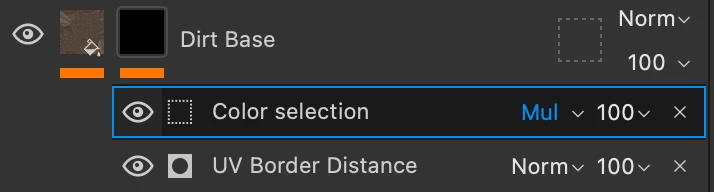
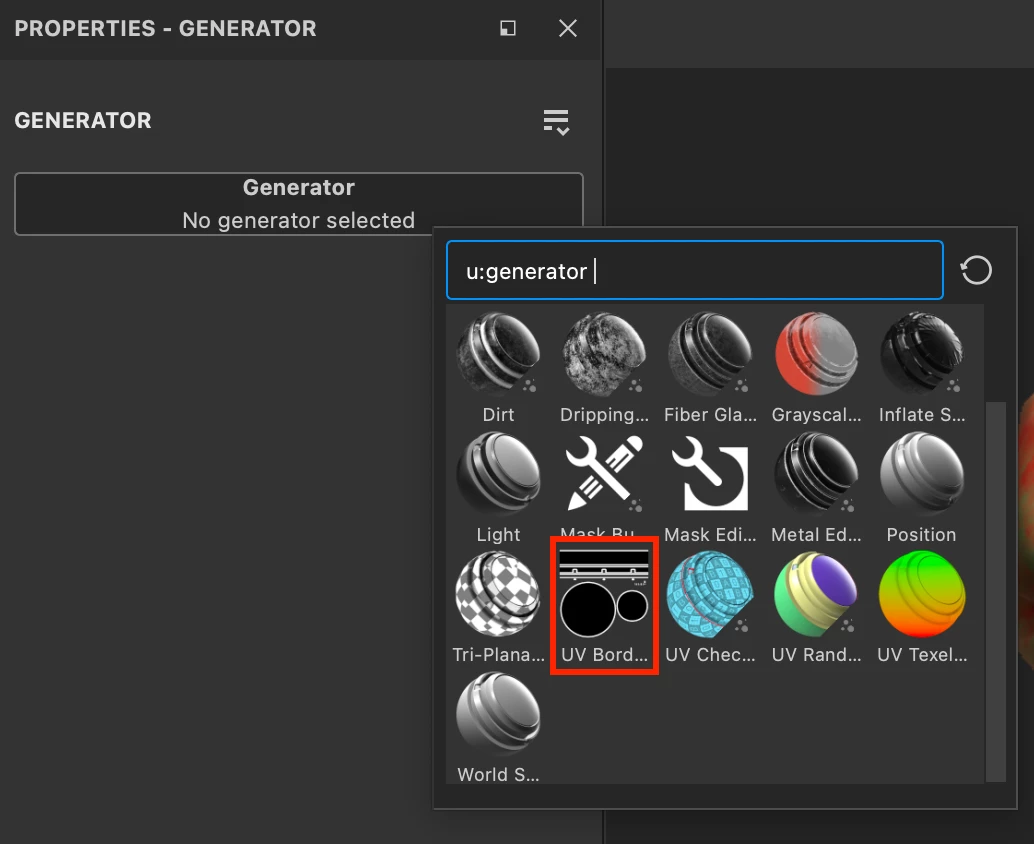
Substance 3D Painter is perfectly capable of selecting the edge of a UV map. You simply need to add a generator UV Border Distance to your mask.


And if you want only certain parts of your ID map to be affected, you can also add on top of the generator a Color Selection and switch his blending mode to Multiply. 


I hope this was helpful and feel free to ask if you need more guidance.


have a nice day.


1 reply

Cyril Dellenbach
Community Manager
Cyril DellenbachCommunity ManagerCorrect answer
Community Manager
February 16, 2023

Hi @petero6663438,


Thanks for your message.


Substance 3D Painter is perfectly capable of selecting the edge of a UV map. You simply need to add a generator UV Border Distance to your mask.


And if you want only certain parts of your ID map to be affected, you can also add on top of the generator a Color Selection and switch his blending mode to Multiply. 


I hope this was helpful and feel free to ask if you need more guidance.


have a nice day.


Cyril Dellenbach (Micro) | QA Support Artist | Adobe
Participant
February 17, 2023

Hi Cyril,

cool, thats it! Thank you so much!
Have a nice day!