
Participant
October 24, 2023
Question

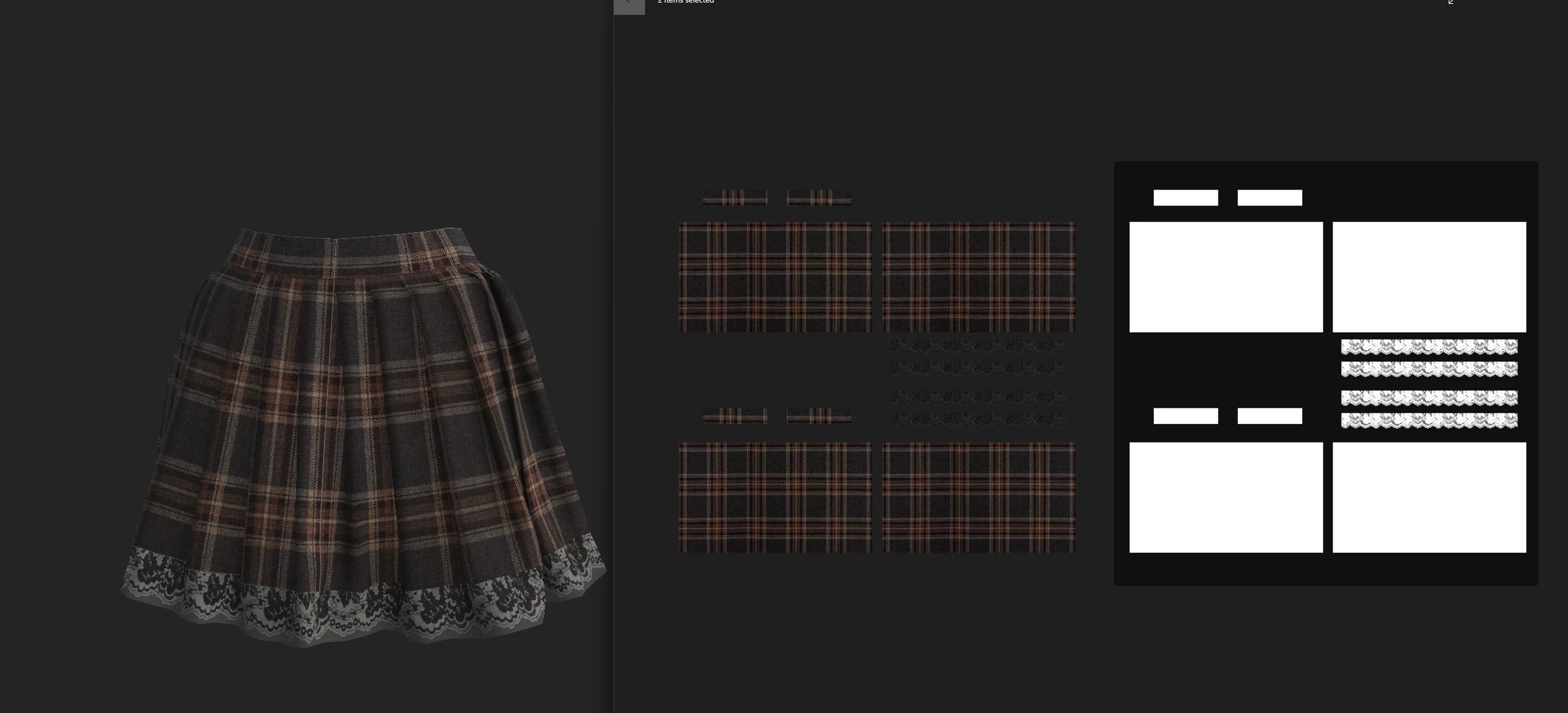
Grey texture showing when using opacity map

  • October 24, 2023
  • 1 reply
  • 1077 views

After watching numurois video tutorials, i still seem to be getting the same outcome. When adding the opacity map, i seem to get this weird grey showing up where it should be fully translucent. 
Textures were done in Marvelous Designer and imported over.
This topic has been closed for replies.

1 reply

Cyril Dellenbach
Community Manager
Community Manager
October 24, 2023

Hi Chris,


Are you using a shader compatible with an Opacity map? Could you detail your workflow?


Let me know.


Cyril Dellenbach (Micro) | QA Support Artist | Adobe
CStenwayAuthor
Participant
October 24, 2023

I'm using pbr-metal-rough-with-alpha-blending
opacity map is placed on a fill layer with base colour texture applied, and opacity map in opacity.

Not sure if the image attached is any help with how i set things up.
Thanks.

Cyril Dellenbach
Community Manager
Community Manager
October 26, 2023

Sure thing, i'll get the file sent over to the email. 
Thank you!


Hi @CStenway,


Thanks for the file.


After verification, the issue is simply that the Opacity map isn't fully black on this specific part, resulting with a slightly visible grey.


You'll have to edit the input in order to prevent this visible part.


Best regards,


Cyril Dellenbach (Micro) | QA Support Artist | Adobe