Participant
February 21, 2023
Answered

hello how do i change icon memory budget

  • February 21, 2023
  • 3 replies
  • 8325 views

[Resources List Model] Icons memory budget set to 100MB. how do I change icon memory.

Correct answer Cyril Dellenbach

Hello @Zoe26434621fivq,


Thanks for your message.


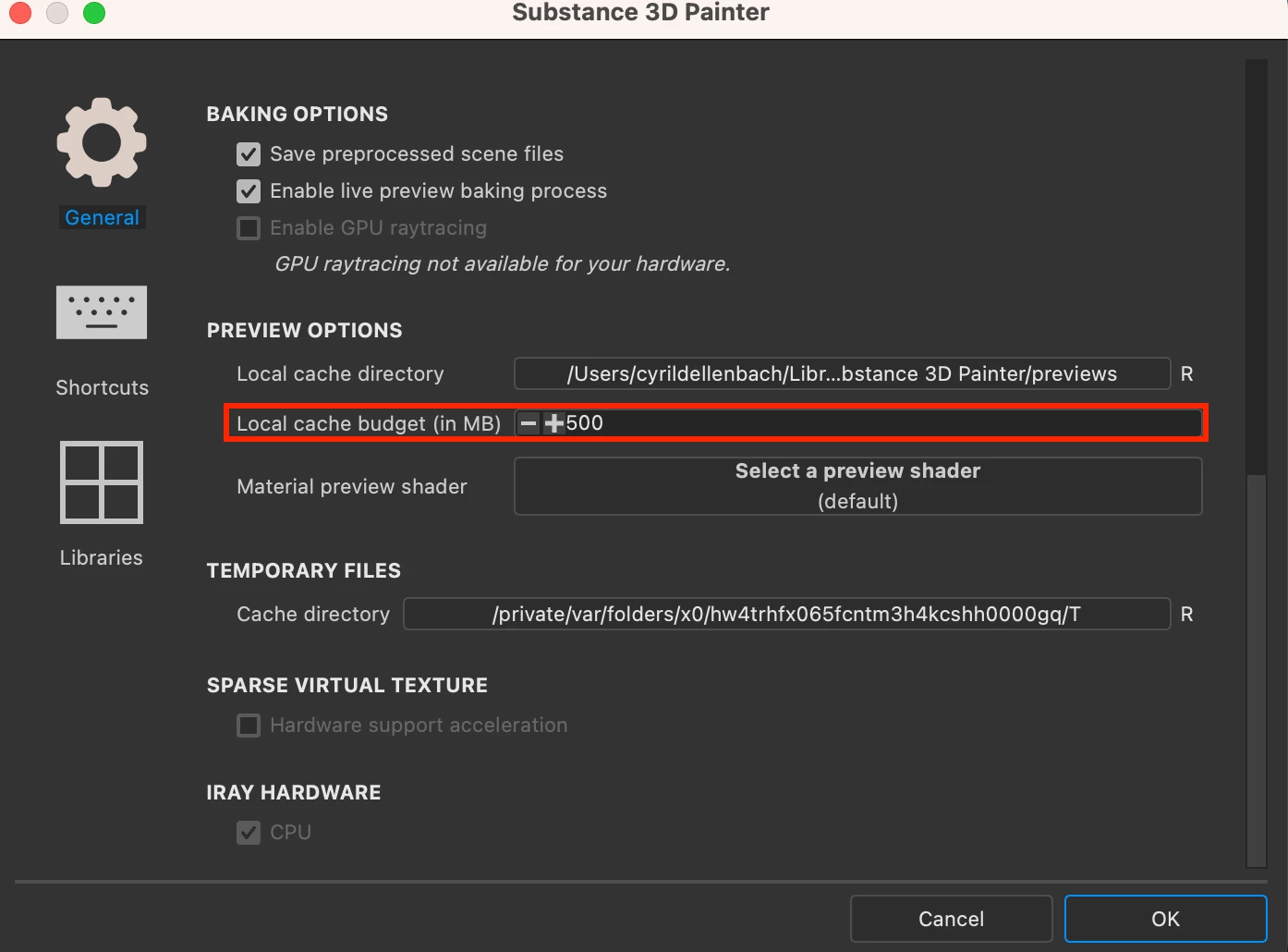
No need to open the console to set up a new value to your memory budget. Under your Preferences > General > Preview Options, you can set up the local cache budget.


The environment variable SUBSTANCE PAINTER VRAM BUDGET will change the allocated Vram to Substance 3D Painter, which doesn't seem like what you want.


Have a nice day,

3 replies

Participant
October 3, 2025

Necro'ing because in 2025 this is still an issue.  No matter what the Local Cache Budget is set to in Preferences, the icon memory is still 100MB.


On an m.2 SSD drive that is blazing fast, my modest material library takes nearly 10 minutes to load every time I open Substance Painter.


What can be done about this?  The environment variable SUBSTANCE _PAINTER_PREVIEWS_MEMORY_BUDGET did not raise this from 100MB.


Thank you!

Participant
November 7, 2025

It still doesn’t work — I just have gray icons with an arrow instead of materials.

Participant
November 7, 2025
Screenshot_358.png
Cyril Dellenbach
Community Manager
Cyril DellenbachCommunity ManagerCorrect answer
Community Manager
February 22, 2023

Hello @Zoe26434621fivq,


Thanks for your message.


No need to open the console to set up a new value to your memory budget. Under your Preferences > General > Preview Options, you can set up the local cache budget.


The environment variable SUBSTANCE PAINTER VRAM BUDGET will change the allocated Vram to Substance 3D Painter, which doesn't seem like what you want.


Have a nice day,

Cyril Dellenbach (Micro) | QA Support Artist | Adobe
davescm
Community Expert
Community Expert
February 22, 2023

@Cyril Dellenbach My mistake on VRAM variable but that disk cache preference does not seem to adjust the icon memory budget reported in the log. Mine is set to 500 but the log reports icon memory set to 100MB


There is another Environment variable - SUBSTANCE_PAINTER_PREVIEWS_MEMORY_BUDGET but I'm not at my PC to try it right now.


Dave

Participating Frequently
March 10, 2023

I would like to add, this error has never come up before on my Current PC, but did, after not using Substance Painter for a month.


I already tried this: "Adobe Substance 3D Painter.exe" --vram-budget 8192


Also the setting: PREVIEW OPTIONS, inside Substance Painter.

davescm
Community Expert
Community Expert
February 21, 2023

That can be controlled with an environment variable SUBSTANCE PAINTER VRAM BUDGET


https://substance3d.adobe.com/documentation/spdoc/environment-variables-172823292.html


Dave

Participant
February 21, 2023

How do I open the console?