
kd35432164
Participant
February 7, 2023
Answered

How to use 3D Materials optimized for Dimension (PBR textures + .mdl) with Substance Painter

  • February 7, 2023
  • 1 reply
  • 1601 views

Backstory: after a couple years of making do with Adobe Dimension for quick and dirty texturing, I recently took the plunge and am now subscribed to Adobe Substance. I have nearly 100 3D materials that I licensed through Adobe Stock which, as far as I can tell, are only compatible with Dimension and cannot be easily imported for use in Substance Painter (each of these 3D material assets, once downloaded, consist of PBR texture maps and .MDL file - see pic below). 



Question: basically, I'm trying to figure out the best way of using these materials with Substance Painter. Is there a streamlined way of importing these materials into Substance Painter / converting them into Substance materials? Do I need to rebuild them as Substance .SBSAR materials using Substance Designer / Sampler?


I've searched high and low online for an answer / workflow for accomplishing this conversion, but haven't found much - if anyone has found a solution or could recommend a good workflow, it'd be very much appreciated! 
This topic has been closed for replies.
Correct answer Cyril Dellenbach

Thank you for the clarification. Indeed, the 3D library from adobe stock is a different one than the Substance 3D assets library, therefore adding your materials could be a bit tedious, but not really complicated.


First of all, I would advise you to check if the adobe stock material you're looking for isn't available on the substance 3D assets library. Some assets are very similar and it's time saving considering how quickly you can send a material to Substance Painter and the fact that you can tweak your material.


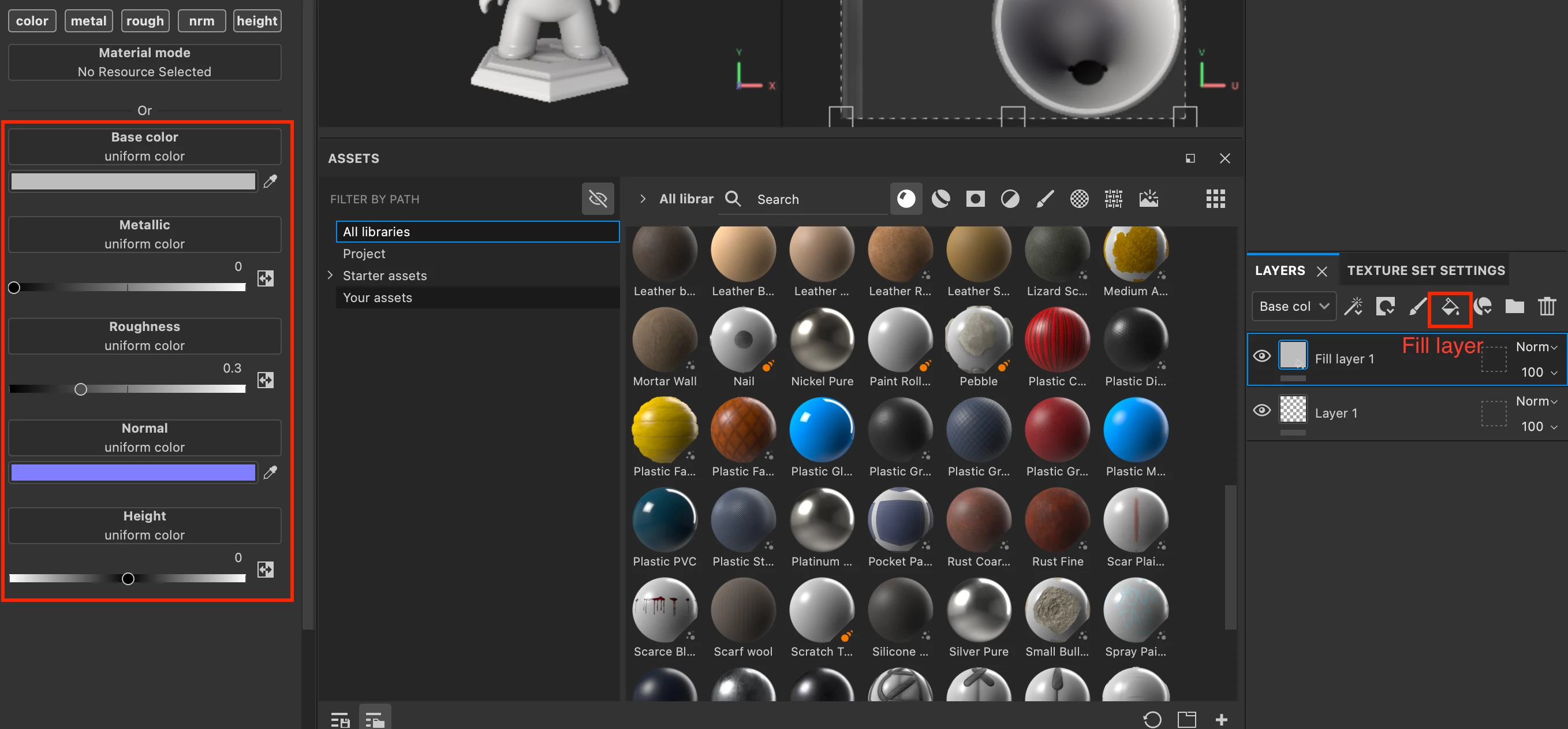
But I agree with you, I would hate to throw a perfectely useable material. For that reason, you can import your .png textures to Substance painter, add a Fill Layer and assign all of your .png at the right place.


Once you're satisfied with how the textures look, you can right click anywhere in the properties window and create material preset. Your material will be added to your library and you'll still have the possibility to update it whenever you want.


I hope this was helpful and have a nice day,


1 reply

Cyril Dellenbach
Community Manager
Community Manager
February 8, 2023

Hello @kd35432164 ,


Thanks for your message.


All of your 3D materials from adobe are available on your creative cloud desktop app, and from this app you can directly send them to painter (send to... > Substance 3D painter).


And if for one reason or another you want to put them manually in your shelf, you also can download them as SBSAR.


I hope this will help with your workflow and I hope you'll have fun with your subscription.


Best regards,


Cyril Dellenbach (Micro) | QA Support Artist | Adobe
kd35432164
Participant
February 8, 2023

Thank you so much for your speedy reply, Cyril!


So the 93 3D Materials I had licensed before subscribing to Susbtance were licensed from this section of the Adobe Stock Marketplace: 


I see them on my cloud desktop app under the files tab (and do not have a send-to Substance option):


But they do not appear under in my Adobe Substance 3D assets library under the Stock & Marketplace tab (which do have the send-to Substance option):


So the assets I have worked with Dimension 3D materials, but as far as I can tell, aren't optimized for use as Substance 3D materials - my apologies, should've been clearer in my first post, but your reply has certainly narrowed it down for me:

(1) Are the Dimension-optimized materials that I have already licensed a lost cause / do I need to relicense these materials from the Substance 3D assets to use them with Substance? And, if so:

(2) Are there any workflows you can recommend for making use of these assets (I'd hate for them to go to waste) by rebuilding them as SBSAR? (I have a decent amount of experience with Substance Painter pre-acquisition, and have since been doing all my texturing work in Blender / C4D, so I can still make use of the PBR textures in these assets, but my hope was/is to do all of my texturing within the Substance ecosystem).

Cyril Dellenbach
Community Manager
Cyril DellenbachCommunity ManagerCorrect answer
Community Manager
February 9, 2023

Thank you for the clarification. Indeed, the 3D library from adobe stock is a different one than the Substance 3D assets library, therefore adding your materials could be a bit tedious, but not really complicated.


First of all, I would advise you to check if the adobe stock material you're looking for isn't available on the substance 3D assets library. Some assets are very similar and it's time saving considering how quickly you can send a material to Substance Painter and the fact that you can tweak your material.


But I agree with you, I would hate to throw a perfectely useable material. For that reason, you can import your .png textures to Substance painter, add a Fill Layer and assign all of your .png at the right place.


Once you're satisfied with how the textures look, you can right click anywhere in the properties window and create material preset. Your material will be added to your library and you'll still have the possibility to update it whenever you want.


I hope this was helpful and have a nice day,


Cyril Dellenbach (Micro) | QA Support Artist | Adobe