


Participant
Nov 25, 2021 3:07 PM UTC
Answered

Material color mismatch

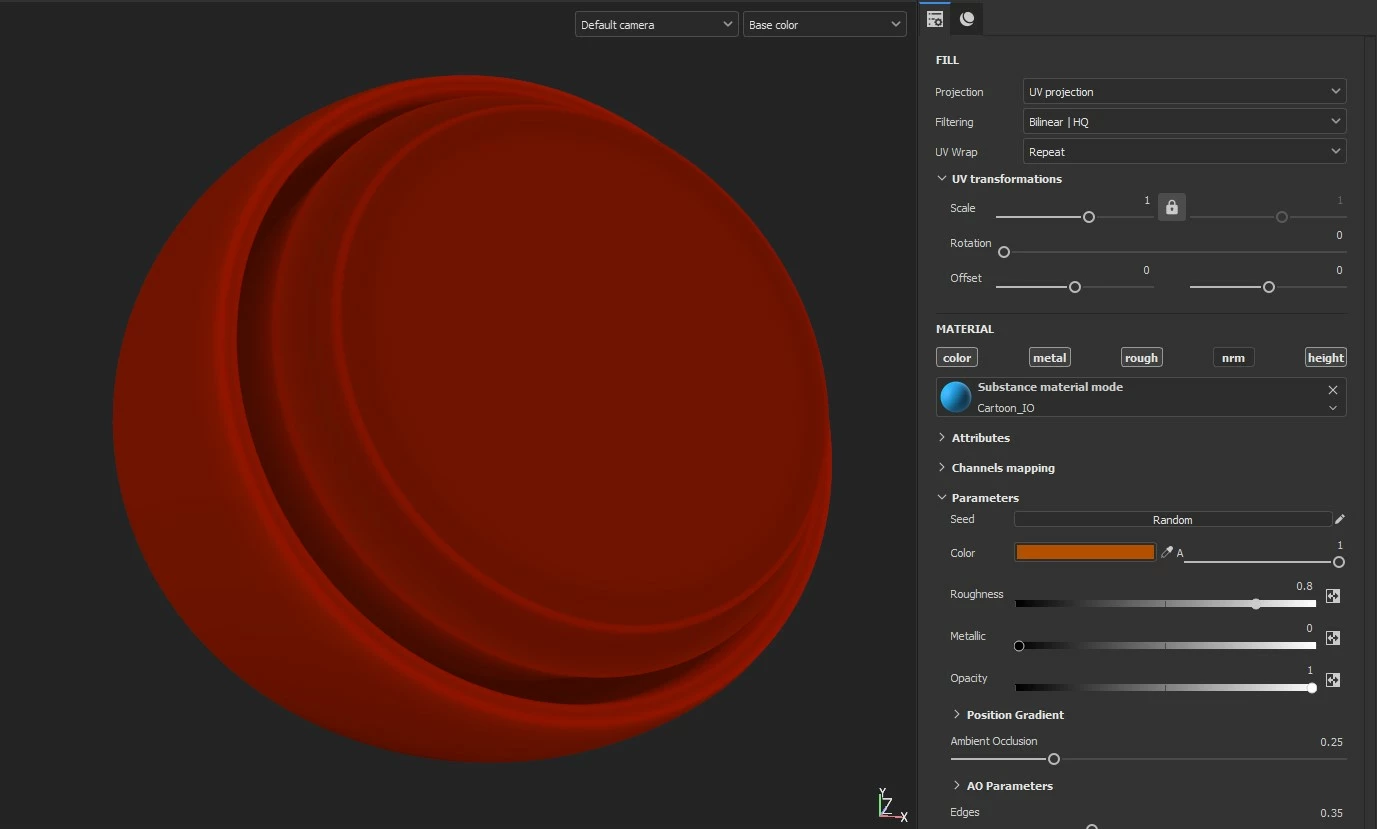
Hey! I have this simple material originally created in Substance Designer and then imported to Painter. It just automatically adds some AO and edge highlights, so nothing major.


As you can see in the screenshot the Color set in properties and the color shown in viewport don't match. It is more noticable with dark warm colors. It was working fine until the last Painter update (v7.4.0).


It is possible to somehow fix this? Do I just install the older version?


This topic is closed to new replies. Start a new post to keep the conversation going.
GeoffroySC
GeoffroySCCorrect answer
Community Manager
Nov 25, 2021 4:40 PM UTC

Hi, 

This is indeed a bug! 

I'm looking for a way to avoid the issue, and I will keep you informed if I find any suitable solution. If this is a work stopper, the best solution would be to revert to a previous version of Painter.

We are looking at solving the issue. We can't give you any ETA, though. 

Thanks for helping us improve our software,

Kind Regards,

Geoffroy SC

7 replies

GeoffroySC
Community Manager
Community Manager
Nov 25, 2021 3:37 PM UTC

Hi,

Could you share your generator as I'm not able to reproduce the issue with another generator?

Thank you,

Kind regards.


Translate
Participant
Nov 25, 2021 4:11 PM UTC

The issue only appers in materials created in Substance Designer. Here's the .sbsar file.

Translate
GeoffroySC
Community Manager
GeoffroySCCommunity ManagerCorrect answer
Community Manager
Nov 25, 2021 4:40 PM UTC

Hi, 

This is indeed a bug! 

I'm looking for a way to avoid the issue, and I will keep you informed if I find any suitable solution. If this is a work stopper, the best solution would be to revert to a previous version of Painter.

We are looking at solving the issue. We can't give you any ETA, though. 

Thanks for helping us improve our software,

Kind Regards,

Geoffroy SC

Translate
