Answered
Painting
Hello Friends!
I am using Substance 3d Painter 7.2. I am having an issue that when I tried to paint it does not appear in the viewport but it shows in layers. please help me fast.
Here is a screenshot 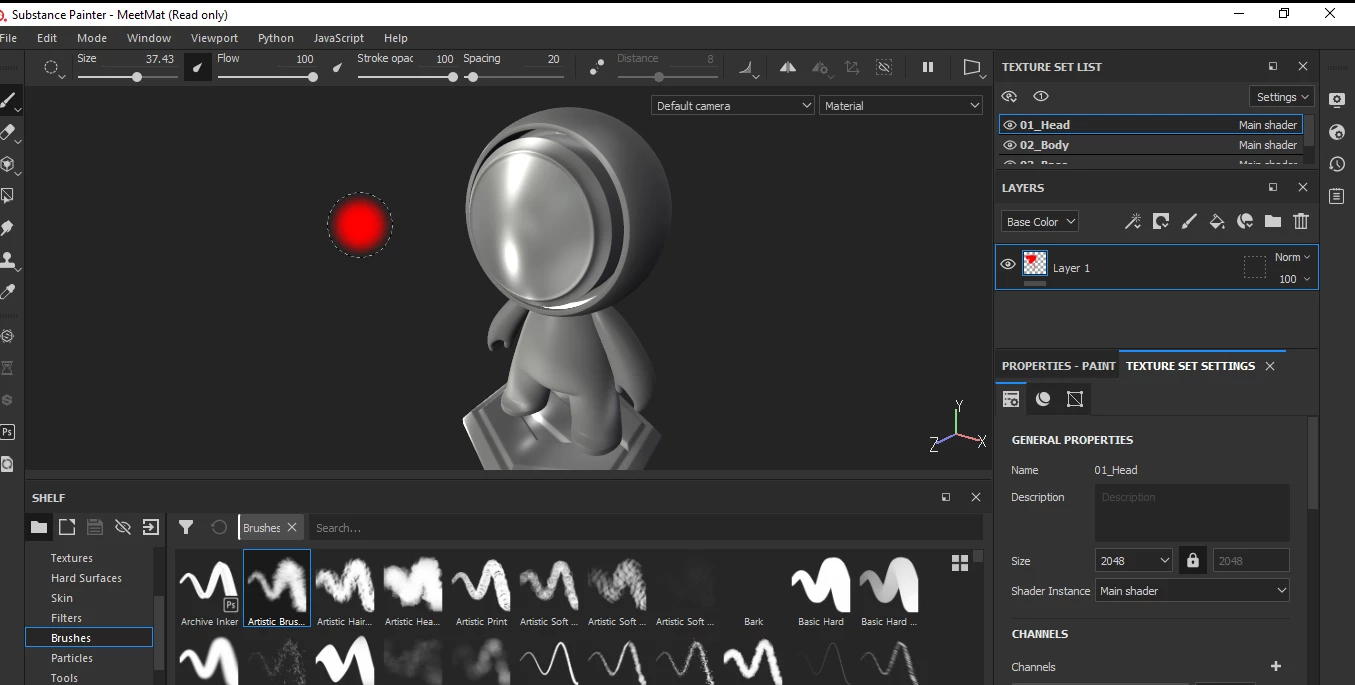

Hello Friends!
I am using Substance 3d Painter 7.2. I am having an issue that when I tried to paint it does not appear in the viewport but it shows in layers. please help me fast.
Here is a screenshot
Hi I just sent a pm to propose you to send to us the project, so we can have a look.
Hi,It seems that you are running on the integrated GPU, an Intel(R) HD Graphics. This device does not allow you enough dedicated Vram to run Substance Painter. We require 4 GB of VRAM to guarantee the stability of Painter.
You can find the minimum specs requirements on that page : https://docs.substance3d.com/spdoc/technical-requirements-172824034.htmlIf you have an other GPU, can you make sure that your main display is connected to it?
You can find more information about unrecognized GPU in our official documentation : https://docs.substance3d.com/spdoc/substance-painter-doesn-t-start-on-the-right-gpu-182266570.htmlIf you have any questions, feel free to ask.
Already have an account? Login
Enter your E-mail address. We'll send you an e-mail with instructions to reset your password.
 AdChoices