NilsDeitmers
Inspiring
March 17, 2023
Answered

Reloading extrenal textures

  • March 17, 2023
  • 1 reply
  • 5139 views

I'm wondering if there's a way to automatically reload textures?
Our pipeline uses Marmoset Toolbag for baking and Substance Painter for painting.
While Toolbag automatically updates and reloads everything you overwrite externally (which is really more helpful than you can give it credit for) unfortunately Painter does not.

So after rebaking the textures I'll have to manually find all of them in the textures shelf and select "reload texture". Then, after repeating this for all 5 or so textures I'll still have to re assign them to their dedicated slots (as in: the AO map goes to the AO slot, the curvature map goes to the curvature slot... etc)
Or I can open the ressource updater, hit "update all" and close it again.

This workflow feels very cumbersome, not what I expected from a modern software like this. Am I missing something?

Correct answer Cyril Dellenbach

Unbelivable for a indutry standard software like Substance not to have this, no wonder basically no one hand paints with Substance Painter. And if one sees a small mistake in the Normal or AO map, one should be able to quickly open it in Photoshop and fix the mistake in that map.

And most artists that know what they are doing, want good results and care about their sanity, won't be baking in software like Substacne Painter, but rather in software like Marmoset, and Substance Painter should accommodate for this fact. Substance Painter isn't made for baking, it's for texturting.

And let me tell you why nothing is happening, it's because Adobe just sits on their hands and does nothing, they abandon all of their software because they know they can. 2022 vs 2024 Substance Painter is almost indistinguishable. Adobe buying software is like sending that software to the grave.


Hello @Sidney Eliot,


Thanks for the message.


We're aware there's a point of friction with resources that aren't automatically reloaded in the project. In fact, the feature is in our backlog, and you can even vote for it in regards to a future QOL release, but just so you know, there's a logical explanation to this current behavior.


Substance Painter has always had autonomous project files. It means that you can share a project with anyone, and no matter the resource used in the project, no matter the disk, it will always be loaded properly. This is a very important point to us, and also for many studios.


However, this means that Painter embeds every resources from the Layer stack in the project file, and doesn't rely on the disk. This behavior is great for optimization, but prevents to automatically reload resources in the project. There probably are solutions we can work on, but this will demand a bit of time and this is not a current priority (don't hesitate to vote for the feature to make it a priority).


That being said, I should have mentioned in my previous message that the Resources Updater can indeed reload all the resources in the Layer stack pretty quickly. If you have overwrite a resource in your library and you want it to be reloaded in the layer stack too, you can open the Resource Updater and Update all (you can also update a specific one).

It's even possible to replace an Alpha from brush strokes, which I think is great.
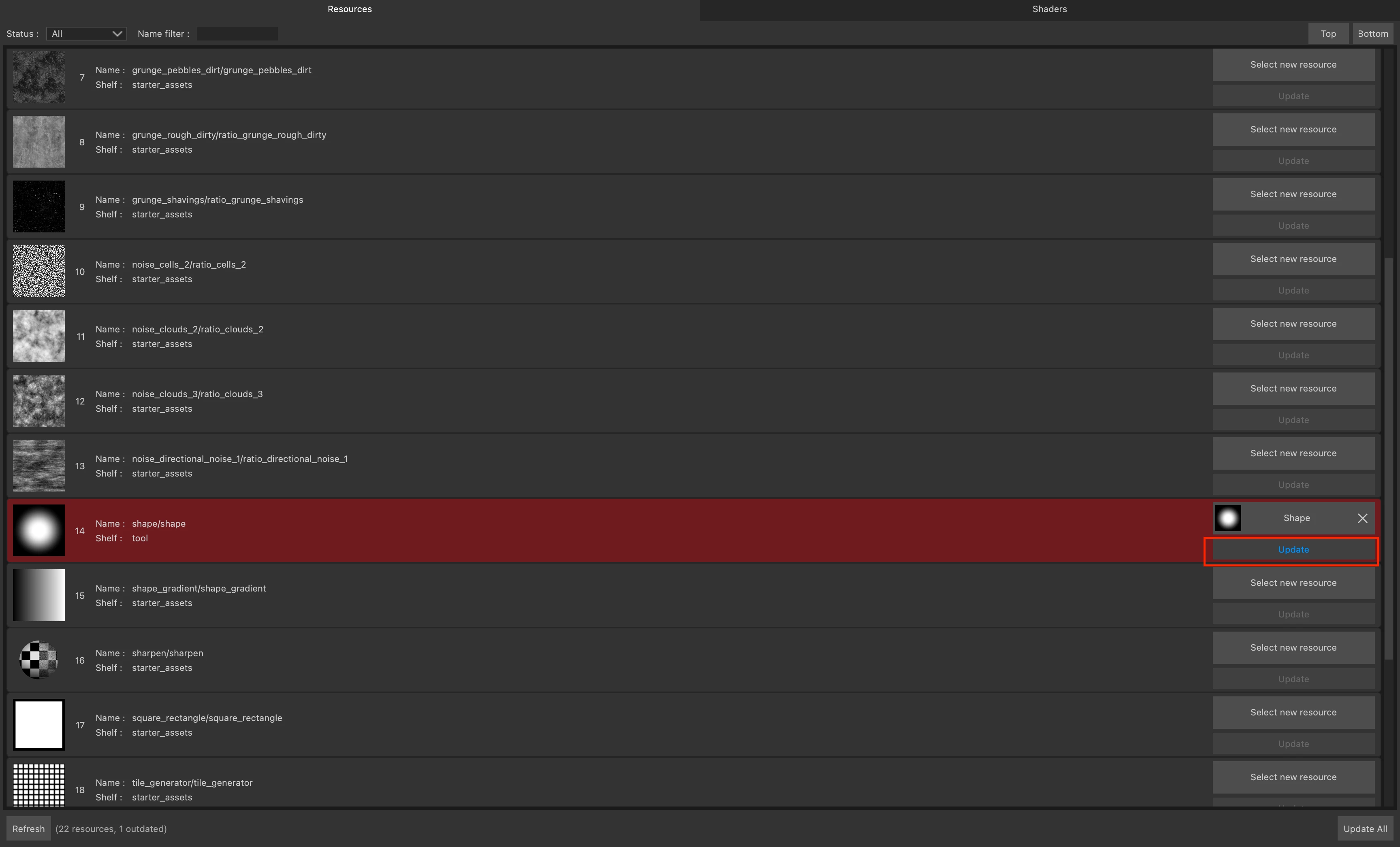


Regarding Substance 2022 vs Substance 2024 and sending our software to the grave; we're still at the beginning of 2024, but I personally liked the new Path tool, the new Baking mode, the support of .SVG, the support of .USD, etc. even so I'm biased and that not everyone expects the same features for Substance 3D Painter.


Regards,

1 reply

Cyril Dellenbach
Community Manager
Community Manager
March 21, 2023

Hello @NilsDeitmers,


Unfortunately, you're not missing anything. This is currently not possible to automatically reload your files, but let me consider your message as a suggestion and I'll bring it up to the team!


Best regards,


Cyril Dellenbach (Micro) | QA Support Artist | Adobe
Participant
April 6, 2023

This is a joke, right?

Sidney Eliot
Participating Frequently
March 8, 2024

I'm in a similar situation. The ressource updater DOES NOT actually update my ressources.

I still have to go through the texture set by hand and go: okay, as a normal map use THIS normal map. For occlusion use THIS ONE, for curvature THIS. Etc....


being able to share the project is nice, although our studio doesn't really use that feature. Besides whoever starts working with the project before sharing it need to be able to update externally baked maps.

Then let's say a co worker passes me their file to improve on it.

I'll be in the exact same spot, the moment I want to touch the high poly or rebake for some reason.


From where I stand automatically updating the referenced maps as soon as they get changed on the disk can only be an advantage, and in certain stages of an asset's production I'll have to do this quite often.


I hope all users are actually aware they have to vote for Adobe to make this software less unfriendly.

For our team this statement is very disappointing and our needs are certainly not met here.


Yeah let's see what the community manager says, maybe this just a bug, that they can roll out a fix for.

In my opinion there is a line with issue in software, where some issues are frustrating but manageable and other issues that simply make the software completely unusable for specific workflows.


I would say this issue crosses that line, constantly removing, adding, re-assigning to be able to get a visual feedback for every small change one makes is beyond madening, especially for hand painted work (like we aren't asking you guys to add "complex" linking between Substance and PS like 3D Coat has, simply for Substance to reload a fricking file). And these "specific workflows" aren't weird, these are industry standard, and as @NilsDeitmers mentioned, working with others in a team just makes this problem so much worse. This is beyond unacceptable.