
Participant
July 6, 2021
Answered

strange Stain on model in other 3d software

  • July 6, 2021
  • 1 reply
  • 1110 views

Hi.

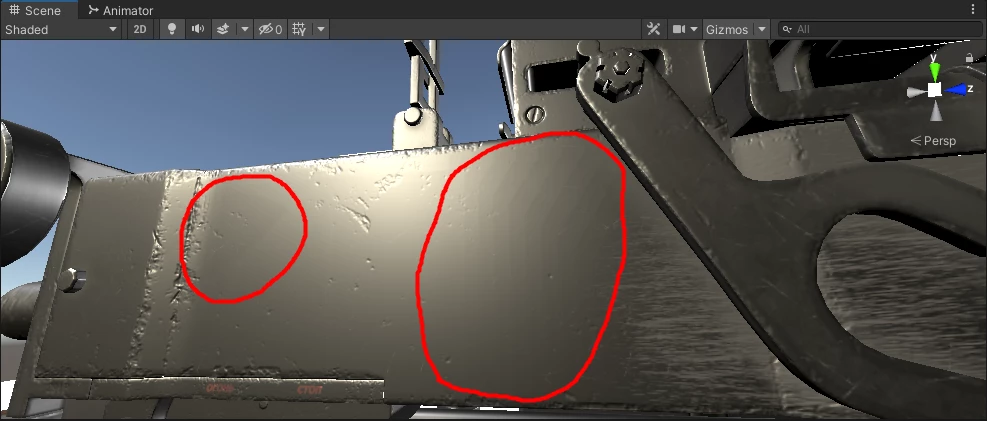
I completed texture in substance painter on all things seem ok. but when I export texture for Unity or PBR Metalic Roughness, I seen some strange stain on some part of my model. also in unity I put compression to None, but also I can see this problem. 
when I disable Normalmap, stain will be removed. but I can't see any problem on normal map.
This topic has been closed for replies.
Correct answer Léna Piquet Froyok

The noise is normal, that's the actual dithering that reduces the banding artifact.

Other software may compress your normal map by default, so even if you use a 16bit normal map it will end-up looking bad because of the compression. This is a generally an accepted trade-off in game engines such as Unity to keep the memory footprint low.


You can try to change the setting of your normal map to uncompressed (or similar) to keep the raw quality. However this will icnrease the size of your texture in Vram.


I would suggest to stick with the 8bit + dithering.

1 reply

Participating Frequently
July 7, 2021

that looks like banding due to low bits per channel used in either the textures or your display settings.

Try a 16 bit export for your textures or 8 bit + dithering.

If that fails, try to set your display to 8 bit+dithering or 10bit. 

Participant
July 8, 2021

In 16 bit export, the problem still exists. but when I tried 8 bit + dithering export, the problem was solved. but it creates noise on normal map.

Léna Piquet Froyok
Adobe Employee
Adobe Employee
July 15, 2021

Thanks.

you're Right, unity compress textures. so I disabled compression textures in unity.
So you suggest I set 8bit + dithering for all textures or only for Normal map?


It depends on the export preset you use, but generally yes dithering is only for the Normal map.