Participant
June 29, 2021
Question

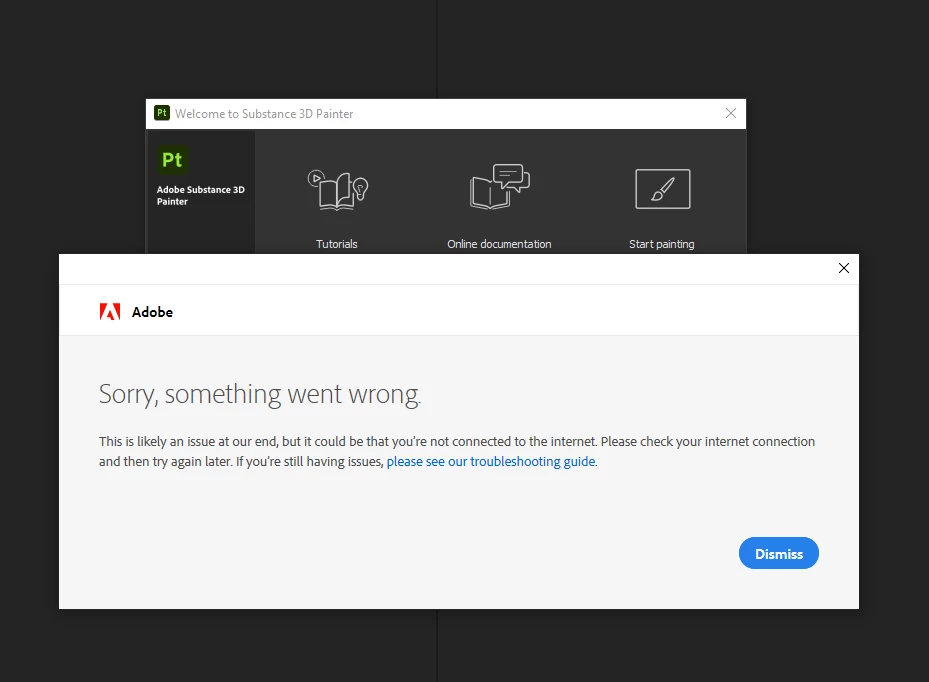
Substance 3D Painter "Sorry, something went wrong." The app failed to connect to the Adobe servers?

  • June 29, 2021
  • 6 replies
  • 7640 views

how to fix it? 

This topic has been closed for replies.

6 replies

michaelbh
Participant
February 14, 2022

same to me...

Cedric Marchessoux
Community Manager
Community Manager
February 14, 2022

Sorry for the trouble you are facing to.
https://support.microsoft.com/en-us/office/change-the-windows-regional-settings-to-modify-the-appearance-of-some-data-types-edf41006-f6e2-4360-bc1b-30e9e8a54989
Changing the regional settings should fix it.
I forward to the team to see if there is something wrong for Adobe Susbtance 3D Painter that can fix it.

Cedric Marchessoux
Community Manager
Community Manager
February 15, 2022

to help the team for understanding the issue and find the fix, we need a log:
it should be in in %TEMP%/NGL on Windows and ~/Library/logs/NGL on Mac (something like NGLClient_SubstancePainter17.2.1.log)
if you can send me it in a private message then I can forward it to the team.

Participant
October 20, 2021

The issue remains unfixed. (How many months now?)

All other creative cloud apps work fine and have worked fine in the past.

In order to run Substance 3D though and NOT get this message, I have to switch the region from Greece to US beforehand.

Every time I open the software mind you. EVERY TIME.

This is absurd.

Allegorythmic licensing servers NEVER gave any such trouble.

It goes without saying that this matter should have been fixed by now.


Cedric Marchessoux
Community Manager
Community Manager
January 10, 2022
Participant
January 22, 2022

This is ridiculous 


Participant
September 29, 2021

Still an issue, amazing stuff Adobe. 


Participant
August 1, 2021

i am having this issue too i want to know how to fix this is happend like 3 day now i can't do anything in the substance


Jeremie Noguer
Community Manager
Community Manager
August 2, 2021

We are still looking into this issue, we're sorry for the inconvenience and will let you know as soon as a solution is found.

If anyone encountering this issue could export a log from CC Desktop right after getting this message, that would be really useful!


Participant
September 6, 2021

Hi a5D95, did you try Mario's solution above? It did the trick here, and solved it permanently.


Hello Klas,


thank you for the feedback. I did before posting the message.


Mainly I reset all additional setting to default but did not see any change.

Not sure if something else is required with this approach.

kissklas
Participant
July 6, 2021

I am also having this.

It happens on the newer version with the Adobe style thumbnail. The older version works fine for me through CC. I did a full uninstall of all things Adobe/Allegorithmic, cleaned out the registry of any remains, the Appdata directory, documents and program files.


I got the new version running once, after installing an old version and upgrading it, but the next day the message came back.

BardurM
Participating Frequently
June 30, 2021

Same here.. i can't use painter.
I can't figure out what the issue could be - i've got the latest Studio drivers (but Substance keeps telling me they are outdated) and substance used to work perfectly fine. But the new version doesn't. -_-
How do we fix this?

Jeremie Noguer
Community Manager
Community Manager
July 1, 2021

Did you get this error again today? I had this issue come up for me too yesterday a few times, there may have been an issue on the licensing server side.

BardurM
Participating Frequently
July 4, 2021

it's still happening. every. single. time.
I can't use Substance Painter anymore. I've tried reinstalling, i've removed all the "old" substance softwares, cleaned up whatever might be left.
I've tried a lot of different things. But it won't work.
By now i'm basicly just paying for a broken software that uses hdd space.