
UnityException after change textures resolution and render in runtime via scripting
- Substance plugin for Unity "Substance 3D for Unity 3.4.0"
Unity 2022.1.20f1 (but I also tested and on more earlier versions) - Windows 10
- There are several problems with changing texture resolution at runtime. I have described them below.
Hi!
First of all I want to say about SetTexturesResolution(Vector2Int size) method from SubstanceRuntimeGraph class.
The description of the method says little. Only at random it became clear that in setting the resolution we indicate the power of two for the width and height, and not the size in pixels. Before everything became clear to me, Unity crashed 10 times 😞
Now about the errors and problems themselves:
1) If you set the maximum resolution (4096*4096) in the texture settings in the editor, then when you try to change the resolution to any lower one (2048,1024,512,256) using the SetTexturesResolution() method and render the texture using the Render() method, then on output we get an exception:
UnityException: LoadRawTextureData: not enough data provided (will result in overread).
UnityEngine.Texture2D.LoadRawTextureData (System.IntPtr data, System.Int32 size) (at <0ee480759f3d481d82ada245dc74f9fd>:0)
Adobe.Substance.SubstanceGraphSO.UpdateOutputTextures (System.IntPtr renderResultPtr) (at Assets/Adobe/Substance3DForUnity/Runtime/Scripts/Unity Objects/SubstanceGraphSO.cs:270)
Adobe.Substance.Runtime.SubstanceRuntimeGraph.Update () (at Assets/Adobe/Substance3DForUnity/Runtime/Runtime/Scripts/SubstanceRuntimeGraph.cs:109)Or such (if using RenderAsync()) :
UnityException: LoadRawTextureData: not enough data provided (will result in overread).
UnityEngine.Texture2D.LoadRawTextureData (System.IntPtr data, System.Int32 size) (at <3ce5a037fce44b639132638672bf3c94>:0)
Adobe.Substance.SubstanceGraphSO.UpdateOutputTextures (System.IntPtr renderResultPtr) (at Assets/Adobe/Substance3DForUnity/Runtime/Scripts/Unity Objects/SubstanceGraphSO.cs:270)
Adobe.Substance.Runtime.SubstanceRuntimeGraph.Render () (at Assets/Adobe/Substance3DForUnity/Runtime/Runtime/Scripts/SubstanceRuntimeGraph.cs:616)
2) This is where the second problem comes from, but I'm not sure. I can't check it exactly because of the error described above.
The fact is that in the texture settings I see only such sizes as 256, 512, 1024, 2048 and 4096.
In my case, I would like to generate pixel textures at runtime and I need small sizes, for example 16, 32, 64.
I hope that with the fix of the bug I will be able to use such sizes in the code.
3) Texture rendering problem at runtime.
I tested the issue on my .sbsar assets and several from https://substance3d.adobe.com/community-assets?format=sbsar
I am attaching material from the site as an example.
In the editor, before starting the game, we set the minimum texture size (256 * 256) for the material in advance.
Further, using the code in runtime, we use the same methods to increase the resolution of the texture and render it. The screenshot I attached shows how, as a result of rendering, instead of a normal texture, we get visual artifacts, and some patterns (like a brick) completely reset their size (to be more precise, the higher the resolution, the larger the size of each of the bricks becomes)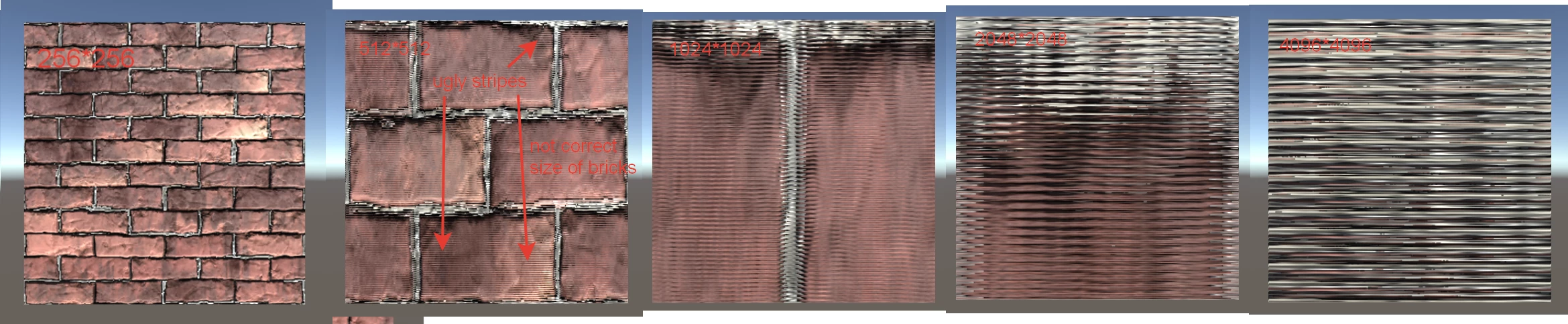


 AdChoices