
Inspiring
January 6, 2022
Answered

How do i import my materials from adobe creative cloud into adobe substance 3d sampler?

  • January 6, 2022
  • 1 reply
  • 1674 views

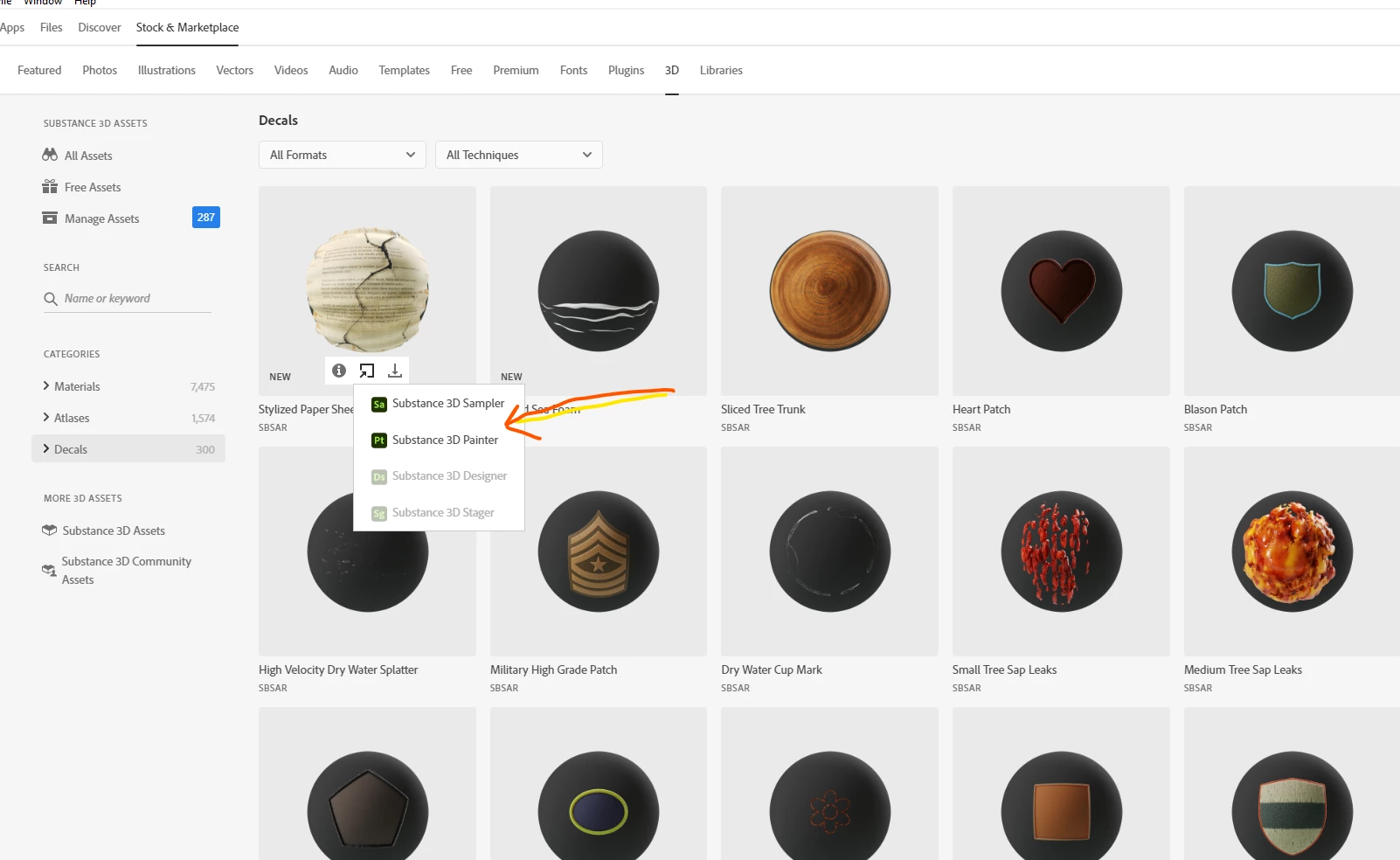
Hi.  I have thousands of Substance materials that are available in Adobe Creative Cloud Desktop under "Stock & Marketplace" > "3D."  I would like to have these materials automatically import into Substance 3D Sampler, but none of them do.  I understand how to add these materials manually linking to a folder on my hard drive, but I would rather link directly into Creative Cloud so that every time I download a new material from substance3d.adobe.com/assets, it automatically shows up in Sampler.  Is this possible?  Thanks.
This topic has been closed for replies.
Correct answer Ares Hovhannesyan

You can use "Send To" command to send material into app


1 reply

Ares Hovhannesyan
Community Expert
Ares HovhannesyanCommunity ExpertCorrect answer
Community Expert
January 7, 2022

You can use "Send To" command to send material into app


Inspiring
January 8, 2022

Thanks for your responses, Ares.  I don't see a way to select all of the materials at once in CC so that I can send them all at one time to Sampler.  Does this exist?  If not, I'm definitely casting a vote for a solution where you can link into the entire Creative Cloud library of assets from within Sampler with just a click or two.  The current method is incredibly clunky for customers like me who have purchased thousands of materials.


LoryAline
Community Manager
Community Manager
January 10, 2022

In the absense of a good way to connect to my entire library of materials, I'm trying to link to my local Substance Source folder which contains numerous subfolders, each with lots of materials.  In the past, with Alchemist, I've been able to link to the top level Substance Source folder and Alchemist would import my entire library complete with subfolders.  I can no longer find a way to do this.  Am I missing something, or did the transition from Alchemist to Sampler do away with this essential feature?  I'm having to import materials from one folder at a time and I can't find a way to create folders within Sampler to organize the imported materials.  This is such a mess.


Is there a way to import my entire local library into Sampler with the subfolder hierachy intact?  If not, is there a way to create folders within Sampler so I can organize each group of materials once I import them from my local drive?


Hi,
In the root of your Asset panel you should have a hint on how you can link your folders. It should link also your subfolders if any.

You can suggest to CC to add the multiselection (wich would be great indeed) To give your feedback or ideas reach CC team by this link: https://creativecloud.uservoice.com/

For any suggestion for 3D Sampler follow this link : https://feedback.substance3d.adobe.com/forums/911713-substance-3d-sampler


If you have any performance issues with 3D Sampler please tell us by sending a bug :

https://substance3d.adobe.com/documentation/sadoc/report-a-bug-172823735.html


Thank you