


Inspiring
February 15, 2023
Answered

Paint peeled graffiti wall

  • February 15, 2023
  • 1 reply
  • 499 views

Hi,

I'm new to Sampler so will do my best to explain what I am trying to achieve.  Currently I have a painted brick wall material and need to add an image on top of the painted brick wall (in this case a graffiti mural with a mask).  I then want to add another paint peeling effect to the mural which, when peeled, reveals the painted brick wall beneath.

In essence I need to be able to create a paint material which uses the masked image as the paint (as opposed to a single solid paint colour) and when it is peeled, reveals the brick wall underneath. 

Been banging my head against a brick wall all day on this (pun intended!)

Any help would be greatly appreciated, keeping in mind I am still trying to grasp the basics of how Sampler works! 😉

This topic has been closed for replies.
Correct answer Ares Hovhannesyan

Hello,

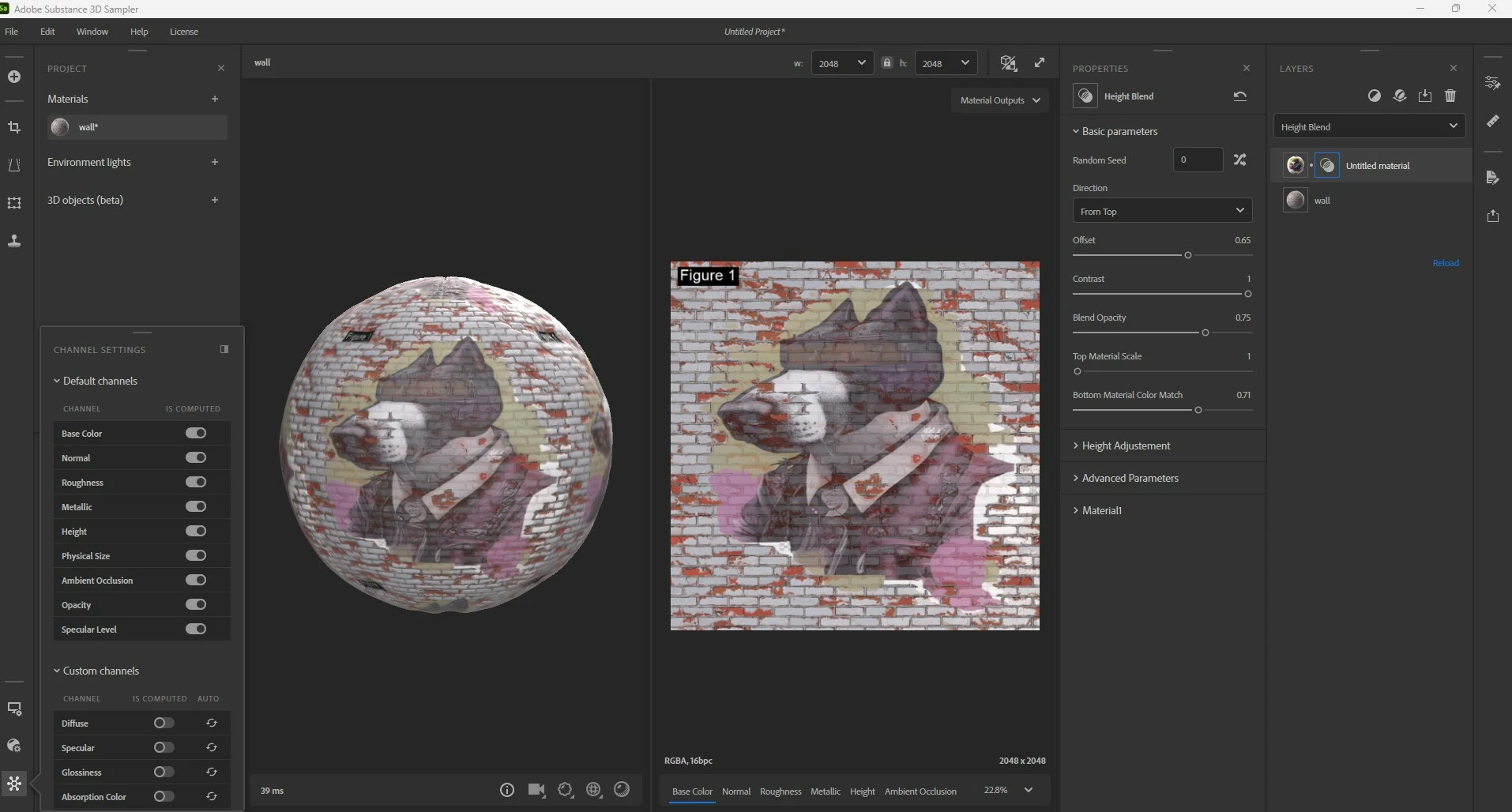
I have created two different materials from each image. Than open one and place another one on top of other. That allows to use blend modes and other properties to complete and customize final material. See capture. Also you can use other filter to customize final look.


1 reply

Ares Hovhannesyan
Community Expert
Community Expert
February 17, 2023

Hi, can you show an image what you want to achieve. That would be helpful. Thanks

leighv123Author
Inspiring
February 21, 2023

Hi Ares,

Thanks for your response.  

What I would like to do is have 2 layers of peeled paint on a brick wall, which is what i have in Figure 2.

However, instead of the top layer of peeled paint being a solid color (shown in Figure 2 by ABC), I want the top layer of peeled paint to use a color image with a mask, such as the one in Figure 3.

Is this possible?

Cheers 😉


Th

Ares Hovhannesyan
Community Expert
Ares HovhannesyanCommunity ExpertCorrect answer
Community Expert
February 23, 2023

Hello,

I have created two different materials from each image. Than open one and place another one on top of other. That allows to use blend modes and other properties to complete and customize final material. See capture. Also you can use other filter to customize final look.