
Exit
  • Global community
    • Language:
      • Deutsch
      • English
      • Español
      • Français
      • Português
  • 日本語コミュニティ
  • 한국 커뮤니티
0

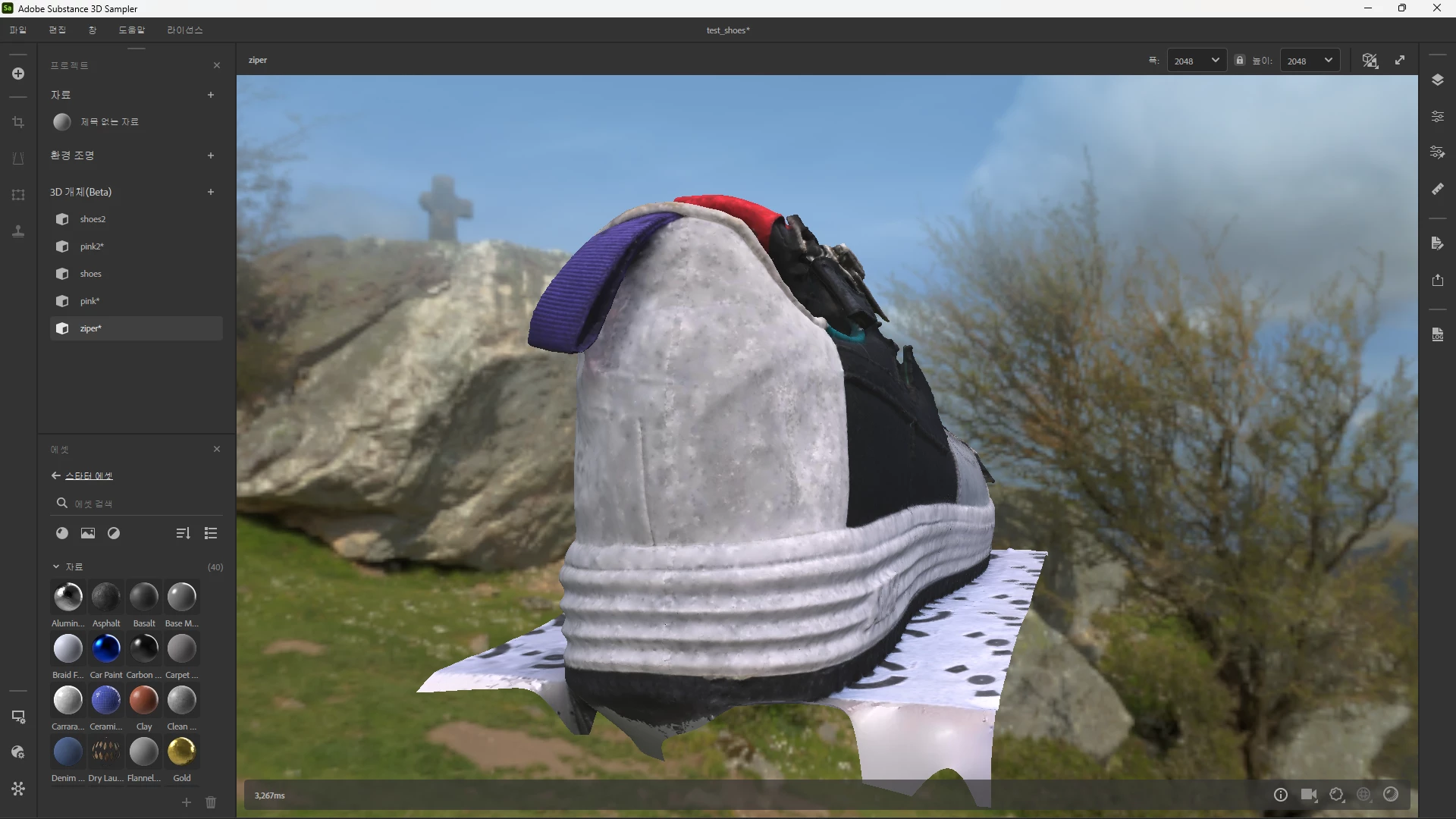
Why is the basic color of the object different from the original color in the sampler?

Community Beginner ,
Mar 01, 2023 Mar 01, 2023

I'm testing my shoes.
The color of the shoes is white. They're new shoes.
Shoes are never dirty.
But the shoes you see in the sampler look dirty.
I think the base color is wrong.
What's the reason?


And I'm curious about the original polygon quantity, but it's not shown. Can I check the original polygon quantity in the sampler?스크린샷(168).png
TOPICS
How to
1.2K
Translate
Report
Community guidelines
Be kind and respectful, give credit to the original source of content, and search for duplicates before posting. Learn more
community guidelines
Community Expert ,
Mar 01, 2023 Mar 01, 2023

There is Mesh Post Process Filter now that can be used for customozise meshes. 3D Capture | Substance 3D Sampler (adobe.com)

Translate
Report
Community guidelines
Be kind and respectful, give credit to the original source of content, and search for duplicates before posting. Learn more
community guidelines
Community Beginner ,
Mar 01, 2023 Mar 01, 2023

Hello
Yes, I also checked the process.
But I don't know if this is an error or what the problem is.

Translate
Report
Community guidelines
Be kind and respectful, give credit to the original source of content, and search for duplicates before posting. Learn more
community guidelines
Community Beginner ,
Mar 07, 2023 Mar 07, 2023

Why is there such a problem with the base color of all objects?
I also attach the original picture.
What's the problem? If you make the base color different from the original picture, you can't use it.
스크린샷(186).png스크린샷(187).png스크린샷(188).png스크린샷(189).png

Translate
Report
Community guidelines
Be kind and respectful, give credit to the original source of content, and search for duplicates before posting. Learn more
community guidelines
Adobe Employee ,
Mar 07, 2023 Mar 07, 2023

Hi, can you show us the other channel map of your jacket material please (normal, height, metalic...) ?


Translate
Report
Community guidelines
Be kind and respectful, give credit to the original source of content, and search for duplicates before posting. Learn more
community guidelines
Community Beginner ,
Mar 07, 2023 Mar 07, 2023

In the blender, map settings contain only base colors. In the beginning, it comes out after baking it with a sampler.That's what it looks like from the sampler before it's imported into the blender.

Translate
Report
Community guidelines
Be kind and respectful, give credit to the original source of content, and search for duplicates before posting. Learn more
community guidelines
Community Beginner ,
Mar 07, 2023 Mar 07, 2023

That jacket was like that even before I brought it to the blender.

Translate
Report
Community guidelines
Be kind and respectful, give credit to the original source of content, and search for duplicates before posting. Learn more
community guidelines
Community Beginner ,
Mar 07, 2023 Mar 07, 2023

The screen shown in the sampler.
It's different from the original picture.
What should I do?스크린샷(228).png

Translate
Report
Community guidelines
Be kind and respectful, give credit to the original source of content, and search for duplicates before posting. Learn more
community guidelines
Adobe Employee ,
Mar 07, 2023 Mar 07, 2023

Ok so the problem come just before you add the mesh into the project from 3D Capture popup.

Can you test to desactivate AO backing create a new version, add it into the projet and check if it's OK?

Translate
Report
Community guidelines
Be kind and respectful, give credit to the original source of content, and search for duplicates before posting. Learn more
community guidelines
Community Beginner ,
Mar 07, 2023 Mar 07, 2023

I introduced it directly into the project without adding a new version. Then isn't the normal one and AO baking not done?

Translate
Report
Community guidelines
Be kind and respectful, give credit to the original source of content, and search for duplicates before posting. Learn more
community guidelines
Community Beginner ,
Mar 01, 2023 Mar 01, 2023

I'm testing my shoes.
The original color is white.
But it looks different from the original color.
Why do shoes look dirty?스크린샷(167).png

Translate
Report
Community guidelines
Be kind and respectful, give credit to the original source of content, and search for duplicates before posting. Learn more
community guidelines
Community Beginner ,
Mar 01, 2023 Mar 01, 2023

The same goes for these shoes.스크린샷(168).png

Translate
Report
Community guidelines
Be kind and respectful, give credit to the original source of content, and search for duplicates before posting. Learn more
community guidelines
Adobe Employee ,
Mar 08, 2023 Mar 08, 2023

Can you share some images of you datasets, and share the maps displayed on 2D view?
Also can you share the properties you use while processing?

Translate
Report
Community guidelines
Be kind and respectful, give credit to the original source of content, and search for duplicates before posting. Learn more
community guidelines
Community Beginner ,
Mar 09, 2023 Mar 09, 2023

Please test other objects more.
It doesn't make sense that I'm the only one with this symptom. Please check what the problem is as soon as possible.
This dress is really clean.스크린샷(239).png

Translate
Report
Community guidelines
Be kind and respectful, give credit to the original source of content, and search for duplicates before posting. Learn more
community guidelines
Adobe Employee ,
Mar 09, 2023 Mar 09, 2023

Hi,
Please refer to the guidelines of the forum, I've merge the four topics you've created in one as it is the same issue.


We can't help you if you don't answer our questions.
I've copied the un-answered question in case you hadn't see them:

  1. Can you share some images of you datasets?
  2. Can you share the maps displayed on 2D view?
  3. Also can you share the properties you use while processing? 

    Here's the documentation of 3D Capture.


And video tutorials about our 3D capture workflow:


Thank you.


Translate
Report
Community guidelines
Be kind and respectful, give credit to the original source of content, and search for duplicates before posting. Learn more
community guidelines
Community Beginner ,
Mar 09, 2023 Mar 09, 2023

1.

스크린샷(243).png2스크린샷(244).png

3.

MASK -> HIGH , Default -> Original 

Translate
Report
Community guidelines
Be kind and respectful, give credit to the original source of content, and search for duplicates before posting. Learn more
community guidelines
Community Beginner ,
Mar 09, 2023 Mar 09, 2023
Translate
Report
Community guidelines
Be kind and respectful, give credit to the original source of content, and search for duplicates before posting. Learn more
community guidelines
Adobe Employee ,
Apr 11, 2023 Apr 11, 2023
LATEST

Hi,

Did you seen any changes with the latest update of 3D Sampler 4.1.0 ?


Thank you.

Translate
Report
Community guidelines
Be kind and respectful, give credit to the original source of content, and search for duplicates before posting. Learn more
community guidelines