 Adobe Community

What would you do?

Copy link to clipboard
Copied
I have a picture of a white cross on a black piece of steel.
I want to use the cross as the first letter in a company logo I would like to create.
The first letter in our company is T. Trinity Drone Service.
#1)
I want to be able to create the same "T" style letter for each first letter of my full company name. Example "D", "S" are the other letters I would like to create use the picture of the cross as a model.
#2)
I would find applicable font style from another Create Suite Program. "Font's" I think is the other program, but I am not sure about my choice.
#3)
Create a business card logo.
#4)
Be able to send my logo to vendors
Branding the company name on:
Website
Caps
Shirts
Truck stickers
ETC.
#5)
Create Company letter head documents for contracts, emails, etc…
#6)
Build a website. already working in Dreamweaver.
I am willing to put in the work to learn the right tools to use, I just don't know which program to start with or which one or ones will help me achieve my goals. I am not asking for you to do it for me, but to suggest a workflow to achieve my goals.
I enjoy doing things for myself, but need guidance from other users of the Creative Suites Subscription. A lot of programs to choose from to achieve my goals.
Hence, my post in the Lounge.
Thank you in advance to anyone that wants to share any Constructive Advice.
Have a fine day and a better tomorrow,
Jack


 8
Replies
8
8
Replies
8




Copy link to clipboard
Copied
Hi @iamrobinson It's a little difficult to know exactly what you are attempting to do without seeing the image you are starting with. But generally speaking, one of the very best Adobe tools for creating vector text to use as fonts or in logos is Illustrator. There is a somewhat steep learning curve with it if you are unfamiliar with drawing software. With your subscription, you have access to all of Adobe's fonts for the rest of your text. But you could trace, outline, and expand the top of the cross to make it into the letter "T" and so on. Hope that's helpful!
Copy link to clipboard
Copied
Good stuff, Thank you for sharing. Great advice. I’m on the right path.
Since my original post I have learned a few things, I want to share with any newbie like myself on a similar quest.
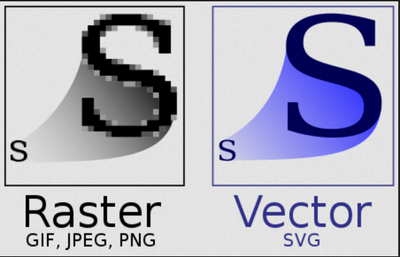
- Vector Graphic is the Key to creating your logo. Vector base data set is scalable in size and will not lose its Quality.
- You can produce a Raster file in the exact size you need.
- Adobe Illustrator is the program to use to generate your logos, text, banners, etc.
- Creative Cloud has a royalty free Font data base. For example, Sabbath Black | Adobe Fonts . I think this font will make an attractive interesting logo for Trinity Drone Service. Massive font choices. Yea, Adobe thank you.
- I did not have the skill to achieve my initial goal of tracing an element from a picture. Found a resolution path in adding Fonts to Creative Cloud Suite.
- Frustration is a component in the path to getting it done.
The Journey continues….
Have a fine day, and a better tomorrow,
Jack

Copy link to clipboard
Copied
Before you begin, consult with your print professional.
Print specifications will vary depending on the paper's finish, weight, size and type of inks they use. Your artwork will also vary depending on how many colors it contains -- duo, mono or full-color (CMYK) process. Most print professionals can give you a spec sheet with the print & color presets they require.
Good luck!
Alt-Web Design & Publishing ~ Web : Print : Graphics : Media

Copy link to clipboard
Copied
I echo what @J E L said, and would like to add that if you're not a professional graphic designer, it might be a good idea to sketch out what you want to achieve and then hire a professional to execute it. There are pitfalls and design rules etc you might not be aware of until it's too late, and I think you'll be glad you did. In addition to the factors I just mentioned, it's important to repeat what Jain said: there is steep learning curve to Illustrator. It can take years to get really good at this stuff, and one day you look back on your early efforts and cringe. (Never mind how I know this.)
-edit typo
Copy link to clipboard
Copied
Intellectual property laws protect designers/artists work. You can't take someone else's design/artwork and use it commercially without their written permission. However, you can use the artwork as an inspiration piece for a similar design. But your logo must be totally original.
For the various outputs required (business cards, web, t-shirts, etc...), you need a high quality vector graphic exported to SVG from Illustrator. Vectors can be rescaled to any size without loss in quality. Ordinary JPG or PNG images can't do that.
If this is over your head, do yourself a favor and hire a graphic designer. Without training & experience, anything you produce will likely look amateurish and/or be unacceptable for professional print purposes. A good graphic designer can produce a logo for you in a day or two. Your logo is the first impression customers have of your company. So it's money well-spent.
Alt-Web Design & Publishing ~ Web : Print : Graphics : Media

Copy link to clipboard
Copied
Make sure that you use Adobe Illustrator to create the logo.... NOT PHOTOSHOP.
If you are using letters choose a bold font.
Col Gray has some awsome videos on Logo design on YouTube. Watch them. He is amazing actually had him a speaker for the Digital Career Institute!!!! Brilliant brand designer.

Copy link to clipboard
Copied
Shows us some pictures!!

Copy link to clipboard
Copied
Instead of doing it yourself, when you do not have design experience, hire a professional and get it done.
I'm not repairing my car, when it's broken. I do not have the experience, even that I am quite good at such things with computers.


 AdChoices