
Participant
October 7, 2020
Question

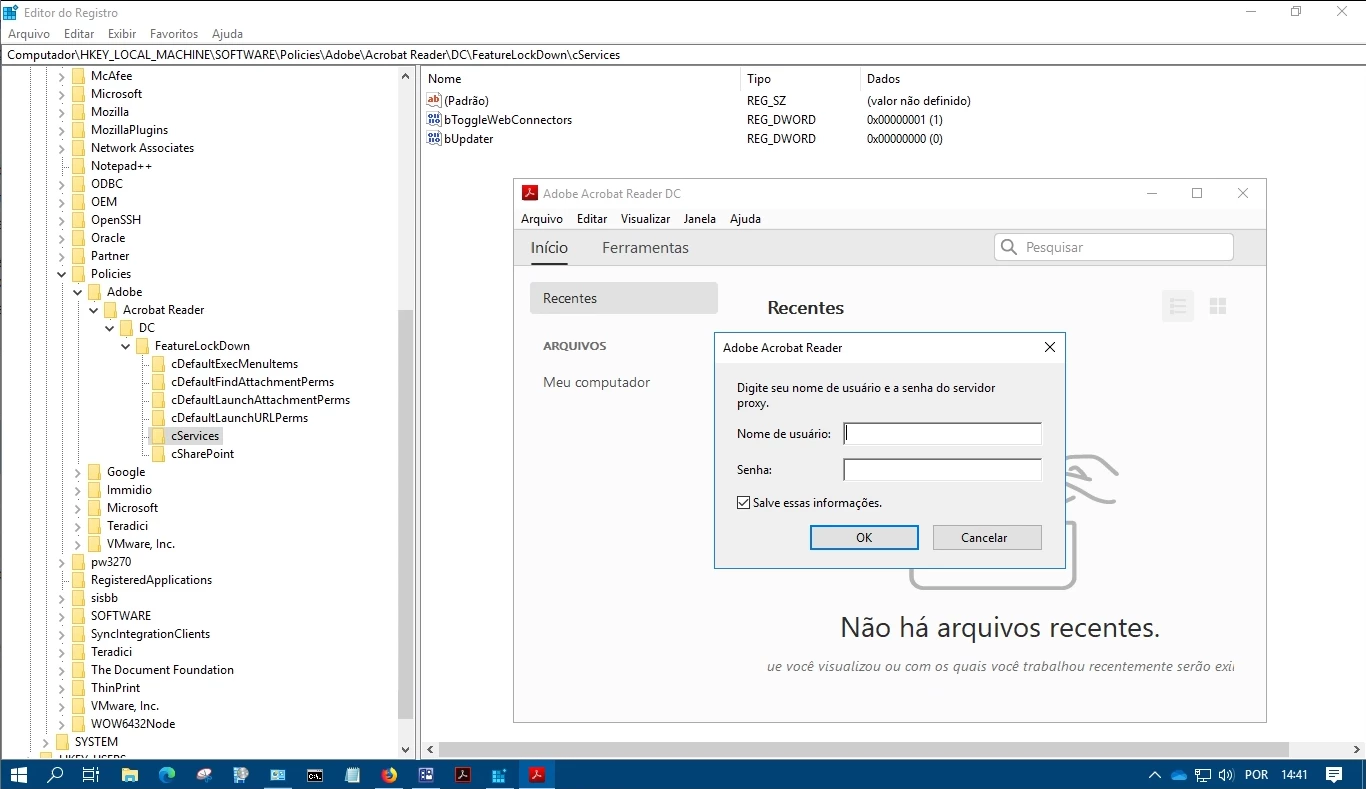
Adobe Reader DC - Proxy Popup Problem (even if configured correctly "cServices\bUpdater=0")

  • October 7, 2020
  • 2 replies
  • 3218 views

Hello, 

I've been trying to figure out how to prevent Adobe Reader DC from displaying the popup Proxy.
I customized Adobe Reader DC using the Acrobat Customization Wizard, and as you can see (img bellow) the configuration that blocks access to online services (cServices\bUpdater should be 0), but it doesn't work.

I looked internet for this problem and found this post and the supposed fix for the problem however, to my surprise, the solution presented is the one i test and it simple doesnt work. 

Adobe needs to provide a definitive solution to this problem !
 

    This topic has been closed for replies.

    2 replies

    Participant
    August 3, 2021

    i have same problem

    Participant
    August 2, 2021

    Facing the same issue. Much appreciate Adobe can provide a solution.

    Thanks

    Participating Frequently
    August 2, 2021

    Please provide an image of the dialog that asks for Proxy credentials.

    Also, please enable Updater verbose logging in advance (search this forum for iLogLevel registry and instruction on how to collect verbose Updater logs) and provide Updater logs at the time you see the dialog.

    It would help if you export registry that has bUpdater set.


    Note that originally posted dialog does not look like being displayed by Updater.

    Participant
    August 6, 2021