
Participant
October 24, 2017
Answered

Cropping with Content Aware

  • October 24, 2017
  • 1 reply
  • 290 views

When I try to crop & straighten a horizon the image crops okay & straightens okay but the content-aware button at top of screen turns gray & doesn't work.

Even if I don't need to straighten the content-aware won't work.

However, content works anytime I need to "Fill" with content-aware.

Any ideas?

Thanks.
    This topic has been closed for replies.
    Correct answer Jeff Arola

    What version of photoshop and operating system are you using?

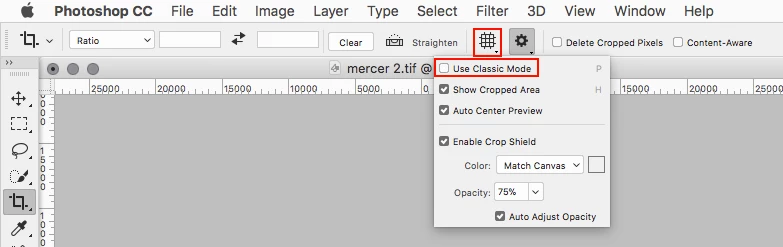
    The most common cause is having Use Classic Mode checked in the Crop Tool options.

    1 reply

    Jeff Arola
    Community Expert
    Jeff ArolaCommunity ExpertCorrect answer
    Community Expert
    October 24, 2017

    What version of photoshop and operating system are you using?

    The most common cause is having Use Classic Mode checked in the Crop Tool options.

    Participant
    October 24, 2017

    Thanks so much, Jeff; that fixed the problem!

    I never would have guessed that in a million years.

    I have Win10, PS CC2018.

    Next time I'd better mention that.

    Regards,

    Fred